


Why do I receive “Storage pool 1 has reached the space alert threshold” Notification Despite Having Space Available?
Applicable Products:
- Storage & Snapshots
You may receive a notification “Storage pool 1 has reached the space alert threshold”, despite having plenty of space available in the volume. This is due to the allocated capacity having reached the defined threshold.
The Storage Pool capacity used to create Volumes/LUNs are considered as allocated, despite the available capacity in the volumes/LUNs itself. If the capacity of the created volume is larger than the configured Storage Pool threshold, the error message will appear. To work around this, follow the procedures below to adjust or disable the predefined threshold.
- Login QTS as an administrator
- Open Control Panel
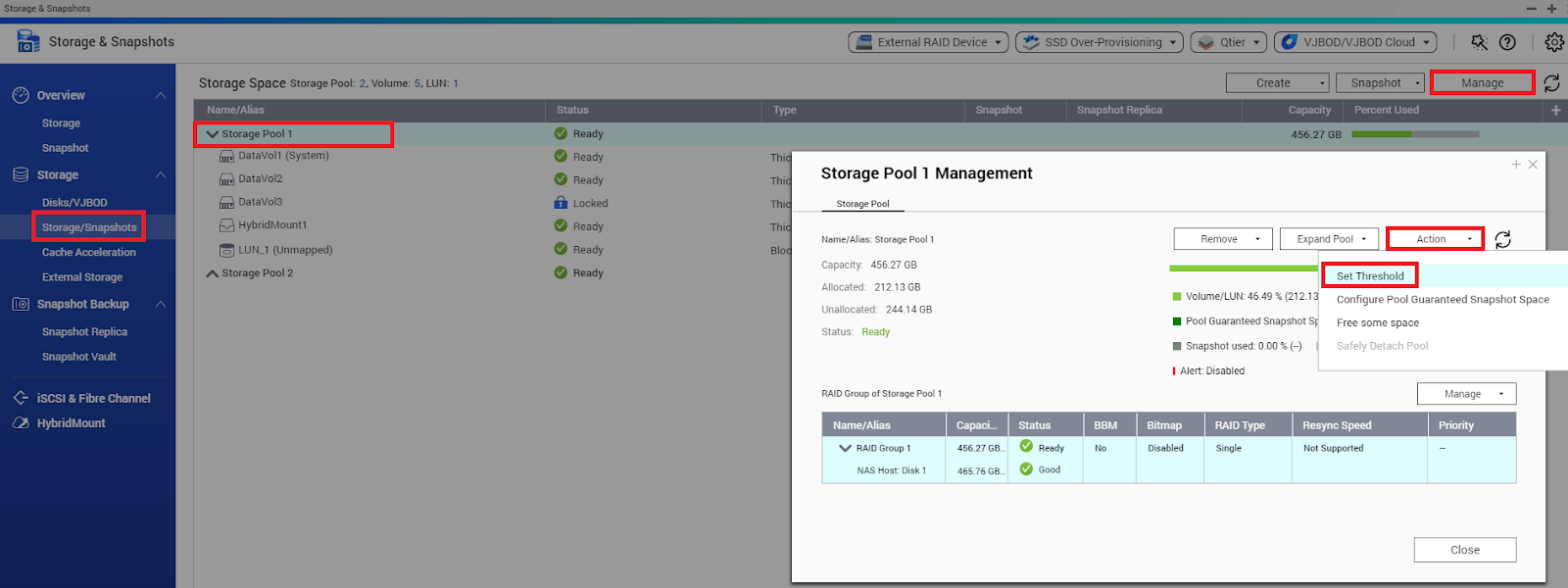
- Find Storage & Snapshots > Stroage > Storage/Snapshots
- Select Storage Pool and click Manage to open Management Window.
- Click Action
- Select Set Threshold
Another option is to shrink the volume size, such that the allocated capacity becomes lower than the predefined threshold.
Pro další pomoc se zeptejte ostatních uživatelů a odborníků QNAP v komunitě. Přejít do komunity QNAP


