


How do I search for metadata in recordings?
Applicable Products
QVR Pro, QVR Elite, QVR Pro Client, QVR Smart Client, QVP appliances
Details
You can search metadata with keywords and use search operators to refine the search results.
Metadata search in QVR Pro, QVR Elite, and QVP appliances
- Open Metadata Vault.
- Go to Metadata List.
- Click the search button.
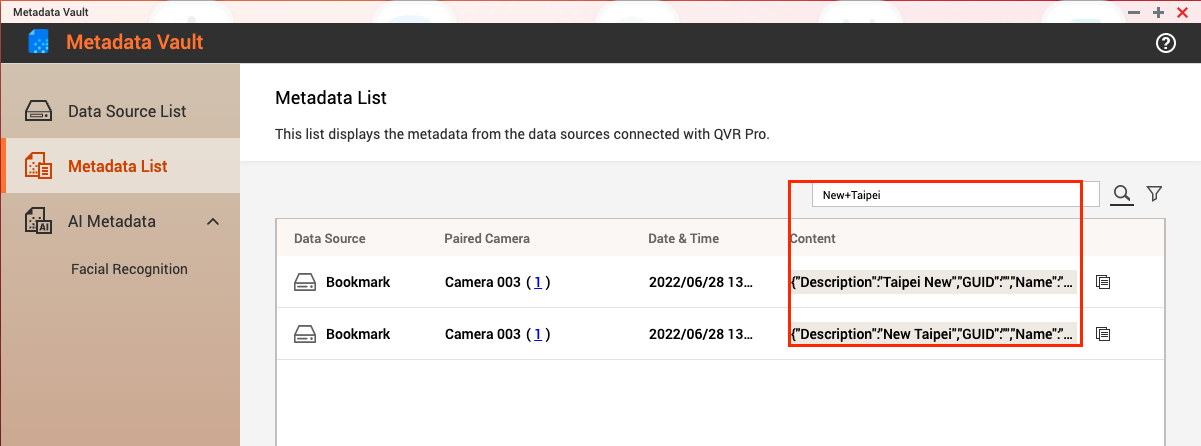
- Enter keywords and operators in the input box.
Metadata search in QVR Pro Client
- Go to Metadata Search.
- Click the Search button on the top panel or under the Metadata tab.

- Enter keywords for your search. You can also filter the results based on time, camera, data source type, and data source.
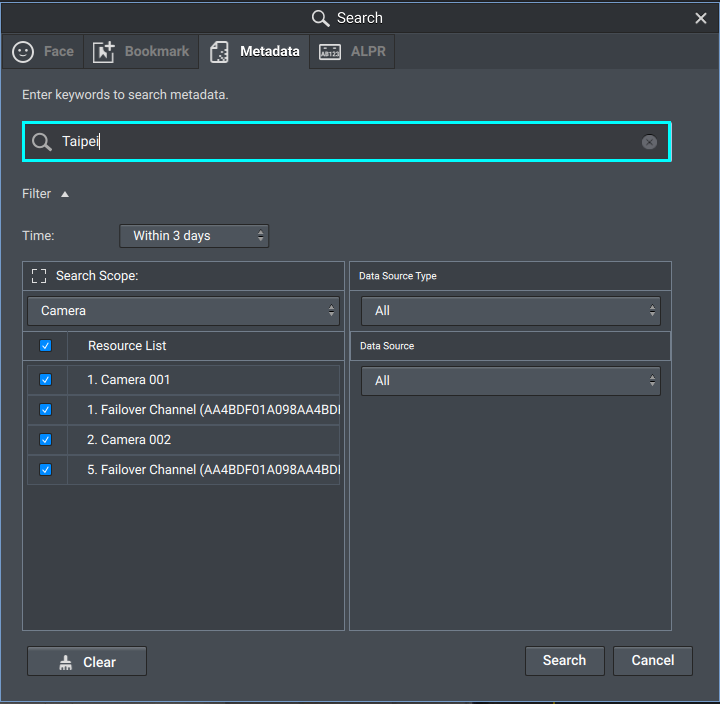
- The search results appear within Metadata Search. Click a result to play back the recording.

Using search operators
The following operators can be used for more advanced metadata searches.
Spaces
Using spaces in your search will return any matches. For example, searching for New Taipei will match the results "New", "Taipei", "New Taipei", and "Taipei New".
Double quotes
Putting your search keywords within double quotes ("") will match only this specific word or phrase. For example, searching for "New Taipei" will only match "New Taipei".
Plus sign
Using a plus sign (+) will match all the words in non specific order. For example, searching for New+Taipei will match "New Taipei" and "Taipei New".
Pro další pomoc se zeptejte ostatních uživatelů a odborníků QNAP v komunitě. Přejít do komunity QNAP


