Applicable Products
Software
- QuWAN Orchestrator 2.9 and later versions
- QVPN Service 3.3 and later
Hardware
Overview
QuWAN Express allows a QNAP NAS to join the QuWAN network quickly with minimal configuration. It provides secure connectivity for remote access and inter-device communication without requiring manual port forwarding or complicated VPN setup.
When a QNAP router (hub) is available, the NAS automatically establishes an IPSec tunnel with the hub to support secure, high-performance data transfer within the organization.
If a hub is not deployed, you can use the Super Node service. Super Node is a cloud gateway that provides an IPSec tunnel for the NAS, assigns a public IP and port for secure external access, and enables NAS-to-NAS communication inside the QuWAN virtual network.
Note
- Super Node is designed for environments without a QuWAN hub router and supports up to three edge NAS devices for remote access. If additional devices need to connect, you can update the allowed NAS list in the QuWAN Orchestrator cloud platform.
- The service includes a monthly free data transmission limit of 15 GB. After this limit is reached, transmission speed is reduced, and you can upgrade your license plan in the QNAP Software Store if more capacity is needed.
Key features
- QuWAN Express allows you to join the QuWAN network with a single click in QVPN Service, and the system automatically handles network configuration on your behalf.
- It enables secure remote access to NAS data from any location by routing traffic through the QuWAN overlay network.
- The Super Node service provides cloud-based connectivity that ensures reliable external access and seamless communication between NAS devices, even when a hub router is unavailable.
- The service assigns a virtual IP address to the NAS so it can communicate with other QuWAN devices without exposing internal network details.
Prerequisites
- Update the NAS firmware and QVPN Service to the versions listed in Applicable Products.
- Ensure the NAS has an active internet connection.
- Disable the L2TP/IPSec server on the NAS before enabling QuWAN Express.
- Sign in to the NAS with a QNAP ID so it can register with QuWAN Orchestrator.
- Make sure the hub router you plan to use supports QuWAN configuration and is registered to the same QuWAN organization that you will select when configuring the QuWAN Express settings.
Procedure
This section describes how to configure access QuWAN Express on QVPN Service, configure device information, and register the NAS as an edge device in QuWAN Orchestrator.
Configure QuWAN Express on your QNAP NAS
- Log in to your NAS as an administrator.
- Open QVPN Service.
- Go to QuWAN > QuWAN Express.
- Click Join.
- Click Start to run prerequisite checks.
QVPN Service verifies the following:- The NAS must have an active internet connection for the check to pass.
- The check confirms whether the L2TP/IPSec server is disabled because it must be turned off before you continue.
- The check verifies that the NAS is signed in with a QNAP ID and prompts you to log in when necessary.
When all prerequisite checks complete successfully, QVPN Service displays the Device Information. - Optional: Configure the QuWAN organization and region settings.
- Click
 .
.
The Edit Device Information window appears.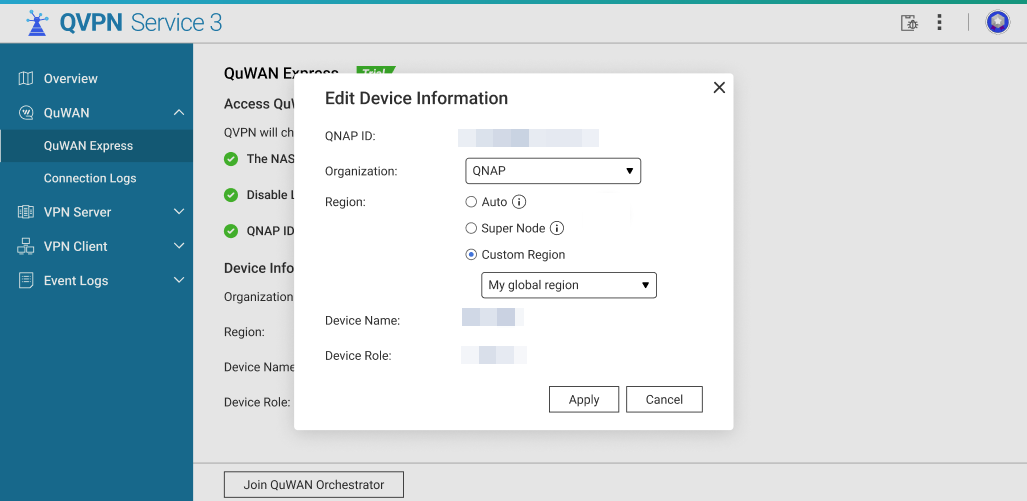
- Optional: Select the QuWAN Organization from the dropdown.
If your QNAP ID is a member of multiple organizations, select the organization that will manage this NAS. - Optional: Select an option to determine the region where the NAS establishes its QuWAN connection:
- Auto (Recommended): QVPN Service automatically chooses the best region. It prioritizes regions where a hub router exists for your organization. If a hub is unavailable, it falls back to a Super Node region.
- Super Node: Force connection to the QuWAN Super Node cloud endpoint.
Note
Use when there is no hub in your organization or when you want immediate cloud endpoint access. When using Super Node, the NAS receives a cloud-assigned public IP and port for external connectivity without port forwarding.
- Custom Region: Manually select a region when you want the NAS to join a particular segment of your QuWAN organization.
- Click Apply.
QVPN Service updates the device registration settings locally and prepares to register the device with QuWAN Orchestrator.
- Click Join QuWAN Orchestrator.
The NAS is registered to QuWAN Orchestrator and becomes an edge NAS.
Once the NAS successfully joins the QuWAN organization, the following actions occur automatically:
- The QuWAN Orchestrator assigns a Virtual IP address to the NAS inside the QuWAN overlay network.
- If a hub router exists in the assigned region, the NAS will automatically establish an IPSec tunnel with that hub.
- If connected to a Super Node, the NAS will receive a public IP address and port assigned by the cloud endpoint enabling secure external access without manual port forwarding.
- Wait until the connection status updates to Connected on the QuWAN Express page.
Once connected the NAS is reachable via the QuWAN virtual network by other edge devices and by users who have appropriate QuWAN access (for example, remote clients or other NAS devices).
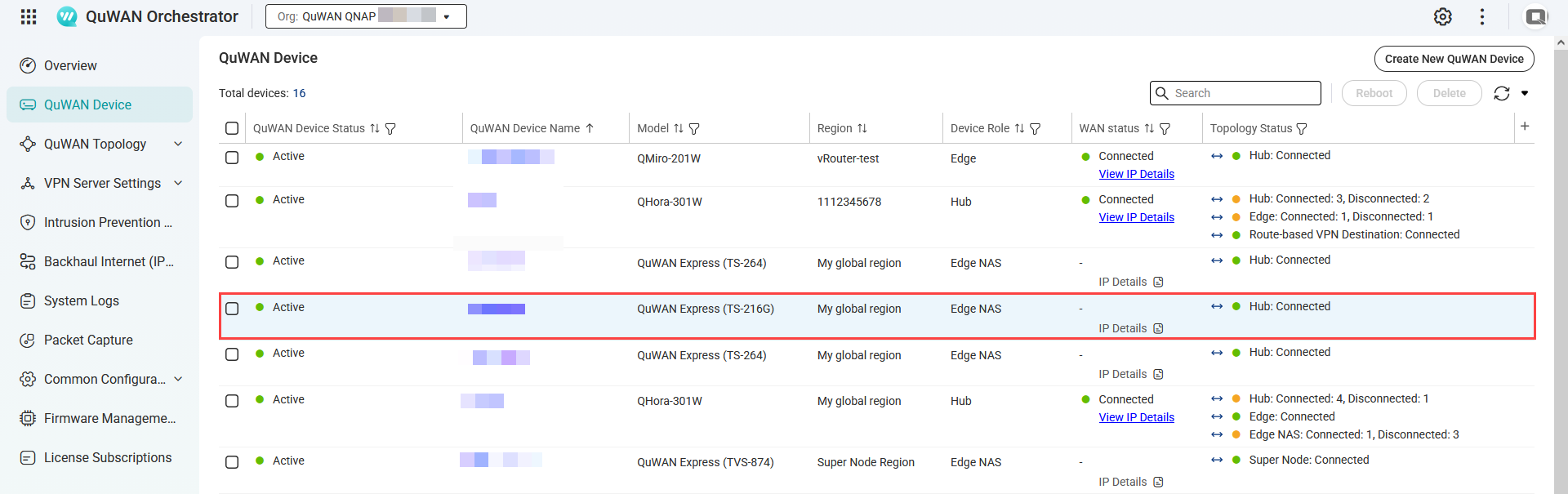
- Optional: Verify the NAS appears in QuWAN Orchestrator.
- Log into QuWAN Orchestrator.
- Select your organization.
- Go to QuWAN Device.
- Locate the NAS by the device name.
- Under Topology Status, check if the status is Connected.
Manage Super Node connections
- Log in to QuWAN Orchestrator.
- Select your organization.
- Go to QuWAN Topology > Super Node (QuWAN Express) > Status.
- Click Manage Super Node Connections.
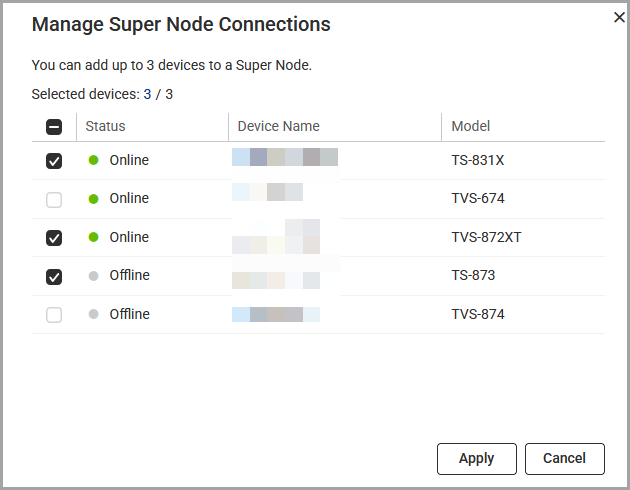
- Select between 1 to 3 edge NAS devices.
- Click Apply.
QuWAN Orchestrator updates the Super Node connections.
Modifying the virtual IP address of the edge NAS
- Log in to your edge NAS.
- Open QVPN Service.
- Go to QuWAN > QuWAN Express.
- Click
 .
.
The Edit Virtual IP window appears. - Enter a different virtual IP address.
- Click Check.
QVPN Service checks the virtual IP address. - Click Apply.
Accessing the NAS remotely via QuWAN Express
- From another QuWAN edge device or routed network, use the assigned Virtual IP address to connect to services on the NAS (e.g., SMB, AFP, HTTP(S), SSH) depending on your NAS access rules and port configuration.
- When using a hub, traffic between NAS and hub-connected devices remains within the IPSec tunnels and private networks, providing lower latency and better throughput for in-organization transfers.
Troubleshooting
- Network connection check failed
- Verify that the NAS has a working internet connection.
- Make sure the DNS settings are correct, because incorrect DNS configuration can cause the NAS to appear offline to QuWAN services.
- L2TP/IPSec conflict check failed
- Disable any local L2TP/IPSec server instance in QVPN Service before activating QuWAN Express, since both services cannot run simultaneously.
- QNAP ID verification failed
- Log in with a QNAP ID that belongs to the organization you want to use, then try joining again. Also confirm that the NAS system date and time are accurate so the authentication tokens can be validated.
- Edge shows "Connecting" but never "Connected"
- Verify that the NAS and the router have working internet connections.
- Check the firewall rules on both your network and the NAS. IPSec and NAT traversal ports, such as UDP 500 and 4500, must be allowed for outbound traffic.
Further Reading
適用產品
軟體
- QuWAN Orchestrator 2.9 及更新版本
- QVPN VPN 伺服器 3.3 及更新版本
硬體
概述
QuWAN Express 允許 QNAP NAS 快速加入 QuWAN 網路,僅需最少的設定。它提供安全的連線性以進行遠端存取和裝置間的通訊,無需手動埠轉發或複雜的 VPN 設定。
當有 QNAP 路由器(Hub)可用時,NAS 會自動與 Hub 建立 IPSec 通道,以支持組織內安全、高效能的資料傳輸。
如果未部署 Hub,您可以使用 Super Node 服務。Super Node 是一個雲端閘道,為 NAS 提供 IPSec 通道,分配公共 IP 和埠以進行安全的外部存取,並啟用 QuWAN 虛擬網路內的 NAS 到 NAS 通訊。
註
- Super Node 專為沒有 QuWAN Hub 路由器的環境設計,支持最多三台 Edge NAS 裝置進行遠端存取。如果需要連接更多裝置,您可以在 QuWAN Orchestrator 雲端平台中更新允許的 NAS 清單。
- 該服務包含每月 15 GB 的免費資料傳輸限制。達到此限制後,傳輸速度會降低,如果需要更多容量,您可以在QNAP 軟體商店中升級您的授權計劃。
主要功能
- QuWAN Express 允許您在 QVPN VPN 伺服器中單擊一下即可加入 QuWAN 網路,系統會自動為您處理網路配置。
- 它透過 QuWAN 覆蓋網路路由流量,從任何位置安全地遠端存取 NAS 資料。
- Super Node 服務提供基於雲端的連接,確保可靠的外部存取和 NAS 裝置之間的無縫通訊,即使在沒有 Hub 路由器的情況下。
- 該服務為 NAS 分配虛擬 IP 位址,使其能夠與其他 QuWAN 裝置通訊,而不暴露內部網路細節。
先決條件
- 將 NAS 韌體和 QVPN VPN 伺服器更新至適用產品中列出的版本。
- 確保 NAS 有有效的網際網路連線。
- 在啟用 QuWAN Express 之前,請先停用 NAS 上的 L2TP/IPSec 伺服器。
- 使用 QNAP ID 登入 NAS,以便註冊至 QuWAN Orchestrator。
- 確保您計劃使用的 Hub 路由器支援 QuWAN 設定,並已註冊至您在設定 QuWAN Express 時將選擇的相同 QuWAN 組織。
程式
本節說明如何在 QVPN VPN 伺服器上設定存取 QuWAN Express、設定裝置資訊,以及將 NAS 註冊為 QuWAN Orchestrator 中的 Edge 裝置。
在您的 QNAP NAS 上設定 QuWAN Express
- 以系統管理員身分登入您的 NAS。
- 開啟QVPN VPN 伺服器。
- 前往QuWAN > QuWAN Express。
- 按一下加入。
- 按一下開始 以執行必要條件檢查。
QVPN VPN 伺服器驗證以下內容:- 檢查通過時,NAS 必須有有效的網際網路連線。
- 檢查確認 L2TP/IPSec 伺服器是否已停用,因為在繼續之前必須關閉。
- 檢查驗證 NAS 是否已使用 QNAP ID 登入,並在必要時提示您登入。
當所有必要條件檢查成功完成時,QVPN VPN 伺服器顯示裝置資訊。 - 選擇性:設定 QuWAN 組織和地區設定。
- 按一下。
顯示編輯裝置資訊視窗。 - 選擇性:從下拉選單中選擇QuWAN 組織。
如果您的 QNAP ID 是多個組織的成員,請選擇將管理此 NAS 的組織。 - 選擇選項以決定 NAS 建立其 QuWAN 連線的地區(可選):
- 自動(推薦):QVPN VPN 伺服器自動選擇最佳地區。它優先選擇您的組織中存在 Hub 路由器的地區。如果 Hub 不可用,則會回退到超級節點地區。
- 超級節點:強制連接到 QuWAN 超級節點雲端端點。
注意
當您的組織中沒有 Hub 或您希望立即訪問雲端端點時使用。使用超級節點時,NAS 會接收到雲端分配的公共 IP 和端口,以便外部連接而無需端口轉發。
- 自訂地區:手動選擇地區,當您希望 NAS 加入 QuWAN 組織的特定區段時。
- 點擊套用。
QVPN VPN 伺服器在本地更新設備註冊設定並準備將設備註冊到 QuWAN Orchestrator。
- 點擊加入 QuWAN Orchestrator。
NAS 註冊到 QuWAN Orchestrator 並成為 Edge NAS。
一旦 NAS 成功加入 QuWAN 組織,以下動作會自動發生:
- QuWAN Orchestrator 在 QuWAN 覆蓋網路內分配虛擬 IP 位址給 NAS。
- 如果分配的地區中存在 Hub 路由器,NAS 會自動與該 Hub 建立 IPSec 隧道。
- 如果連接到超級節點,NAS 會接收到由雲端端點分配的公共 IP 位址和端口,啟用安全的外部訪問而無需手動端口轉發。
- 等待連線狀態更新至已連線 於 QuWAN Express 頁面上。
連線後,NAS 可透過 QuWAN 虛擬網路由其他 Edge 裝置及具有適當 QuWAN 存取權限的使用者(例如,遠端客戶端或其他 NAS 裝置)存取。
- 選擇性:驗證 NAS 是否出現在 QuWAN Orchestrator 中。
- 登入 QuWAN Orchestrator。
- 選擇您的組織。
- 前往QuWAN 裝置。
- 透過裝置名稱找到 NAS。
- 在拓撲狀態下,檢查狀態是否為已連線。
管理 Super Node 連線
- 登入QuWAN Orchestrator。
- 選擇您的組織。
- 前往QuWAN 拓撲 > Super Node (QuWAN Express) > 狀態。
- 按一下管理 Super Node 連線。
- 選擇 1 至 3 台 Edge NAS 裝置。
- 按一下套用。
QuWAN Orchestrator 更新 Super Node 連線。
修改 Edge NAS 的虛擬 IP 位址
- 登入您的 Edge NAS。
- 開啟 QVPN VPN 伺服器。
- 前往QuWAN > QuWAN Express。
- 按一下。
顯示編輯虛擬 IP視窗。 - 輸入不同的虛擬 IP 位址。
- 按一下檢查。
QVPN VPN 伺服器檢查虛擬 IP 位址。 - 按一下套用。
透過 QuWAN Express 遠端存取 NAS
- 從另一個 QuWAN Edge 裝置或路由網路,使用分配的虛擬 IP 位址連接到 NAS 上的服務(例如 SMB、AFP、HTTP(S)、SSH),這取決於您的 NAS 存取規則和埠配置。
- 使用 Hub 時,NAS 與集線器連接的裝置之間的流量保持在 IPSec 隧道和私人網路內,提供較低的延遲和更好的輸送量以進行組織內傳輸。
故障排除
- 網路連線檢查失敗
- 確認 NAS 有正常的網際網路連線。
- 確保 DNS 設定正確,因為錯誤的 DNS 配置可能導致 NAS 對 QuWAN 服務顯示為離線。
- L2TP/IPSec 衝突檢查失敗
- 在啟用 QuWAN Express 之前,請停用 QVPN VPN 伺服器中的任何本地 L2TP/IPSec 伺服器實例,因為兩個服務不能同時運行。
- QNAP ID 驗證失敗
- 使用屬於您想使用的組織的 QNAP ID 登入,然後嘗試重新加入。還要確認 NAS 系統日期和時間準確,以便驗證身份驗證令牌。
- Edge 顯示「連接中」但從未「已連接」
- 確認 NAS 和路由器有正常的網際網路連線。
- 檢查您網路和 NAS 上的防火牆規則。必須允許 IPSec 和 NAT 穿透埠,例如 UDP 500 和 4500 的出站流量。
進一步閱讀


