


How to install QNAP applications (.qpkg files) manually?
最後修訂日期:
2019-02-27
-
First, we are going to have to download the application we would like to install.
-
Visit the QNAP App Center, select the model and QTS version of your NAS and download some apps. You may find applications on other third-party websites as well.
-
Unzip the file you have downloaded and have the .qpkg file ready
-
Log in to your NAS via web browser and launch App Center
-
Click on this icon below

-
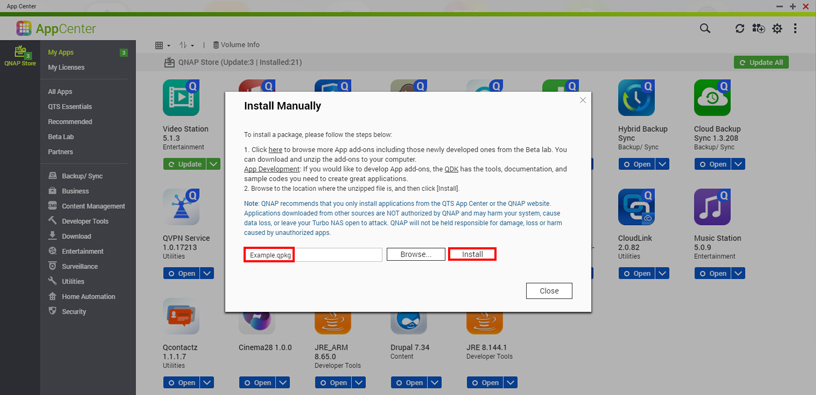
Click “Browse…” and select the .qpkg file on your computer
-
Hit “Install” and wait for the progress bar to finish.

-
Your application is now installed and a shortcut will be created on the QTS desktop.
需要進一步協助,歡迎前往官方社群發文,與其他用戶及 QNAP 專家交流。 前往 QNAP 官方社群


