


How to enable LMB (Local Master Browser) in QTS?
Summary
In case your NAS doesn’t show up in Network Neighborhood or Finder in OS X you may try enabling Local Master Browser in QTS.
When the NAS is selected as Local Master Browser there is a chance it would be visible in Network Neighborhood.
However If any other Windows system is set as Local Master Browser it’s possible that all Linux systems (like NAS system) couldn’t be visible. Please note that.
Procedures
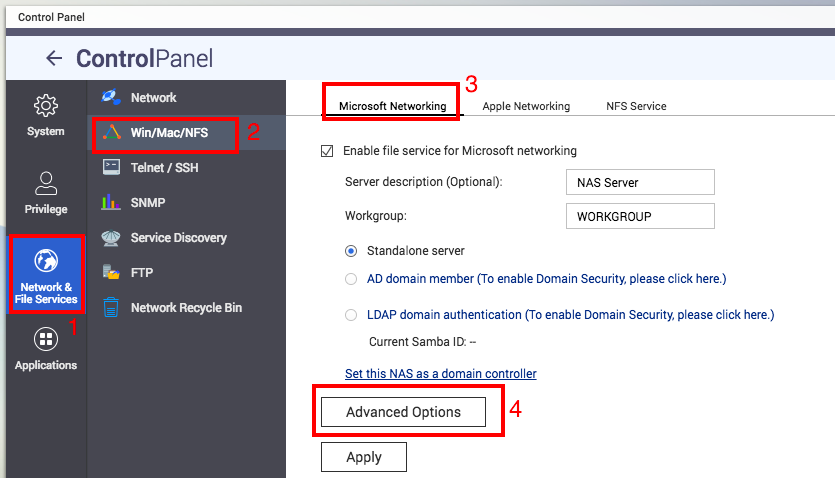
1.Find Control Panel > Network & File Services > Win/Mac/NFS > Microsoft Networking > Advanced Option
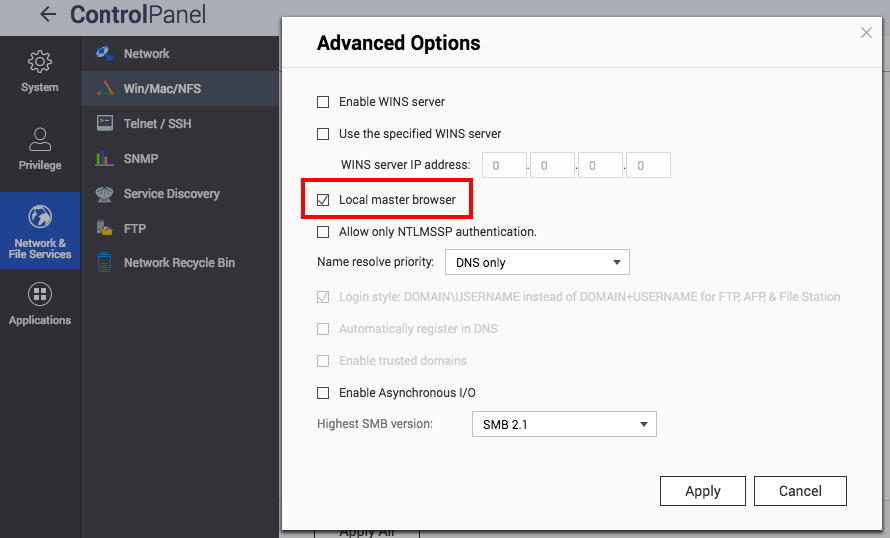
2.Enable Local master browser and apply the setting.
Related links
1.What to do if the NAS can’t be seen in Network Neighborhood?
Để được hỗ trợ thêm, hãy hỏi những người dùng khác và chuyên gia QNAP trong cộng đồng. Đến Cộng đồng QNAP


