[Important Security Notice] Fake Qfinder Pro Websites Detected. Learn more >

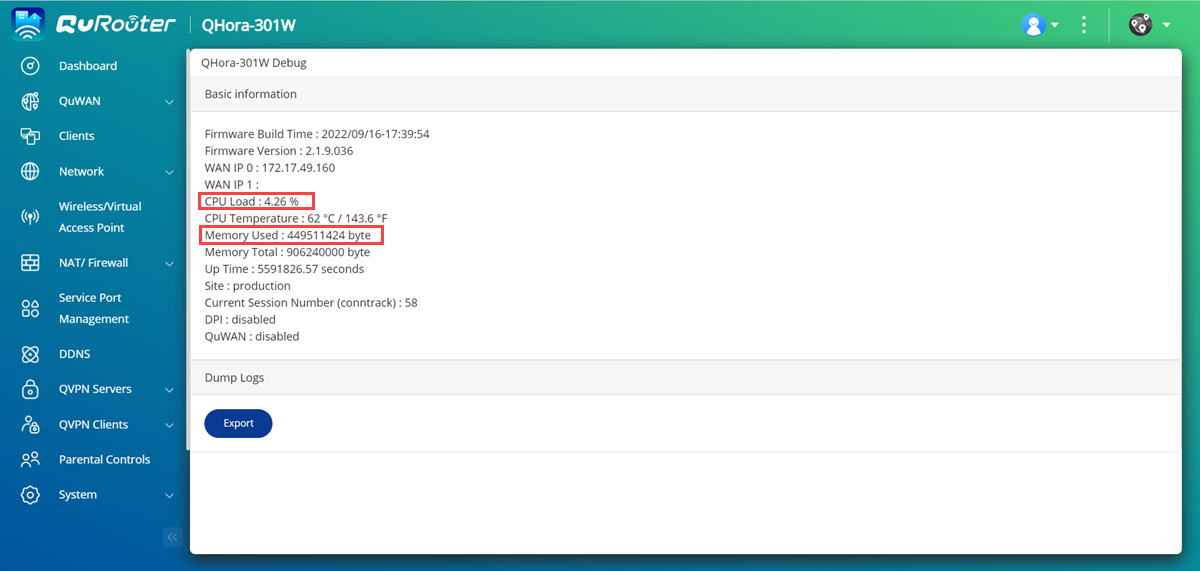
How do I check the CPU and memory usage of a QHora-301W router?


Last modified date: 2023-02-13

Applicable Products

QHora-301W

Answer

  1. Log into QuRouter.
  2. Change the QuRouter URL from http://192.168.100.1/#/dashboard to http://192.168.100.1/#/debug.
  3. Locate the CPU and memory information.
Was this article helpful?

83% of people think it helps.
Thank you for your feedback.

For further assistance, ask other users and QNAP experts in the community. Go to QNAP Community

Please tell us how this article can be improved:

If you want to provide additional feedback, please include it below.

Choose specification

      Show more Less
      This site in other countries/regions:
      open menu
      back to top