Applicable products
- QNAP NAS running Plex Media Server 1.43.2 or earlier.
Overview
Plex2Shell refers to four vulnerabilities in the third-party application Plex Media Server, affecting version 1.43.2 and earlier: CVE-2026-96652, CVE-2026-96654, CVE-2026-96655, and CVE-2026-96656. Each presents limited risk on its own, but chained together they allow an unauthenticated remote attacker to execute arbitrary code with the privileges of the Plex Media Server process.
According to Plex, a public proof of concept was released on October 16, and internet-facing servers that have not been updated have since been subject to widespread attacks. Compromised servers have been used to run cryptocurrency miners and proxy software.
The fixed release, Plex Media Server 1.43.3 (build 1.43.3.10861 and later), is available in the QNAP App Center. The vulnerabilities reside in Plex Media Server only; QNAP operating systems such as QTS and QuTS hero are not themselves affected.
Important: If Plex on your NAS was reachable from the Internet while running 1.43.2 or earlier, updating alone is not enough. Treat the NAS as potentially compromised and complete the clean reinstall, compromise check, and credential reset described below.
Q1. Is my NAS affected?
Only a NAS with Plex Media Server 1.43.2 or earlier installed is affected. QNAP operating systems are not themselves affected, and a NAS without Plex needs no action.
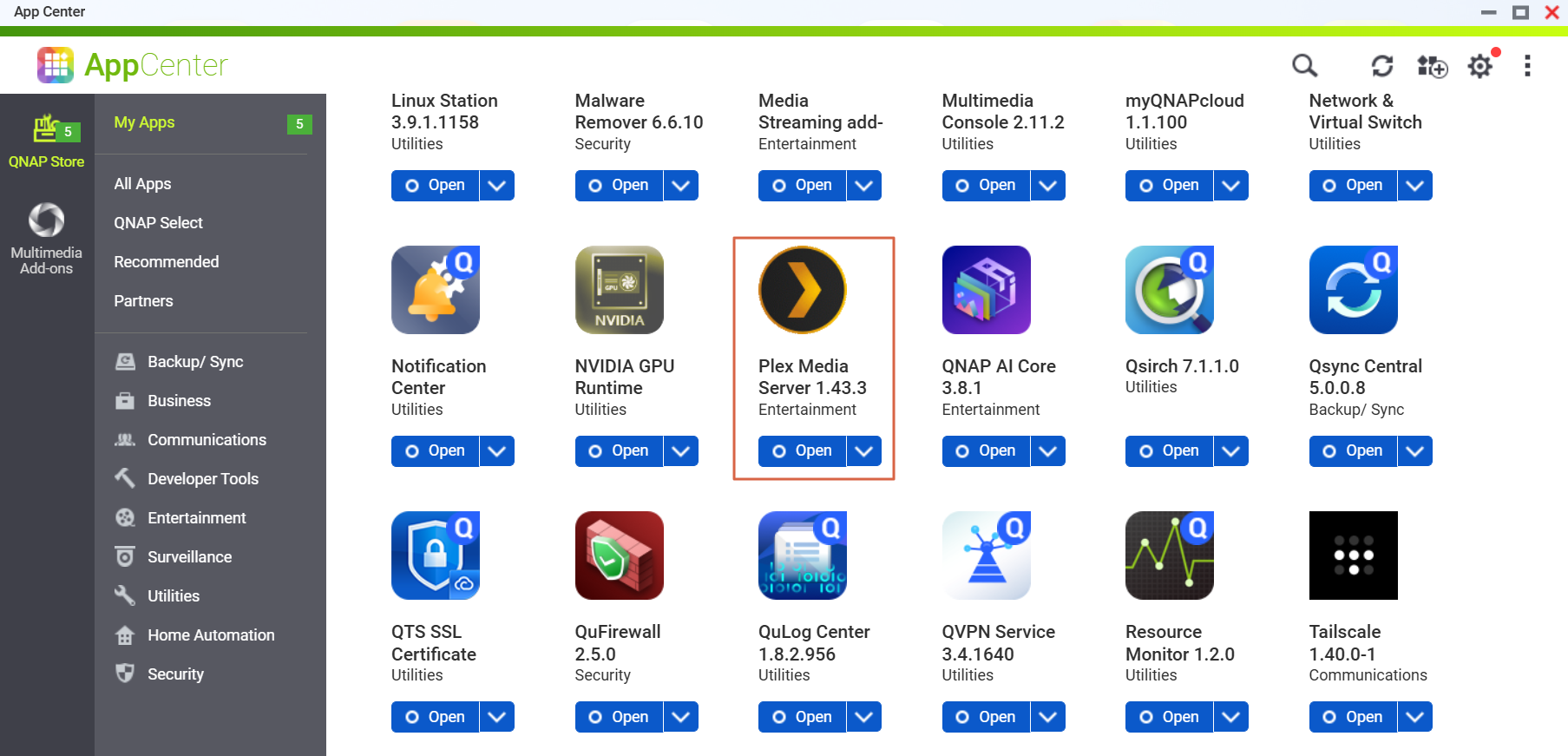
To check the version:
- App Center > My Apps shows 1.43.3 for the patched release.
Q2. How do I know whether my Plex was reachable from the Internet?
If any of the following applied while you were running 1.43.2 or earlier, or if you upgraded to a non-affected version only after the PoC was publicly disclosed on October 16, treat the NAS as potentially compromised and complete Q4 to Q8:
- Remote Access was enabled in Plex Web > Settings > Remote Access;
- your router forwards port 32400;
- UPnP is enabled on your router and Plex Remote Access was enabled (Plex opens the port automatically);
- Plex was exposed through myQNAPcloud auto router configuration or any other means.
Q3. How do I update?
- Go to App Center > My Apps > Plex Media Server > Update.
- Confirm that the version is 1.43.3. or later.
If no update is shown, refresh App Center and make sure the NAS can reach the Internet.
Later Plex releases (with other security fixes) will also be published once verified; update again when they appear, but do not wait for them – update now.
Q4. I have updated. Is there anything else to do?
- If Plex was never reachable from the Internet: updating is enough; we still recommend the exposure-reduction settings in Q7.
- If it was reachable: updating only closes the entry point and does not remove anything already installed. Complete Q5 (clean reinstall), Q6 (indicators of compromise), and Q8 (credential reset), in that order.
Q5. How do I perform a clean reinstall?
- If you would like QNAP to help confirm a compromise, first copy the Plex Logs folder (under "Plex Media Server" in the PlexData shared folder) to another location.
- Go to App Center > My Apps > Plex Media Server and select Remove.
- Use File Station to check whether a "Plex Media Server" folder still exists in the PlexData shared folder. If it does, do not reuse it: at minimum delete everything in the Codecs folder and review Preferences.xml for transcoder-related options you did not set.
- Reinstall 1.43.3 or later from App Center.
- After reinstalling, do not restore the previous contents of the Codecs folder. Plex will download the components it needs.
Q6. How do I check for indicators of compromise?
Look for any of the following:
- Unknown processes started by Plex Media Server, in particular names such as
myawesomeproxy, mylovelyminer, or x12345;
- unfamiliar
.so or .dll files in the Codecs folder;
- outbound connections to
proxystream.st;
- sustained high CPU usage while nothing is playing (see Resource Monitor);
- a Malware Remover detection (for example, detection code MR2104).
If you find any of these, do not just remove the suspicious program; other components or persistence mechanisms may remain. Complete the clean reinstall in Q5 and the credential reset in Q8. If you need QNAP's help, preserve the Logs folder first and open a case with Technical Support.
Q7. How do I reduce exposure?
- Disable Remote Access in Plex Web > Settings > Remote Access if you do not need it;
- remove the port 32400 forwarding rule on your router and disable UPnP; remove any myQNAPcloud auto router configuration for Plex;
- use a VPN (for example, QVPN Service on the NAS) when you need remote access;
- keep QTS or QuTS hero and all apps up to date, and enable Malware Remover scheduled scans and QuFirewall;
- if your device is beyond its software support period and cannot run the latest operating system, review its overall security posture as well.
Q8. Which credentials should I reset?
- Plex account: sign out all devices in your Plex account settings first, then change your Plex password. Because the administrator token may have been exposed, changing the password alone is not enough.
- NAS accounts: shared folders that Plex Media Server could access, and credentials stored on the NAS, should be treated as potentially exposed. Change the NAS administrator and user passwords, enable two-step verification, and rotate passwords or access keys stored by other services on the NAS (for example, backup jobs and cloud connections).
Q9. Will later Plex versions be published? Should I wait?
Later Plex releases will be published in App Center once verified; they contain other security fixes. Version 1.43.3 already fixes Plex2Shell, so do not wait.
Q10. How do I get help from QNAP?
Open a case with QNAP Technical Support and include your Plex version, whether Plex was reachable from the Internet, and any indicators you found. If you want QNAP to help confirm a compromise, preserve the Logs folder before removing Plex.
Further Reading
適用產品
- 執行 Plex Media Server 1.43.2 或更早版本的 QNAP NAS。
概覽
Plex2Shell 指的是第三方應用程式 Plex Media Server 中的四個漏洞,影響版本1.43.2 及更早版本:CVE-2026-96652、CVE-2026-96654、CVE-2026-96655和CVE-2026-96656。每個漏洞本身風險有限,但結合在一起時,允許未經身份驗證的遠程攻擊者以 Plex Media Server 進程的權限執行任意代碼。
根據 Plex 的說法,公共概念驗證於 10 月 16 日發布,未更新的面向網際網路的伺服器自此遭受廣泛攻擊。受損伺服器已被用來執行加密貨幣挖礦和代理軟體。
修復版本Plex Media Server 1.43.3(版本 1.43.3.10861 及更高版本)已在 QNAP App Center 中提供。漏洞僅存在於 Plex Media Server 中;QNAP 作業系統如 QTS 和 QuTS hero 本身不受影響。
重要:如果您的 NAS 上的 Plex 在運行 1.43.2 或更早版本時可從互聯網訪問,僅更新不足。將 NAS 視為可能已受損,並完成以下描述的重新安裝、損害檢查和憑證重置。
Q1. 我的 NAS 是否受到影響?
只有安裝了 Plex Media Server 1.43.2 或更早版本的 NAS 受到影響。QNAP 作業系統本身不受影響,沒有安裝 Plex 的 NAS 不需要採取任何行動。
檢查版本:
- App Center > 我的應用程式顯示1.43.3為修補版本。
Q2. 我如何知道我的 Plex 是否可以從網路上訪問?
如果在您運行1.43.2 或更早版本時,任何以下情況適用,或如果您在 10 月 16 日 PoC 公開披露後才升級到未受影響的版本,請將 NAS 視為可能已被入侵,並完成 Q4 至 Q8:
- 在Plex Web > 設定 > 遠端存取中啟用了遠端存取;
- 您的路由器轉發了埠32400;
- 您的路由器上啟用了 UPnP,並且啟用了 Plex 遠端存取(Plex 自動開啟埠);
- Plex 透過 myQNAPcloud 自動設定路由器或其他方式暴露。
Q3. 我如何更新?
- 前往App Center > 我的應用程式 > Plex Media Server > 更新。
- 確認版本為1.43.3 或更新版本。
如果沒有顯示更新,請刷新 App Center 並確保 NAS 能夠連接到互聯網。
稍後的 Plex 發行版本(包含其他安全性修復)將在驗證後發布;當它們出現時再次更新,但不要等待它們 - 現在就更新。
Q4. 我已更新。還需要做其他事情嗎?
- 如果 Plex 從未能夠從互聯網訪問:更新就足夠了;我們仍然建議在 Q7 中使用減少曝光的設置。
- 如果能夠訪問:更新僅關閉入口點,並不會移除已安裝的任何內容。依次完成Q5(清除重裝)、Q6(妥協指標)和Q8(憑證重置)。
Q5. 如何執行清除重灌?
- 如果您希望 QNAP 協助確認妥協,首先將 Plex Logs資料夾(位於PlexData共享資料夾中的「Plex Media Server」下)複製到其他位置。
- 前往App Center > 我的應用程式 > Plex Media Server並選擇移除。
- 使用 File Station 檢查在PlexData共享資料夾中是否仍然存在 "Plex Media Server" 資料夾。如果存在,請勿重複使用:至少刪除Codecs資料夾中的所有內容,並檢查Preferences.xml中您未設定的轉碼相關選項。
- 從 App Center 重新安裝1.43.3 或更新版本。
- 重新安裝後,請不要還原 Codecs 資料夾的先前內容。Plex 會下載所需的元件。
Q6. 如何檢查是否有妥協的指標?
尋找以下任何一項:
- Plex Media Server 啟動的未知進程,特別是名稱如
myawesomeproxy、mylovelyminer或x12345;
.so或.dll資料夾中的不熟悉的Codecs檔案;- 到
proxystream.st的外部連接;
- 在沒有播放任何內容時持續高 CPU 使用率(參見資源監控);
- Malware Remover 偵測(例如,偵測代碼MR2104)。
如果發現任何這些情況,請不要只移除可疑程式;其他元件或持久性機制可能仍然存在。完成 Q5 中的清潔重新安裝和 Q8 中的憑證重置。如果需要 QNAP 的幫助,請先保留 Logs 資料夾並向技術支持開案。
Q7. 如何降低曝光風險?
- 如果不需要,請在Plex Web > 設定 > 遠端存取中停用遠端存取;
- 移除路由器上的 32400 通訊埠轉發規則並停用 UPnP;移除任何 myQNAPcloud 自動設定路由器用於 Plex;
- 當您需要遠端存取時,使用 VPN(例如,NAS 上的 QVPN VPN 伺服器);
- 保持 QTS 或 QuTS hero 和所有應用程式的最新版本,並啟用 Malware Remover 排程掃描和 QuFirewall;
- 如果您的裝置已超過軟體支援期且無法執行最新的作業系統,也應檢查其整體安全狀況。
Q8. 我應該重設哪些憑證?
- Plex 帳戶:首先在您的 Plex 帳戶設定中登出所有設備,然後更改您的 Plex 密碼。由於系統管理員令牌可能已暴露,僅更改密碼是不夠的。
- NAS 帳戶: Plex Media Server 可以存取的共享資料夾,以及儲存在 NAS 上的憑證,應被視為可能已暴露。更改 NAS 系統管理員和使用者密碼,啟用雙步驗證,並輪替其他服務在 NAS 上儲存的密碼或存取金鑰(例如,備份工作和雲端連線)。
Q9. 之後的 Plex 版本會發布嗎?我應該等待嗎?
經過驗證後,之後的 Plex 版本將在 App Center 中發布;它們包含其他安全性修復。版本1.43.3 已經修復了 Plex2Shell,所以不必等待。
Q10. 我如何從 QNAP 獲得幫助?
開啟QNAP 技術支援案例,並包含您的 Plex 版本、Plex 是否可從網際網路訪問,以及您發現的任何指標。如果您希望 QNAP 幫助確認是否遭到入侵,在移除 Plex 之前保留 Logs 資料夾。
進一步閱讀


