


Why is my QTS 4 NAS up-to-date even though QTS 5 is available?
Applicable Products
QTS 4.5.4
Overview
A NAS operating system running QTS 4.5.4 is up-to-date if auto update or Control Panel > System > Firmware Update > Live Update > Check For Updates indicates that there are no available firmware updates.
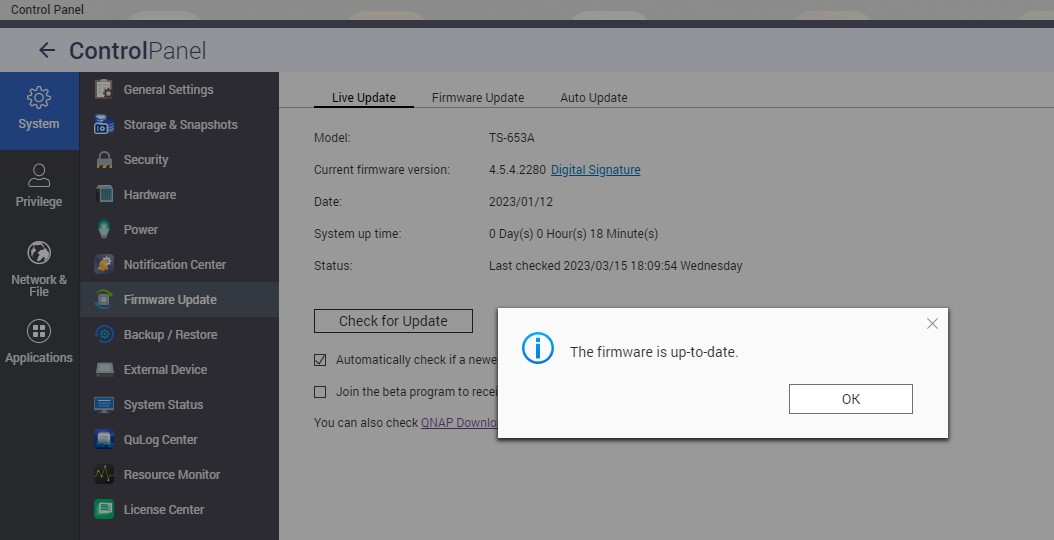
A NAS running QTS 4.5.4 cannot be updated to QTS 5.0.0 or later with automatic updates or via Control Panel > System > Firmware Update > Live Update > Check For Updates. The update from QTS 4.5 to QTS 5.0 must be done manually.
Updating from QTS 4.5.0 to QTS 5.0.0 must be done manually because QTS 5.0.0 contains significant changes and enhancements that might affect the stability of certain services or applications for certain users. For details, see the QTS 5.0.1 Release Notes.
Workaround
QTS 4.5.4 can be manually updated to QTS 5.0.0 or later. For details on manually updating your system, see Updating The Firmware Manually (QTS 4.5.x).
Further Reading
Updating The Firmware Manually (QTS 4.5.x)
Để được hỗ trợ thêm, hãy hỏi những người dùng khác và chuyên gia QNAP trong cộng đồng. Đến Cộng đồng QNAP


