


Why HBS sync to Google Drive error with 'Cloud storage service failed to create file with Google Docs'
Applicable Products
Hybrid Backup Sync with Google Drive
Scenario
This error is expected behavior when using HBS 3 with Google Drive. Files like gdoc, gsheet, and gslides are not actual files — they are shortcuts (URLs) pointing to Google Docs content stored online. These cannot be recreated or edited outside of Google’s own platform.
If the original document exists, HBS can recreate the shortcut.
If the original document is missing, HBS fails to create the file, resulting in the error.
This behavior is the same as the Google Drive desktop app and is a limitation of how Google handles these file types.
Solution
- Open HBS 3.
- Edit your job and go to Filter Criteria.
- In the Excluded file types field, enter:
*.gdoc,*.gsheet,*.gslides
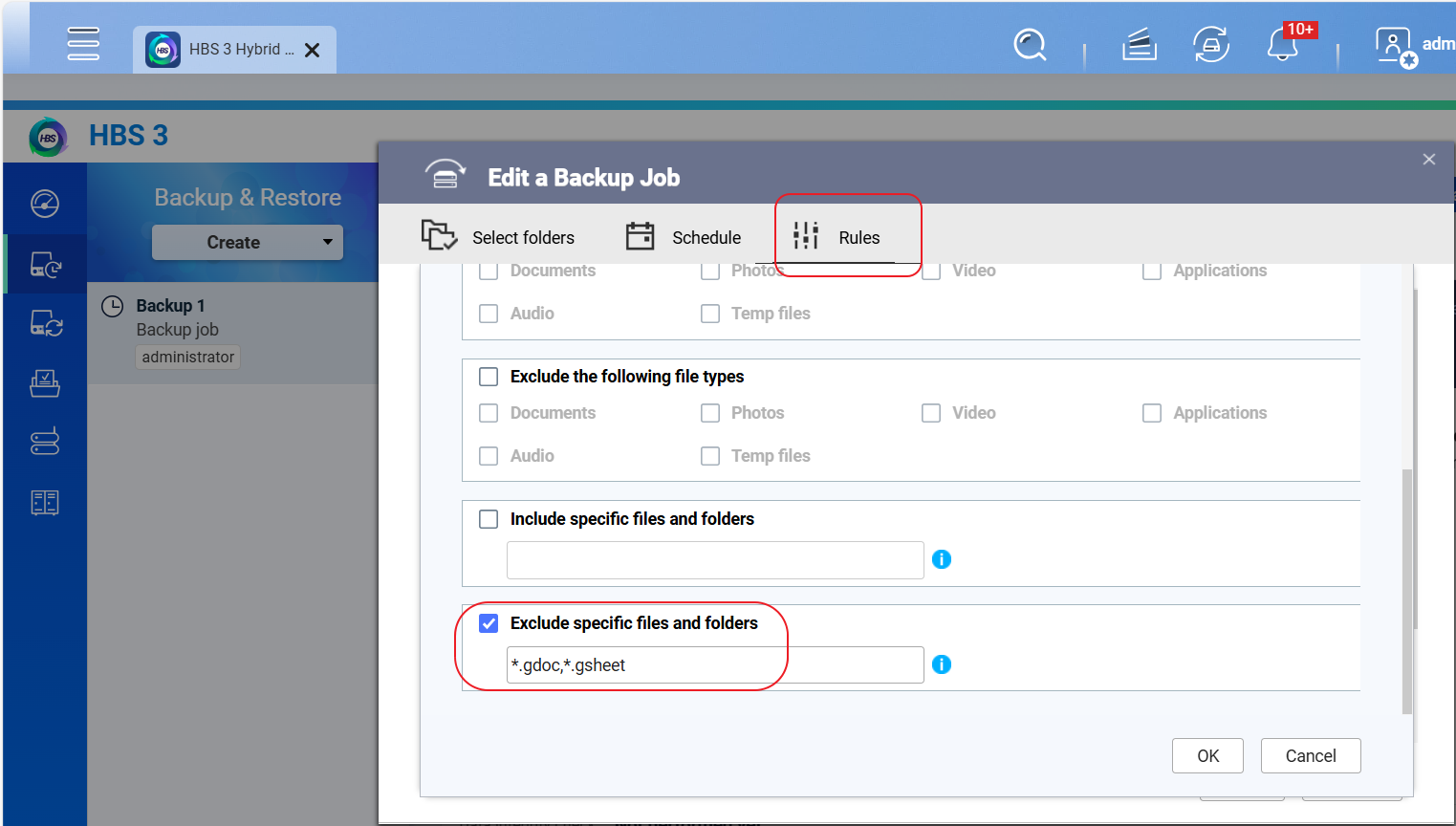
This prevents HBS from attempting to process those files, avoiding job failures.
Further Reading
Why can’t I create Google documents and other online files through a HybridMount connection?
Để được hỗ trợ thêm, hãy hỏi những người dùng khác và chuyên gia QNAP trong cộng đồng. Đến Cộng đồng QNAP


