


Why am I receiving constant “Failed to log in via user account admin” notifications?
Applicable Products:
- Notification Center
- QuFirewall
These warnings are caused when there is an unsuccessful attempt to log in to the NAS. Receiving a large number of these notifications is a potential sign of your NAS being subjected to a brute force attack. Consider taking the following security precautions to ensure your NAS is protected.
Disable the default admin account. This will prevent anyone from accessing or using the default admin account but will not prevent login attempts nor stop the notifications.
Follow the steps in Review and disable unnecessary port forwarding to find out which ports on the router are opened to the internet and change the ports if necessary.
Follow the best practices for enhancing NAS security.
To stop receiving these notifications, take the following actions according to your version of QTS.
QTS 4.4.1 (or later): Install QuFirewall and enable basic protection.
- Log in to QTS as an administrator.
- Open the App Center.
- Search for “QuFirewall”.
- Click Install.
- Once installed, open and enable QuFirewall.
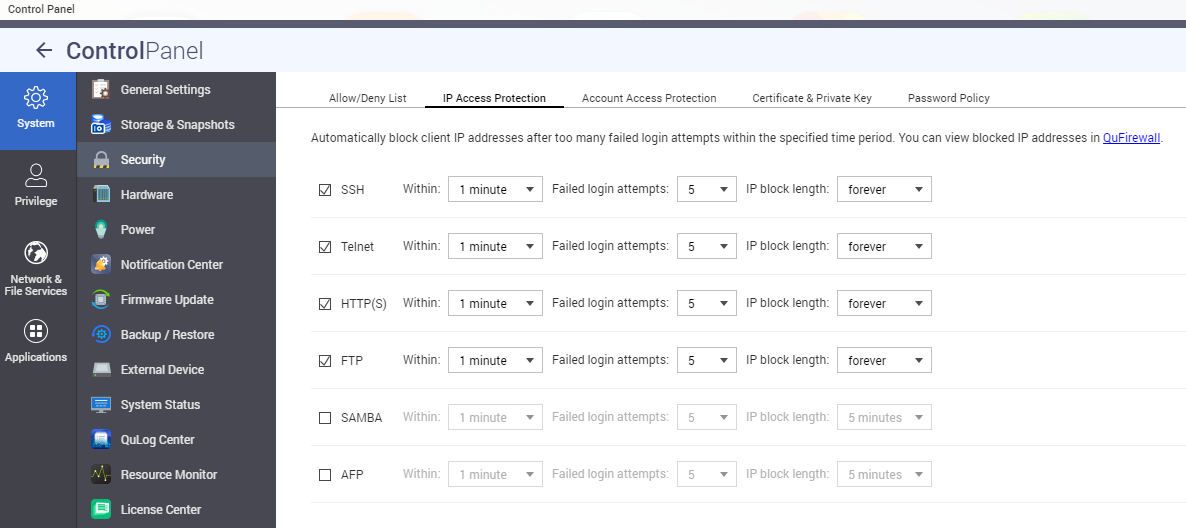
QTS 4.3.4 (or earlier): Set up IP Access protection to block failed login attempts.
- Open Control Panel.
- Go to System > Security > IP Access Protection.
- Set time thresholds and failed login attempts for each of your protocols.
Để được hỗ trợ thêm, hãy hỏi những người dùng khác và chuyên gia QNAP trong cộng đồng. Đến Cộng đồng QNAP


