[Thông báo bảo mật quan trọng] Phát hiện các trang web giả mạo Qfinder Pro. Tìm hiểu thêm >

How do I get information of denied packets in QuFirewall?


Last modified date: 2023-09-06

Applicable Products

QuFirewall


Details

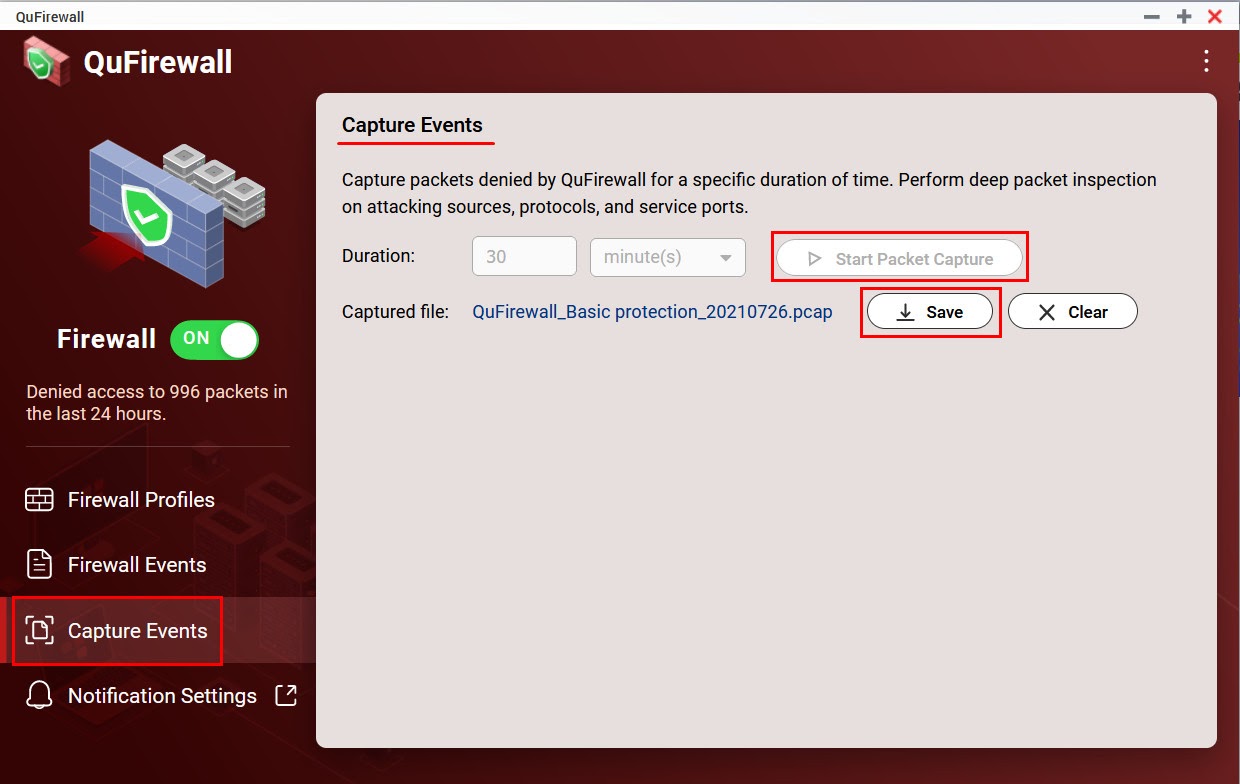
  1. Open QuFirewall.
  2. Go to Capture Events.
  3. Configure a Duration and click Start Packet Capture.
  4. Once your specified duration of time has passed, click Save.
  5. A PCAP file containing the captured packets is downloaded to your device.

Further Reading

How do I open *.pcap/*.pcapng files?

Was this article helpful?

25% of people think it helps.
Thank you for your feedback.

Để được hỗ trợ thêm, hãy hỏi những người dùng khác và chuyên gia QNAP trong cộng đồng. Đến Cộng đồng QNAP

Please tell us how this article can be improved:

If you want to provide additional feedback, please include it below.

Chọn thông số kỹ thuật

      Xem thêm Thu gọn
      Chọn quốc gia hoặc khu vực của bạn
      Trò chuyện với chúng tôi! Trò chuyện với chúng tôi!
      back to top