


How do I configure SMB Multichannel on QTS 5.1.x and later versions?
Last modified date:
2024-03-21
Applicable Products
- QTS 5.1.x and later versions
- QuTS hero 5.1.x and later versions
- Microsoft Networking (Samba)
Details
Users can now allow SMB 3.x clients to establish multiple network connections simultaneously to an SMB file share with QTS 5.1.x and later versions. SMB Multichannel increases network performance by aggregating network bandwidths over multiple NICs and mitigate network disruption by increasing the network fault tolerance.
SMB Multichannel is supported on the following clients using SMB 3.0 and later:
- Windows 8.1 and later versions
- Windows Server 2012 and later versions
- macOS Big Sur 11.3.1 and later versions
Procedure
- Log in to QTS or QuTS hero.
Open Control Panel. - Go to Network & File Services > Win/Mac/NFS/WebDAV > Microsoft Networking.
- Select Enable SMB Multichannel.
- Click SMB Multichannel Settings.
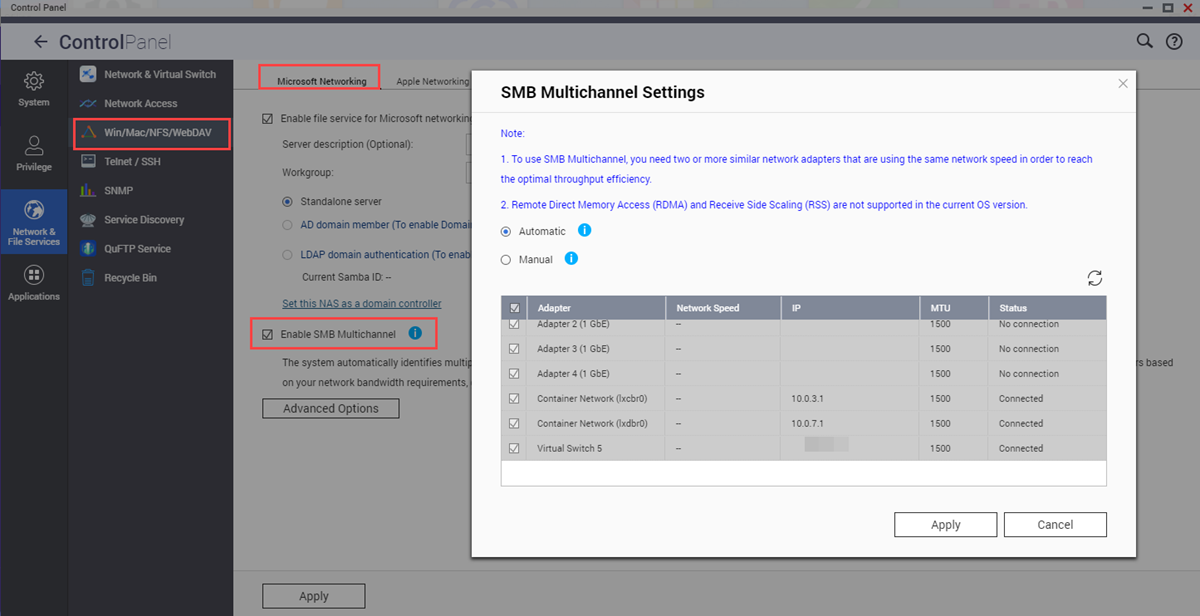
- Configure the settings.
Setting Action Automatic Select to allow the system to automatically select multiple network adapters that possess similar configurations. Manual Select to manually choose two or more network adapters that have the same network speed. - Click Apply.
- Click Yes on the confirmation window.
SMB Multichannel is enabled on the device.
Để được hỗ trợ thêm, hãy hỏi những người dùng khác và chuyên gia QNAP trong cộng đồng. Đến Cộng đồng QNAP


