


[QuMagie Android/iOS] Why can't I see all NAS folders while setting up the backup function?
Applied Products:
-
All NAS Series
Please use the same NAS user account to log into the NAS web admin interface via a computer > QuMagie > Folder View > check if you can see all the desired NAS folders here?
If not, please use administrator group account to log into your NAS web admin interface via a computer > Multimedia Console > Content Management > Content Source > QuMagie > check if the desired folders are set as content source folder.
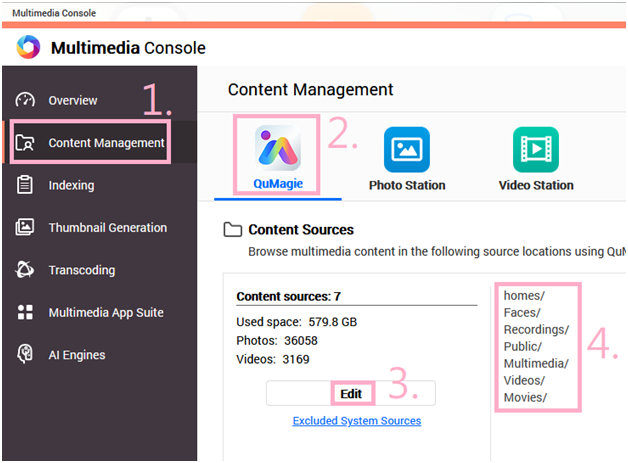
After desired folders are set as content source folders for QuMagie, please execute QuMagie > Folder View > check if you can see all those folders here.
If yes, you can then see those folders while setting up Backup via mobile APPs.
Daha fazla yardım için toplulukta diğer kullanıcılara ve QNAP uzmanlarına sorun. QNAP Topluluğuna Git


