


Why WIFI is so slow in Qhora-301W?
Last modified date:
2023-02-13
Applicable Products:
- QHora-301W
This could be due to the "Country/network location" of the device is not configured, causing the WIFI 5G not enabled. To enable, click on the "Wireless in basic mode" message to configure the location.
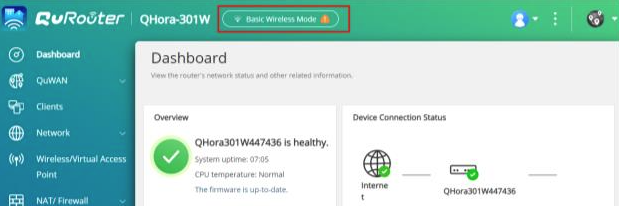
If QHora-301W still encounters connection/transfer speed slow, try the following steps:
- Use a LAN cable connect between QHora-301W router LAN port & your client PC/laptop LAN port. Use this connection to verify if the slow speed is due to local connection.
- Reboot the QHora-301W router device in System > System Settings > Restart / Reset / Backup / Restore page, click “Restart” button and see if transfer speed return to normal after rebooting.
- If you are using Wifi connection, move your client PC/laptop near the QHora-301W router and see if the speed returns to normal.
- Install WIFI analyzer APP in your mobile Phone, use WIFI analyzer APP to check whether has other WIFI router use same WIFI channel which can affect the transfer apeed. Remove these devices from your area and see if the speed returns to normal


