Applicable Products
Software
- QuWAN Orchestrator 2.9 and later versions
- QVPN Service 3.3 and later
Hardware
Overview
QuWAN Express allows a QNAP NAS to join the QuWAN network quickly with minimal configuration. It provides secure connectivity for remote access and inter-device communication without requiring manual port forwarding or complicated VPN setup.
When a QNAP router (hub) is available, the NAS automatically establishes an IPSec tunnel with the hub to support secure, high-performance data transfer within the organization.
If a hub is not deployed, you can use the Super Node service. Super Node is a cloud gateway that provides an IPSec tunnel for the NAS, assigns a public IP and port for secure external access, and enables NAS-to-NAS communication inside the QuWAN virtual network.
Note
- Super Node is designed for environments without a QuWAN hub router and supports up to three edge NAS devices for remote access. If additional devices need to connect, you can update the allowed NAS list in the QuWAN Orchestrator cloud platform.
- The service includes a monthly free data transmission limit of 15 GB. After this limit is reached, transmission speed is reduced, and you can upgrade your license plan in the QNAP Software Store if more capacity is needed.
Key features
- QuWAN Express allows you to join the QuWAN network with a single click in QVPN Service, and the system automatically handles network configuration on your behalf.
- It enables secure remote access to NAS data from any location by routing traffic through the QuWAN overlay network.
- The Super Node service provides cloud-based connectivity that ensures reliable external access and seamless communication between NAS devices, even when a hub router is unavailable.
- The service assigns a virtual IP address to the NAS so it can communicate with other QuWAN devices without exposing internal network details.
Prerequisites
- Update the NAS firmware and QVPN Service to the versions listed in Applicable Products.
- Ensure the NAS has an active internet connection.
- Disable the L2TP/IPSec server on the NAS before enabling QuWAN Express.
- Sign in to the NAS with a QNAP ID so it can register with QuWAN Orchestrator.
- Make sure the hub router you plan to use supports QuWAN configuration and is registered to the same QuWAN organization that you will select when configuring the QuWAN Express settings.
Procedure
This section describes how to configure access QuWAN Express on QVPN Service, configure device information, and register the NAS as an edge device in QuWAN Orchestrator.
Configure QuWAN Express on your QNAP NAS
- Log in to your NAS as an administrator.
- Open QVPN Service.
- Go to QuWAN > QuWAN Express.
- Click Join.
- Click Start to run prerequisite checks.
QVPN Service verifies the following:- The NAS must have an active internet connection for the check to pass.
- The check confirms whether the L2TP/IPSec server is disabled because it must be turned off before you continue.
- The check verifies that the NAS is signed in with a QNAP ID and prompts you to log in when necessary.
When all prerequisite checks complete successfully, QVPN Service displays the Device Information. - Optional: Configure the QuWAN organization and region settings.
- Click
 .
.
The Edit Device Information window appears.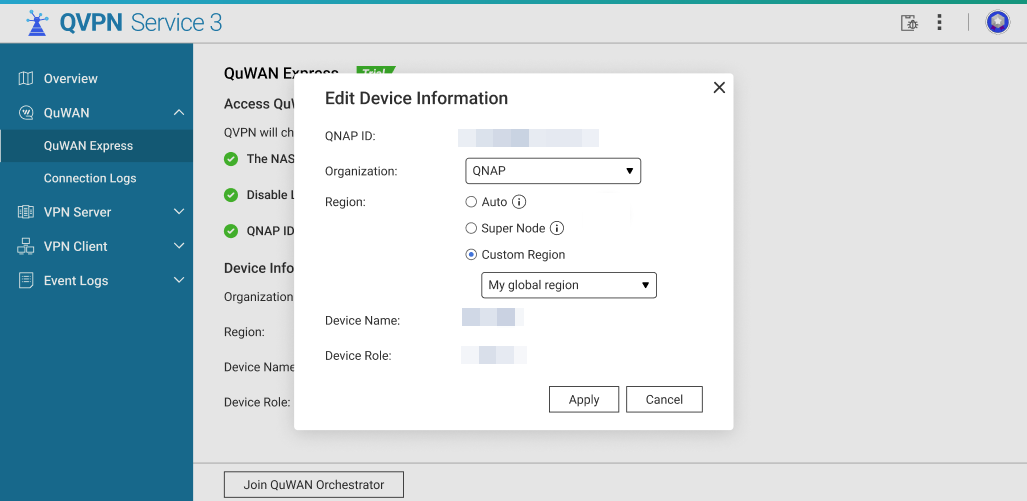
- Optional: Select the QuWAN Organization from the dropdown.
If your QNAP ID is a member of multiple organizations, select the organization that will manage this NAS. - Optional: Select an option to determine the region where the NAS establishes its QuWAN connection:
- Auto (Recommended): QVPN Service automatically chooses the best region. It prioritizes regions where a hub router exists for your organization. If a hub is unavailable, it falls back to a Super Node region.
- Super Node: Force connection to the QuWAN Super Node cloud endpoint.
Note
Use when there is no hub in your organization or when you want immediate cloud endpoint access. When using Super Node, the NAS receives a cloud-assigned public IP and port for external connectivity without port forwarding.
- Custom Region: Manually select a region when you want the NAS to join a particular segment of your QuWAN organization.
- Click Apply.
QVPN Service updates the device registration settings locally and prepares to register the device with QuWAN Orchestrator.
- Click Join QuWAN Orchestrator.
The NAS is registered to QuWAN Orchestrator and becomes an edge NAS.
Once the NAS successfully joins the QuWAN organization, the following actions occur automatically:
- The QuWAN Orchestrator assigns a Virtual IP address to the NAS inside the QuWAN overlay network.
- If a hub router exists in the assigned region, the NAS will automatically establish an IPSec tunnel with that hub.
- If connected to a Super Node, the NAS will receive a public IP address and port assigned by the cloud endpoint enabling secure external access without manual port forwarding.
- Wait until the connection status updates to Connected on the QuWAN Express page.
Once connected the NAS is reachable via the QuWAN virtual network by other edge devices and by users who have appropriate QuWAN access (for example, remote clients or other NAS devices).
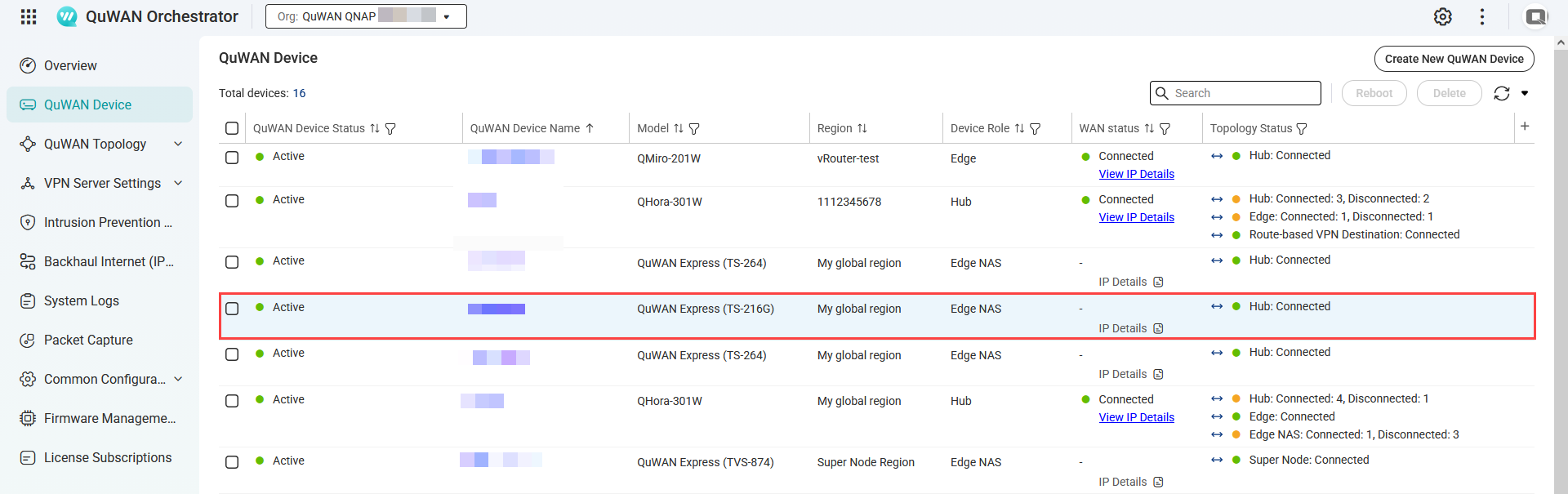
- Optional: Verify the NAS appears in QuWAN Orchestrator.
- Log into QuWAN Orchestrator.
- Select your organization.
- Go to QuWAN Device.
- Locate the NAS by the device name.
- Under Topology Status, check if the status is Connected.
Manage Super Node connections
- Log in to QuWAN Orchestrator.
- Select your organization.
- Go to QuWAN Topology > Super Node (QuWAN Express) > Status.
- Click Manage Super Node Connections.
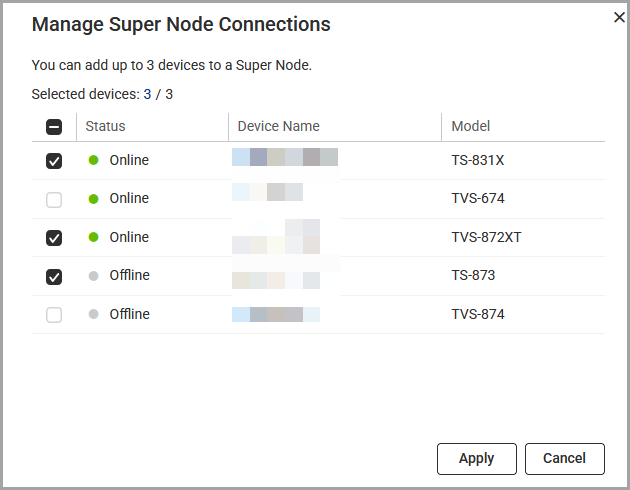
- Select between 1 to 3 edge NAS devices.
- Click Apply.
QuWAN Orchestrator updates the Super Node connections.
Modifying the virtual IP address of the edge NAS
- Log in to your edge NAS.
- Open QVPN Service.
- Go to QuWAN > QuWAN Express.
- Click
 .
.
The Edit Virtual IP window appears. - Enter a different virtual IP address.
- Click Check.
QVPN Service checks the virtual IP address. - Click Apply.
Accessing the NAS remotely via QuWAN Express
- From another QuWAN edge device or routed network, use the assigned Virtual IP address to connect to services on the NAS (e.g., SMB, AFP, HTTP(S), SSH) depending on your NAS access rules and port configuration.
- When using a hub, traffic between NAS and hub-connected devices remains within the IPSec tunnels and private networks, providing lower latency and better throughput for in-organization transfers.
Troubleshooting
- Network connection check failed
- Verify that the NAS has a working internet connection.
- Make sure the DNS settings are correct, because incorrect DNS configuration can cause the NAS to appear offline to QuWAN services.
- L2TP/IPSec conflict check failed
- Disable any local L2TP/IPSec server instance in QVPN Service before activating QuWAN Express, since both services cannot run simultaneously.
- QNAP ID verification failed
- Log in with a QNAP ID that belongs to the organization you want to use, then try joining again. Also confirm that the NAS system date and time are accurate so the authentication tokens can be validated.
- Edge shows "Connecting" but never "Connected"
- Verify that the NAS and the router have working internet connections.
- Check the firewall rules on both your network and the NAS. IPSec and NAT traversal ports, such as UDP 500 and 4500, must be allowed for outbound traffic.
Further Reading
적용되는 제품
소프트웨어
- QuWAN Orchestrator 2.9 및 이후 버전
- QVPN Service 3.3 및 이후 버전
하드웨어
개요
QuWAN Express는 QNAP NAS가 최소한의 설정으로 QuWAN 네트워크에 빠르게 가입할 수 있도록 하며, 수동 포트 포워딩이나 복잡한 VPN 설정 없이 원격 액세스 및 장치 간 통신을 위한 안전한 연결을 제공합니다.
QNAP 라우터(허브)가 사용 가능한 경우, NAS는 조직 내에서 안전하고 고성능의 데이터 전송을 지원하기 위해허브와 자동으로 IPSec 터널을 설정합니다.
허브가 배포되지 않은 경우, Super Node 서비스를 사용할 수 있습니다. Super Node는 NAS를 위한 IPSec 터널을 제공하는 클라우드 게이트웨이로, 안전한 외부 액세스를 위한 공용 IP 및 포트를 할당하고 QuWAN 가상 네트워크 내에서 NAS 간 통신을 가능하게 합니다.
참고
- Super Node는 QuWAN 허브라우터가 없는 환경을 위해 설계되었으며, 최대 세 대의엣지 NAS 장치에 대한 원격 액세스를 지원합니다. 추가 장치가 연결되어야 하는 경우, QuWAN Orchestrator클라우드 플랫폼에서 허용된 NAS 목록을 업데이트할 수 있습니다.
- 이 서비스는 월간 15GB의 무료 데이터 전송 한도를 포함합니다. 이 한도에 도달하면 전송 속도가 감소하며, 더 많은 용량이 필요할 경우QNAP Software Store에서라이선스계획을 업그레이드할 수 있습니다.
주요 기능
- QuWAN Express는QVPN Service에서 한 번의 클릭으로 QuWAN 네트워크에 가입할 수 있으며, 시스템이 자동으로 네트워크 구성을 처리합니다.
- QuWAN 오버레이 네트워크를 통해 트래픽을 라우팅하여 어느 위치에서나 NAS 데이터에 안전하게 원격 액세스할 수 있습니다.
- Super Node 서비스는 클라우드 기반 연결을 제공하여허브라우터가 없는 경우에도 NAS 장치 간의 신뢰할 수 있는 외부 액세스와 원활한 통신을 보장합니다.
- 이 서비스는 NAS에 가상 IP 주소를 할당하여 내부 네트워크 세부 정보를 노출하지 않고 다른 QuWAN 장치와 통신할 수 있도록 합니다.
필수 조건
- NAS 펌웨어및QVPN Service을적용되는 제품에 나열된 버전으로 업데이트하십시오.
- NAS가 활성화된 인터넷 연결을 가지고 있는지 확인하십시오.
- QuWAN Express를 활성화하기 전에 NAS에서 L2TP/IPSec 서버를 비활성화하십시오.
- NAS에 QNAP ID로 로그인하여QuWAN Orchestrator에 등록할 수 있도록 합니다.
- 사용하려는허브라우터가 QuWAN 구성을 지원하고 QuWAN Express 설정을 구성할 때 선택할 동일한 QuWAN 조직에 등록되어 있는지 확인하십시오.
절차
이 섹션에서는QVPN Service에서 QuWAN Express에 액세스하는 방법, 장치 정보를 구성하는 방법, NAS를QuWAN Orchestrator의엣지장치로 등록하는 방법을 설명합니다.
QNAP NAS에서 QuWAN Express 구성
- NAS에관리자로 로그인합니다.
- QVPN Service을 엽니다.
- QuWAN > QuWAN Express로 이동합니다.
- Join을 클릭합니다.
- 필수 조건 검사를 실행하려면Start 를 클릭합니다.
QVPN Service은 다음을 확인합니다:- 검사가 통과하려면 NAS가 활성화된 인터넷 연결을 가지고 있어야 합니다.
- 검사는 L2TP/IPSec 서버가 비활성화되어 있는지 확인하며, 계속하기 전에 꺼져 있어야 합니다.
- 검사는 NAS가 QNAP ID로 로그인되어 있는지 확인하며, 필요할 경우 로그인하라는 메시지를 표시합니다.
모든 필수 조건 검사가 성공적으로 완료되면QVPN Service은장치 정보를 표시합니다. - 선택 사항: QuWAN 조직 및 지역 설정을 구성합니다.
- 을 클릭합니다.
장치 정보 편집창이 나타납니다. - 선택 사항: 드롭다운에서QuWAN 조직을 선택합니다.
QNAP ID가 여러 조직의 멤버인 경우, 이 NAS를 관리할 조직을 선택하십시오. - 선택 사항: NAS가 QuWAN 연결을 설정할 지역을 결정하기 위해 옵션을 선택합니다:
- 자동 (권장): QVPN Service이 최적의 지역을 자동으로 선택합니다. 이는 조직에허브라우터가 있는 지역을 우선시합니다. 허브가 없을 경우, 슈퍼 노드 지역으로 대체됩니다.
- 슈퍼 노드: QuWAN 슈퍼 노드 클라우드 엔드포인트에 강제로 연결합니다.
참고
조직에허브가 없거나 즉각적인 클라우드 엔드포인트 접근을 원할 때 사용합니다. 슈퍼 노드를 사용할 경우, NAS는 외부 연결을 위한 클라우드 할당 공용 IP 및 포트를 포트 포워딩 없이 받습니다.
- 사용자 지정 지역: NAS가 QuWAN 조직의 특정 세그먼트에 가입하도록 지역을 수동으로 선택합니다.
- 적용을 클릭합니다.
QVPN Service이 장치 등록 설정을 로컬에서 업데이트하고QuWAN Orchestrator에 장치를 등록할 준비를 합니다.
- QuWAN Orchestrator가입을 클릭합니다.
NAS가QuWAN Orchestrator에 등록되고엣지 NAS가 됩니다.
NAS가 QuWAN 조직에 성공적으로 가입하면 다음 작업이 자동으로 수행됩니다:
- QuWAN Orchestrator이 QuWAN 오버레이 네트워크 내에서 NAS에 가상 IP 주소를 할당합니다.
- 할당된 지역에허브라우터가 존재하면, NAS는 해당허브와 자동으로 IPSec 터널을 설정합니다.
- 슈퍼 노드에 연결된 경우, NAS는 클라우드 엔드포인트에 의해 할당된 공용 IP 주소와 포트를 받아 수동 포트 포워딩 없이 안전한 외부 접근을 가능하게 합니다.
- 연결 상태가Connected 로 업데이트될 때까지 기다립니다. QuWAN Express 페이지에서.
연결되면 NAS는 다른엣지장치 및 적절한 QuWAN 액세스 권한이 있는 사용자(예: 원격 클라이언트 또는 다른 NAS 장치)를 통해 QuWAN 가상 네트워크를 통해 접근할 수 있습니다.
- 선택 사항: NAS가QuWAN Orchestrator에 나타나는지 확인합니다.
- QuWAN Orchestrator에 로그인합니다.
- 조직을 선택합니다.
- QuWAN Device로 이동합니다.
- 장치 이름으로 NAS를 찾습니다.
- Topology Status에서 상태가Connected인지 확인합니다.
Super Node 연결 관리
- QuWAN Orchestrator.에 로그인합니다.
- 조직을 선택합니다.
- QuWAN 토폴로지 > Super Node (QuWAN Express) > Status로 이동합니다.
- Manage Super Node Connections를 클릭합니다.
- 1에서 3개의엣지 NAS 장치를 선택합니다.
- Apply를 클릭합니다.
QuWAN Orchestrator가 Super Node 연결을 업데이트합니다.
엣지 NAS의 가상 IP 주소 수정
- 엣지 NAS에 로그인합니다.
- QVPN Service을 엽니다.
- QuWAN > QuWAN Express로 이동합니다.
- 를 클릭합니다.
Edit Virtual IP창이 나타납니다. - 다른 가상 IP 주소를 입력합니다.
- Check를 클릭합니다.
QVPN Service이 가상 IP 주소를 확인합니다. - 적용을 클릭합니다.
QuWAN Express를 통해 NAS에 원격으로 액세스하기
- 다른 QuWAN 엣지장치나 라우팅된 네트워크에서 할당된 가상 IP 주소를 사용하여 NAS의 서비스(SMB, AFP, HTTP(S), SSH 등)에 연결합니다. 이는 NAS 액세스 규칙과 포트 구성에 따라 다릅니다.
- 허브를 사용할 때, NAS와 허브에 연결된 장치 간의 트래픽은 IPSec 터널과 사설 네트워크 내에 머물러, 조직 내 전송에 대해 더 낮은 지연 시간과 더 나은처리량을 제공합니다.
문제 해결
- 네트워크 연결 검사 실패
- NAS가 정상적으로 인터넷에 연결되어 있는지 확인합니다.
- DNS 설정이 올바른지 확인합니다. 잘못된 DNS 구성은 NAS가 QuWAN 서비스에 오프라인으로 나타나게 할 수 있습니다.
- L2TP/IPSec 충돌 검사 실패
- QuWAN Express를 활성화하기 전에QVPN Service에서 로컬 L2TP/IPSec 서버 인스턴스를 비활성화합니다. 두 서비스는 동시에 실행될 수 없습니다.
- QNAP ID 인증 실패
- 사용하려는 조직에 속한 QNAP ID로 로그인한 후 다시 시도합니다. 또한 NAS 시스템의 날짜와 시간이 정확한지 확인하여 인증 토큰이 유효성을 검증할 수 있도록 합니다.
- 엣지가 "연결 중"으로 표시되지만 "연결됨"으로는 표시되지 않음
- NAS와 라우터가 정상적으로 인터넷에 연결되어 있는지 확인합니다.
- 네트워크와 NAS의방화벽규칙을 확인합니다. UDP 500 및 4500과 같은 IPSec 및 NAT 트래버설 포트는 아웃바운드 트래픽에 허용되어야 합니다.
추가 읽기


