Applicable Products
NAS (QTS / QuTS hero)
Scenario
Some QNAP NAS models support both QTS (a modern app-based NAS OS with ext4 file system) and QuTS hero (an advanced, ZFS-based NAS OS). If you want to change your NAS operating system, this article explains how to safely switch from one to the other and highlights key benefits and considerations for each.
Solution
Switching from QTS to QuTS hero
Benefits of QuTS hero (ZFS)
- Data integrity and self-healing: ZFS provides end-to-end checksums that detect and correct data corruption, and supports copy-on-write snapshots.
- Efficient storage: Inline data deduplication and compression saves space.
Note: At least 32 GB RAM is recommended for optimal performance of these features. - Advanced protection and disaster recovery: SnapSync enables near-real-time, snapshot-based backup and disaster recovery across QuTS hero NAS devices.
- Large shared folder support: Single ZFS shared folders can be up to 5 petabytes (PB).
- WORM (Write Once, Read Many): Data can be locked against modification, supporting compliance needs.
Procedure
Important
Switching to QuTS hero will erase all data on your NAS. Make sure to back up your data before starting.
- Power off your NAS and remove all storage devices, including M.2 SSDs.
- Ensure your NAS is connected to the internet, then power it on.
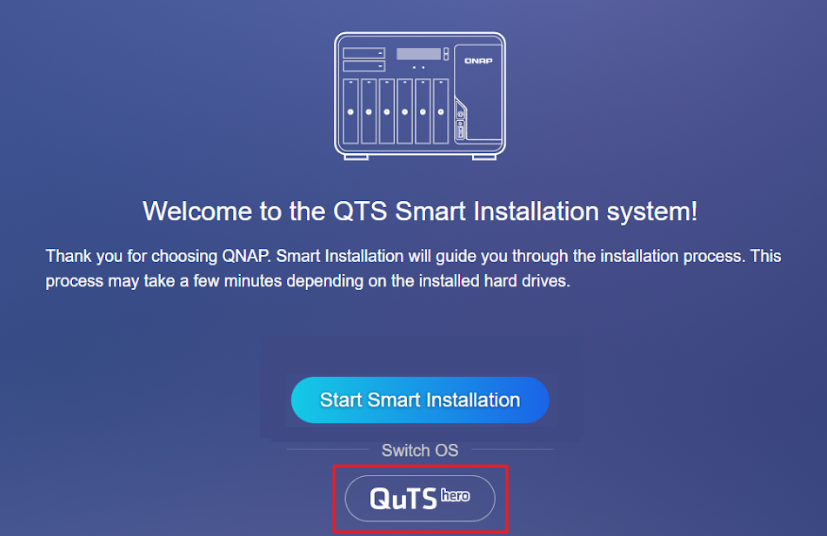
- Sign in to the NAS. The QuTS hero Smart Installation screen will appear.
- Select QuTS hero under the Switch OS heading and follow the on-screen instructions to complete the installation.
- After installation, power off the NAS, reinstall your storage devices, and restart the NAS.

Switching from QuTS hero to QTS
Benefits of QTS (ext4/LVM)
- Qtier auto-tiering (QTS only): Automatically moves frequently accessed ("hot") data to SSDs and less-used ("cold") data to HDDs within the same storage pool.
- Lower system overhead: QTS runs efficiently even on NAS models with less than 8 GB of RAM, making it a good choice for entry-level hardware.
- Wide app compatibility: QTS supports a large selection of QNAP and third-party applications.
- LVM (Logical Volume Manager): Enables flexible volume and storage management.
Procedure
Important
Switching to QTS will erase all data on your NAS. Make sure to back up your data before starting.
- Power off your NAS and remove all storage devices, including M.2 SSDs.
- Ensure your NAS is connected to the internet, then power it on.
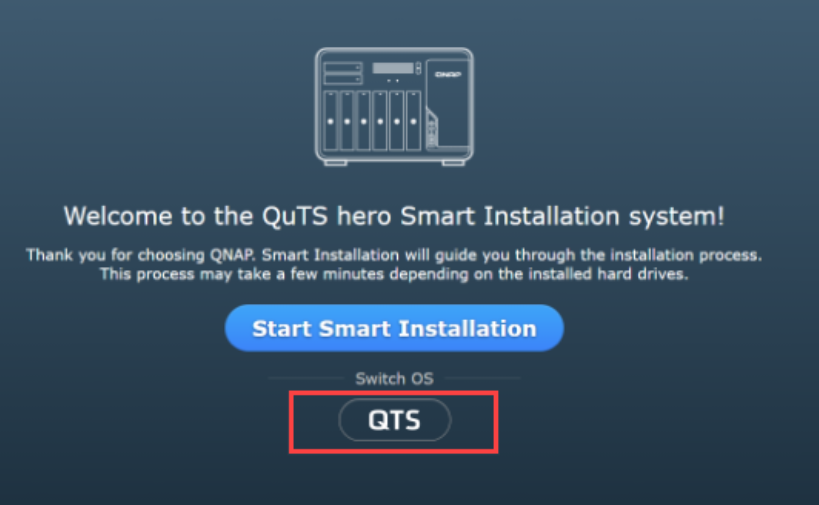
- Sign in to the NAS. The QTS Smart Installation screen will appear.
- Select QTS under the Switch OS heading and follow the on-screen instructions to complete the installation.
- After installation, power off the NAS, reinstall your storage devices, and restart the NAS.

Which operating system should I choose?
| Choose QuTS hero (ZFS) if you want... | Choose QTS (ext4/LVM) if you want... |
|---|
- ZFS self-healing, integrity and robust snapshots
- Data deduplication and compression
- Large single shared folders (up to 5 PB)
- SnapSync for disaster recovery
- WORM compliance features
| - Auto-tiering (Qtier for SSD/HDD in a single pool)
- Lower resource overhead on entry-level hardware
- Extensive QNAP app ecosystem
- Simpler, traditional NAS experience
- Recommended for systems with less than 8 GB RAM
|
Further Reading
Prodotti Applicabili
NAS (QTS / QuTS hero)
Scenario
Alcuni modelli di NAS QNAP supportano sia QTS (un moderno sistema operativo NAS basato su app con file system ext4) sia QuTS hero (un avanzato sistema operativo NAS basato su ZFS). Se desideri cambiare il sistema operativo del tuo NAS, questo articolo spiega come passare in sicurezza da uno all'altro e mette in evidenza i principali vantaggi e considerazioni per ciascuno.
Soluzione
Passaggio da QTS a QuTS hero
Vantaggi di QuTS hero (ZFS)
- Integrità dei dati e auto-riparazione: ZFS fornisce checksum end-to-end che rilevano e correggono la corruzione dei dati e supporta il copy-on-write Snapshot.
- Efficienza Archiviazione: La deduplica dei dati Deduplicazione inline e la compressione risparmiano spazio.
Nota: Si raccomandano almeno 32 GB di RAM per prestazioni ottimali di queste funzionalità. - Protezione avanzata e disaster recovery: SnapSync consente backup e disaster recovery quasi in tempo reale basati su snapshot su dispositivi NAS QuTS hero.
- Supporto per grandi cartelle condivise: Le singole cartelle condivise ZFS possono arrivare fino a 5 petabyte (PB).
- WORM (Write Once, Read Many): I dati possono essere bloccati contro le modifiche, supportando le esigenze di conformità.
Procedura
Importante
Il passaggio a QuTS hero cancellerà tutti i dati sul tuo NAS. Assicurati di eseguire il backup dei tuoi dati prima di iniziare.
- Spegni il NAS e rimuovi tutti i dispositivi Archiviazione, inclusi gli SSD M.2.
- Assicurati che il NAS sia connesso a Internet, quindi accendilo.
- Accedi al NAS. Apparirà la schermata di installazione intelligente di QuTS hero.
- Seleziona QuTS hero sotto la voce Switch OS e segui le istruzioni sullo schermo per completare l'installazione.
- Dopo l'installazione, spegni il NAS, reinstalla i tuoi dispositivi Archiviazione e riavvia il NAS.
Passaggio da QuTS hero a QTS
Vantaggi di QTS (ext4/LVM)
- Auto-tiering Qtier (solo QTS): Sposta automaticamente i dati frequentemente accessibili ("hot") su SSD e i dati meno utilizzati ("cold") su HDD all'interno dello stesso pool Archiviazione.
- Minore overhead di sistema: QTS funziona efficacemente anche su modelli NAS con meno di 8 GB di RAM, rendendolo una buona scelta per hardware entry-level.
- Ampia compatibilità delle app: QTS supporta una vasta selezione di applicazioni QNAP e di terze parti.
- LVM (Logical Volume Manager): Consente una gestione flessibile del volume e Archiviazione.
Procedure
Importante
Passare a QTS cancellerà tutti i dati sul tuo NAS. Assicurati di eseguire il backup dei tuoi dati prima di iniziare.
- Spegni il NAS e rimuovi tutti i dispositivi Archiviazione, inclusi gli SSD M.2.
- Assicurati che il NAS sia connesso a Internet, quindi accendilo.
- Accedi al NAS. Apparirà la schermata di installazione intelligente di QTS.
- Seleziona QTS sotto la voce Switch OS e segui le istruzioni sullo schermo per completare l'installazione.
- Dopo l'installazione, spegni il NAS, reinstalla i tuoi dispositivi Archiviazione e riavvia il NAS.
Quale sistema operativo dovrei scegliere?
| Scegli QuTS hero (ZFS) se vuoi... | Scegli QTS (ext4/LVM) se vuoi... |
|---|
- ZFS auto-riparazione, integrità e robusto Snapshot
- Deduplicazione dei dati e compressione
- Grandi cartelle condivise singole (fino a 5 PB)
- SnapSync per il disaster recovery
- Funzionalità di conformità WORM
| - Auto-tiering (Qtier per SSD/HDD in un unico pool)
- Minore sovraccarico di risorse su hardware entry-level
- Ecosistema di app QNAP esteso
- Esperienza NAS più semplice e tradizionale
- Consigliato per sistemi con meno di 8 GB di RAM
|
Ulteriori letture