


How does Q’center display QTS hero NAS devices?
QTS hero is a new edition of the QNAP’s QTS operating system, featuring the advanced ZFS file system. Q’center version 1.10 or later supports QTS hero.
Adding a QTS hero NAS to Q’center
You can add a QTS hero NAS to Q’center the same way as adding a QTS NAS. For details, see the following tutorial: https://www.qnap.com/go/how-to/tutorial/con_show.php?cid=141
Differences between QTS and QTS hero
The QTS hero has an “h” at the start of its version number, for example “version h4.5.0”, to differentiate it from QTS.

In QTS hero, shared folders replace volumes. To simplify the management of both QTS and QTS hero, Q’center treats QTS hero shared folders as thin volumes.
QTS hero NAS devices in Q’center
When you first add a QTS hero NAS to Q’center, you will see the message below:

Here is a list of ways that Q’center displays QTS hero NAS devices differently to QTS:
- The firmware version of a QTS hero NAS starts with an "h". This “h” appears on any screen that shows the NAS device’s firmware version.
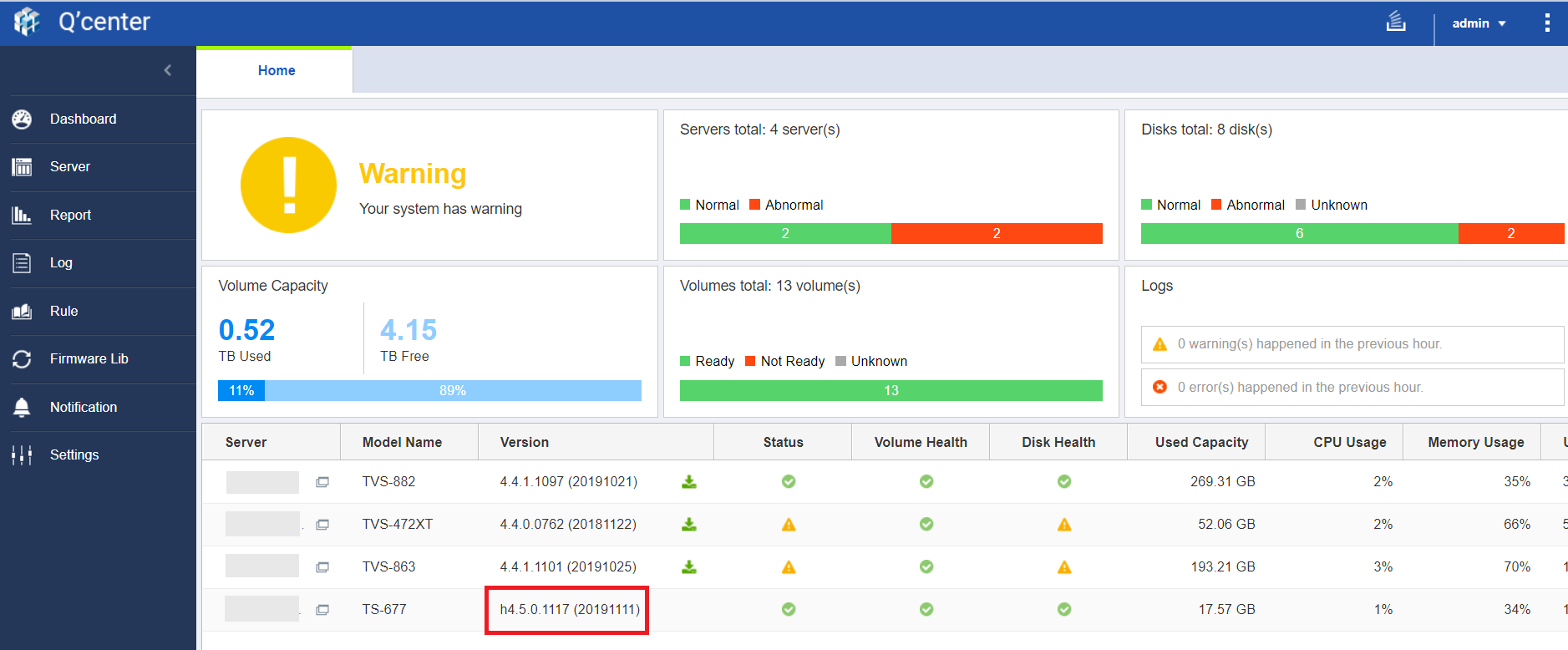

- On the Home screen, the Volume Capacity widget shows the total capacity of all QTS hero shared folders. QTS hero shared folders are treated as thin volumes, which means volume capacity might appear to be greater than storage pool capacity.

- On the detailed server information page (go to Server and click on the name of a NAS):
- General: QTS hero NAS devices have a version number starting with "h".

- Storage: The Volume Configuration widget shows QTS hero shared folders.
- Shared Folder: The Volume column shows the name of the QTS hero shared folder instead of a separate volume name.

- Capacity: On the detailed screens for Volume Capacity, Volume Utilization, and Volume Growth, the Name/Alias column shows the name of the QTS hero shared folder.

The Volume Capacity widget shows the total capacity of all QTS hero shared folders. QTS hero shared folders are treated as thin volumes, which means volume capacity might appear to be greater than storage pool capacity.

- Performance: The Volume/LUN IOPS, Volume/LUN Latency, and Volume/LUN Throughput widgets all show QTS hero shared folder performance.

- Report:
- Shared Folder Report: The Volume column shows the name of the QTS hero shared folder instead of a separate volume name.

- Volume Utilization Report: This report shows the utilization of QTS hero shared folders.

- Volume Capacity Report: This report shows capacity details of QTS hero shared folders.

- Volume Growth Report: This report shows data growth of QTS hero shared folders.

- Volume/LUN IOPS Report, Volume/LUN Latency Report, Volume/LUN Throughput Report: These reports show the performance of QTS hero shared folders.

- Shared Folder Report: The Volume column shows the name of the QTS hero shared folder instead of a separate volume name.
- General: QTS hero NAS devices have a version number starting with "h".


