


How do I schedule RAID scrubbing and avoid conflicts with NAS reboots?
Applicable Products
- QuTS hero
Overview
Storage pool scrubbing is a maintenance task that scans the file system of each RAID group in a storage pool to detect and automatically repair damaged data blocks in the ZFS file system. Scheduling pool scrubbing helps maintain data consistency and integrity. However, while scrubbing is running, the storage pool's read and write performance may be reduced. It is recommended to schedule pool scrubbing during periods of low NAS usage.
When storage pools are large or contain significant data, scrubbing tasks may take a long time to complete. If a scheduled system reboot or shutdown occurs during an active scrubbing task, the process will be interrupted and must be restarted from the beginning. Advanced scheduling features, such as excluding specific times or days, can help avoid conflicts with planned maintenance or reboots.
Procedure
Follow these steps to set up storage pool scrubbing with appropriate scheduling and exclusions. The example below demonstrates how to configure scrubbing for a scenario where:
- Business hours are Monday to Friday, 8:00–19:00.
- A scheduled system reboot occurs every Sunday early morning, 3:00.
- The largest storage pool requires approximately 30 hours to complete scrubbing.
- Scrubbing should run only once per month.
Step 1: Plan the monthly scrubbing schedule
- Scrubbing should not run during business hours (Mon–Fri, 8:00–19:00).
- Scrubbing must finish before the scheduled reboot (Sunday early morning).
- Choose a monthly window that allows uninterrupted completion (for example, the first Friday of each month, 20:00 to Sunday 3:00).
Step 2: Configure the monthly scrubbing schedule and exclude times
- Go to Storage & Snapshots > Storage > Storage/Snapshots.
- Click Settings or locate Storage Global Settings.
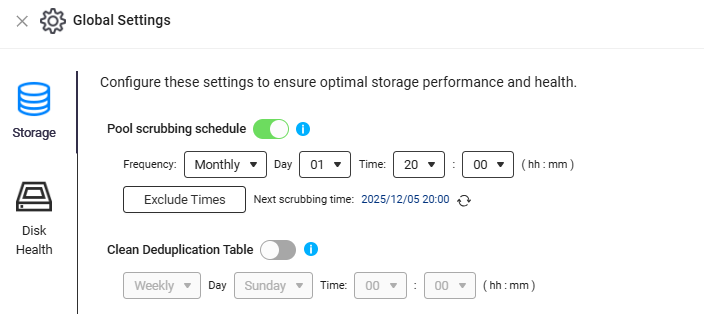
- Find the Pool Scrubbing Schedule setting.
- Set the schedule to run monthly, starting on the first Friday after business hours (for example, at 20:00).
- In Exclude Times, add:
- Monday to Friday, 8:00–19:00 (to avoid business hours)
- Sunday, 3:00 (to avoid the scheduled reboot window)
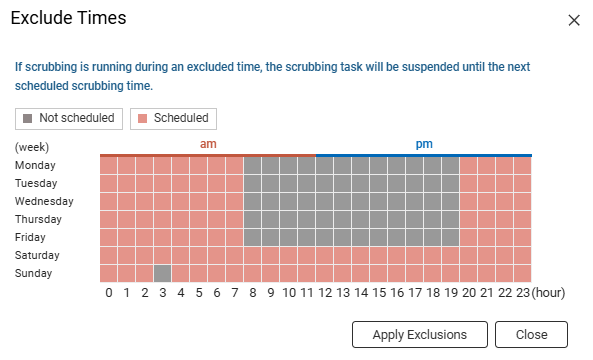
- Save your settings.
This configuration ensures monthly scrubbing completes before the scheduled reboot and does not impact business operations.
Note: The exact navigation and labels may vary slightly depending on your QuTS hero version.
Step 3: Monitor scrubbing progress
- In Storage & Snapshots, select the storage pool to view scrubbing status and progress.
- Check logs or notifications for completion or errors.
Recommendation
- Review and adjust the scrubbing schedule if your business hours or scrubbing duration changes.
- Use Exclude Times to prevent scrubbing during critical periods.
- Monitor scrubbing progress and check system logs for any interruptions or errors.
- If scrubbing is interrupted, manually restart the task as soon as possible to maintain data integrity.


