


What is Recovery Management in QVR Pro/Elite?
Last modified date:
2024-04-11
Applicable Products
- QVR Pro
- QVR Elite
Overview
Recovery Management is a tool provided in QVR Pro and QVR Elite that allows a camera to restore recordings from an internal SD card in case the network connection between the NAS and IP camera is interrupted. This article describes how to check the recovery status and provides basic troubleshooting if the video recovery is not successful.
Details
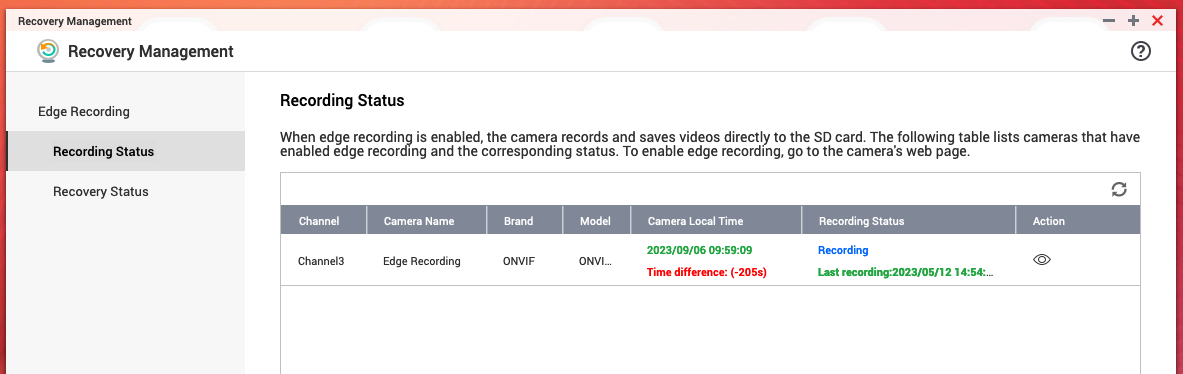
In Recovery Management, cameras used by QVR Pro/Elite with edge recording enabled are listed here. See the following instructions if a camera is not listed.
- Ensure that edge recording or SD card recording is enabled for the camera.
- Ensure that the camera profile in QVR Pro/Elite is set to ONVIF Profile T or ONVIF Profile S.
- Ensure that the camera supports ONVIF profile G for recovery. QVR Pro/Elite automatically detects this feature when the camera profile is set to S or T.
- Ensure that the stream is set to H.264 or H.265. Other stream formats, such as MJPEG, are not supported and will result in a failed recovery.
- When the camera brand is set to AXIS, its profile can only support recovery for H.264. Set the camera to ONVIF to support recovery for H.265.


