


How to Download the Debug Log from Container Station
Last modified date:
2026-07-09
Applicable Products
- All QNAP NAS running Container Station
- Container Station 3.0 and later
Details / Solution
When troubleshooting issues with Container Station, QNAP support may request a debug log to help diagnose the problem. You can download the debug report directly from within the application in just a few steps.
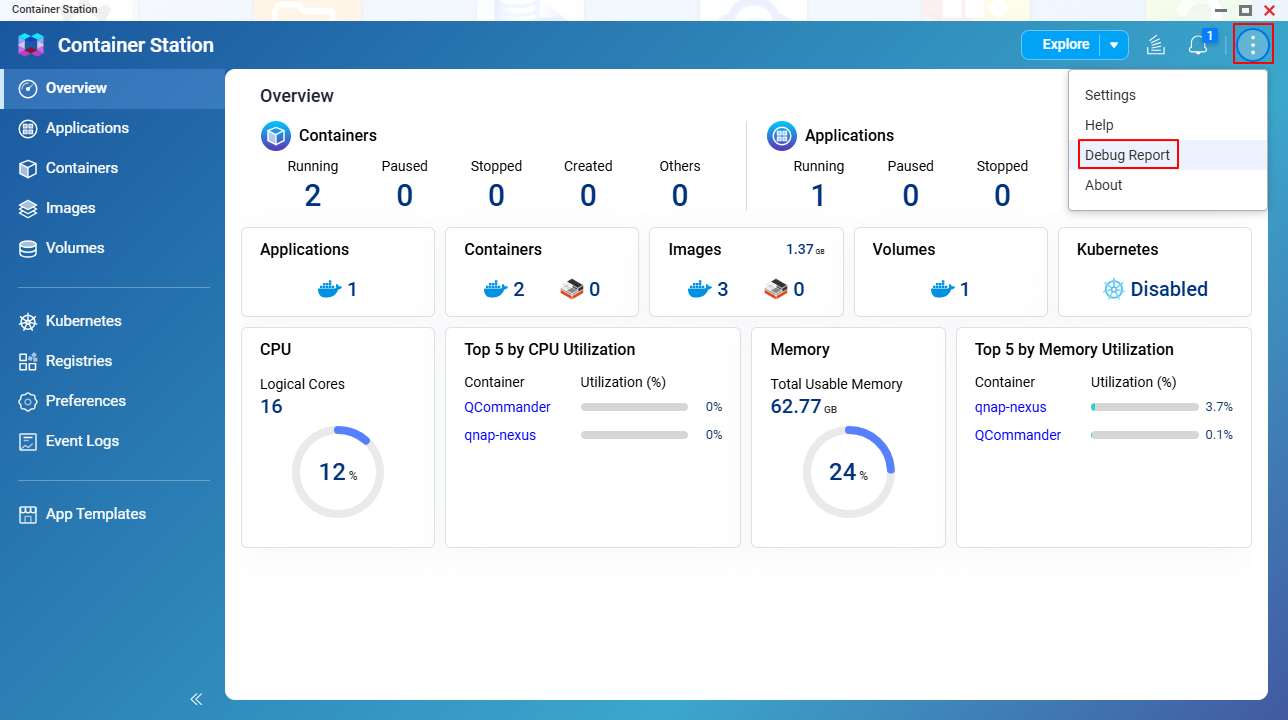
To download the debug log from Container Station:
- Open the Container Station application.
- Click the vertical 3-dot icon (⋮) in the upper-right corner.
- Select Debug Report.
The debug report will be downloaded to your local computer.
Note
Provide the downloaded debug report file to QNAP support when submitting a support ticket to help expedite troubleshooting.


