


How can I filter photos by multiple people in QuMagie?
Last modified date:
2026-03-12
Applicable Products
- QNAP NAS running QuMagie
Explanation
In QuMagie, you can filter photos by multiple people using either:
- AND logic: show only photos where all selected people appear together.
- OR logic: show photos where any of the selected people appear.
This behavior is controlled in the Conditional Search panel under the People section. Some users are not aware that the AND/OR logic can be changed there, which can cause confusion when filtering by multiple people.
Solution
Use Conditional Search to choose AND or OR logic
- Open QuMagie on your QNAP NAS.
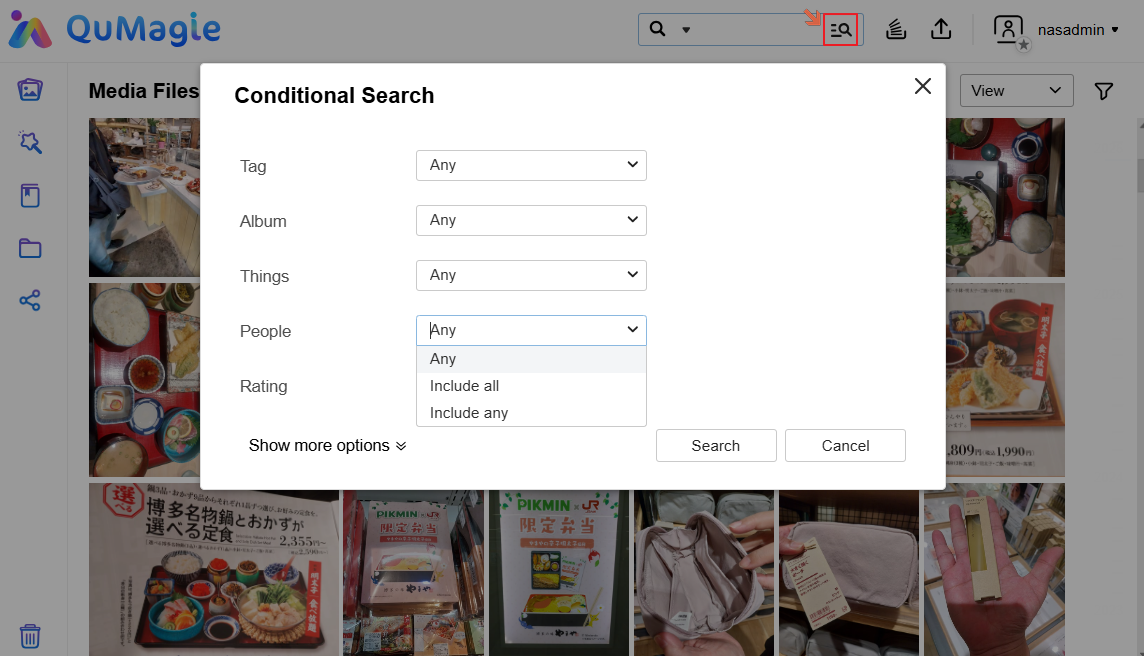
- Click the icon next to the search bar to open Conditional Search (the advanced search panel).
- In the People section, open the logic dropdown and choose:
- Include all: show photos where all selected people appear together (AND logic).
- Include any: show photos where at least one selected person appears (OR logic).
- Select the people you want to filter by.
- Review the results and confirm that they match your intended logic:
- With Include all, only photos where all selected people co-appear are shown.
- With Include any, photos containing any of the selected people are shown.
Reminder: Face recognition and tagging quality, as well as indexing status, can affect how complete your search results are. If some photos are missing, ensure that:
- Face recognition has finished processing.
- People are correctly tagged in QuMagie.


