


Cannot download a file to phone ; the message indicates Download folder quota limit exceeded
Last modified date:
2022-03-30
Applied models:
All NAS Series
Applied firmware:
All NAS firmware
Scenarios:
I have plenty of space in my phone but when I try to download a file from NAS to phone via Qfile / Qmusic / Qvideo, the message says “Download folder quota limit exceeded”.
Solution:
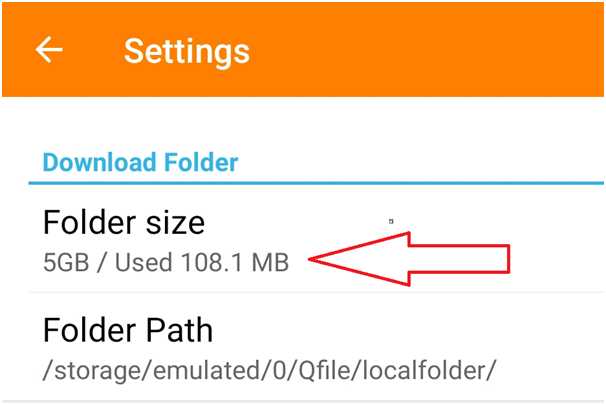
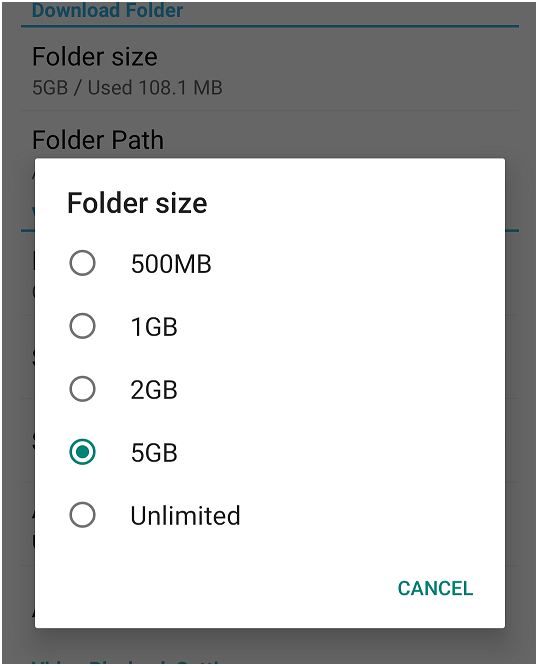
Please slide out the left panel in the APP > Settings > Download folder > Folder size and check if you have enough space set for downloading your files.
For further assistance, ask other users and QNAP experts in the community. Go to QNAP Community


