


How to bypass the “Your connection is not private” warning in Google Chrome during wireless projection in KoiMeeter?
Applicable Products
QTS 5.0.0 and later, QTS hero h5.0.0 and later, KoiMeeter (QTS), KoiBox-100W
Overview
Insight View is a browser-based interface built into KoiMeeter that uses HTTPS encryption to wirelessly sharing the screen of your local device with meeting attendees . When used in LAN environments, QNAP devices use self-signed certificates for browser applications like Insight View. These self-signed certificates trigger a warning from modern browsers.
Resolution
You can resolve this issue by typing thisisunsafe anywhere in the browser window. If the page doesn't load, you may need to refresh the browser and repeat this process.
Additionally, if you are using a macOS or iOS device, you can mirror the screen directly to a KoiBox-100W as long as both devices are connected to the same network.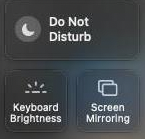
Further Reading
Daha fazla yardım için toplulukta diğer kullanıcılara ve QNAP uzmanlarına sorun. QNAP Topluluğuna Git


