Applicable Products
HDP for SaaS 2.4 or later
Starting from version 2.4, the product previously known as Boxafe has been renamed to HDP for SaaS.
HDP for SaaS license requirement
HDP for SaaS version 2.4 and later requires licenses for backing up and restoring data. To purchase and activate an HDP for SaaS license, follow the steps below:
Tip
Boxafe licenses purchased prior to version 2.4 are still valid for HDP for SaaS version 2.4 and later.
- Purchase an HDP for SaaS license from the QNAP Software Store.
- Activate the HDP for SaaS license in License Center on your NAS.
For details on activating licenses in License Center, see "Licenses > License activation" in the QTS User Guide or QuTS hero User Guide. - Confirm the purchased HDP for SaaS license for Microsoft 365 or Google Workspace.
- Log in to your NAS as an administrator.
- Open HDP for SaaS.
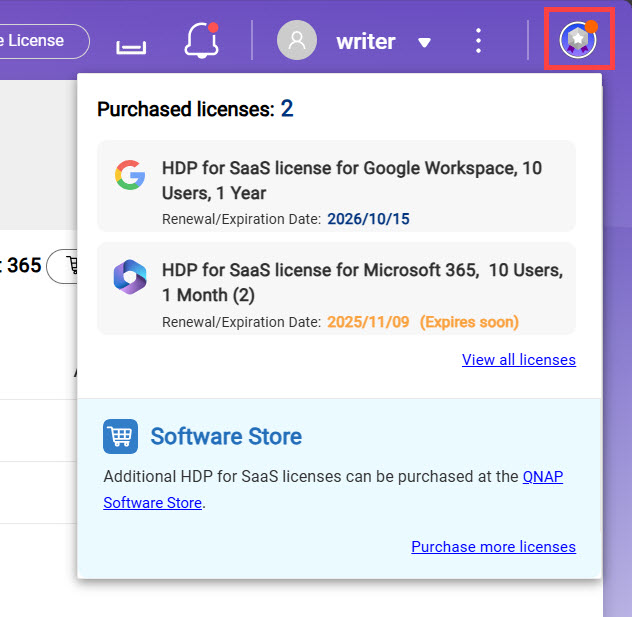
- Click the License Information icon on the top right corner to confirm your purchased HDP for SaaS license.

Assigning HDP for SaaS licenses
With the HDP for SaaS license activated and confirmed, perform the following steps to assign the license to domain users.
- Log in to your NAS as an administrator.
- Open HDP for SaaS.
- Click Domains on the left panel.

- Click
in the Action column. - Click the Users tab.
- Select all the user accounts associated with your domain.
- Click Actions to expand the context menu.

- Click Licenses.
- Click Assign.
The system assigns your HDP for SaaS license to the selected domain user accounts. You can now back up and restore domain data for these users.
Further Reading
HDP for SaaS Quick Start Guide
Why is HDP for SaaS not backing up data after a high availability (HA) switchover?
적용되는 제품
HDP for SaaS 2.4 이상
버전 2.4부터 이전에 Boxafe로 알려졌던 제품이 HDP for SaaS로 이름이 변경되었습니다.
HDP for SaaS 라이선스요구 사항
HDP for SaaS 버전 2.4 이상은 데이터 백업 및 복원을 위해라이선스가 필요합니다. HDP for SaaS 라이선스를 구매하고 활성화하려면 아래 단계를 따르십시오:
팁
버전 2.4 이전에 구매한 Boxafe 라이선스는 HDP for SaaS 버전 2.4 이상에서도 여전히 유효합니다.
- QNAP Software Store에서 HDP for SaaS 라이선스를 구매합니다.
- NAS의라이선스 Center에서 HDP for SaaS 라이선스를 활성화합니다.
라이선스 Center에서라이선스를 활성화하는 방법에 대한 자세한 내용은QTS 사용 설명서또는QuTS hero 사용 설명서의 "라이선스 > 라이선스활성화"를 참조하십시오. - Microsoft 365 또는 Google Workspace용으로 구매한 HDP for SaaS 라이선스를 확인합니다.
- NAS에관리자로 로그인합니다.
- HDP for SaaS를 엽니다.
- 구매한 HDP for SaaS 라이선스를 확인하기 위해 오른쪽 상단의라이선스정보아이콘을 클릭합니다.
HDP for SaaS 라이선스할당
HDP for SaaS 라이선스가 활성화되고 확인되면, 도메인 사용자에게라이선스를 할당하기 위해 다음 단계를 수행합니다.
- NAS에관리자로 로그인합니다.
- HDP for SaaS를 엽니다.
- 왼쪽 패널에서Domains 을 클릭합니다.
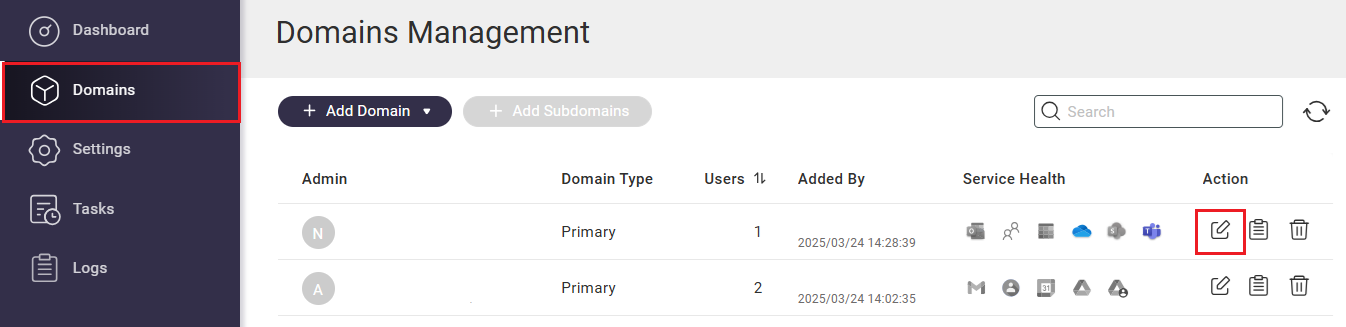
- 클릭
에서작업 열. - 클릭합니다 사용자 탭.
- 도메인과 연결된 모든 사용자 계정을 선택합니다.
- 클릭하여작업 컨텍스트 메뉴를 확장합니다.
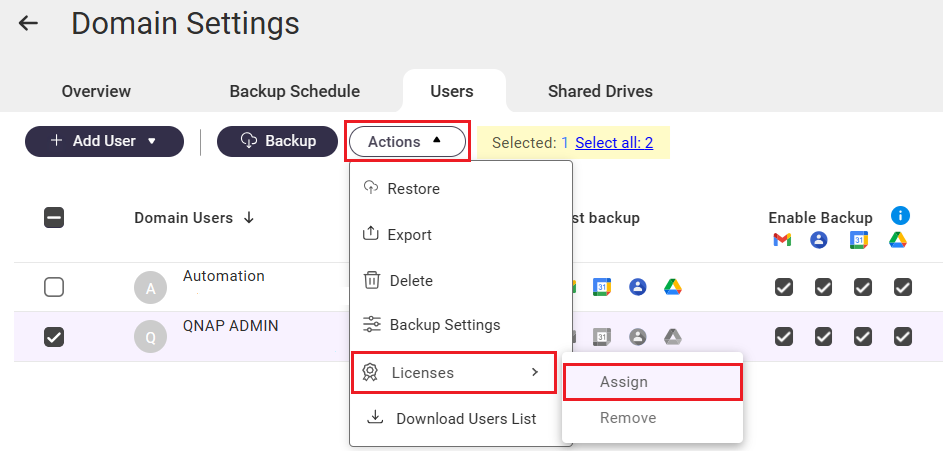
- 클릭합니다 라이선스.
- 클릭합니다 할당.
시스템이 선택한 도메인 사용자 계정에 SaaS 라이선스용 HDP를 할당합니다. 이제 이러한 사용자의 도메인 데이터를 백업하고 복원할 수 있습니다.
추가 읽기
SaaS용 HDP 빠른 시작 가이드
고가용성 (HA) 전환 후 SaaS용 HDP가 데이터를 백업하지 않는 이유는 무엇입니까?