Applicable Products
Overview
Port breakout enables you to split a high-speed QSFP port into multiple lower-speed interfaces, increasing flexibility and port utilization on your QNAP switch. The most common use case is breaking out a QSFP28 100GbE port into four independent 25GbE interfaces using a breakout cable and compatible SFP28 modules.
The QNAP M7308R-4X also supports breaking out a QSFP+ 40GbE port into four 10GbE interfaces with SFP+ modules and the appropriate breakout cable.
Note: A breakout cable is a special cable that allows a single high-speed port to function as several independent, lower-speed ports, often called "sub-interfaces."
Important: Configuring or changing breakout modes may interrupt data traffic. If your switch is in production use, consider performing these operations during scheduled downtime.
Procedure: Configuring 100GbE to 4x25GbE breakout
- Log in to the switch management interface.
- Go to System > Port Management > Port Breakout Configuration.
- Select the QSFP28 100GbE port you want to break out.
- Enable breakout mode and select 4x25GbE as the breakout option.
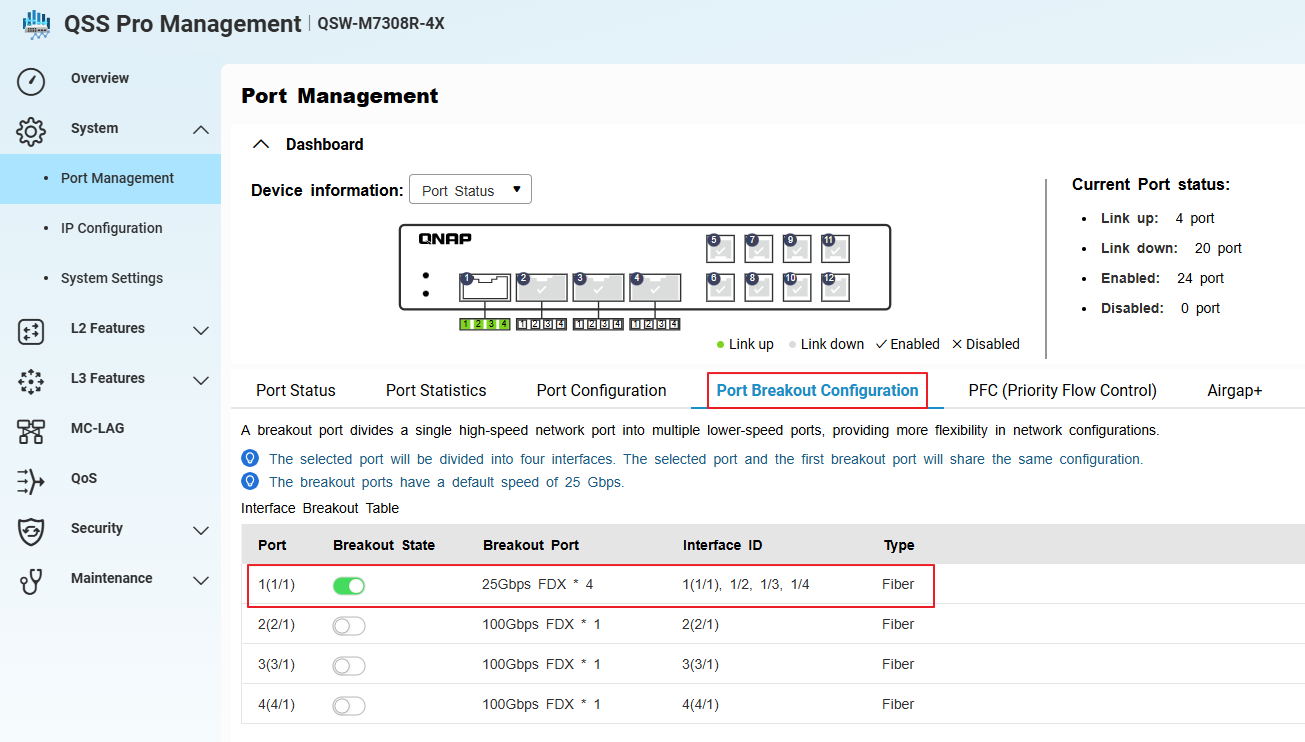
- Go to System > Port Management > Port Configuration.
- Confirm that the system has created four sub-interfaces (virtual ports) for the selected port, each operating at 25GbE.
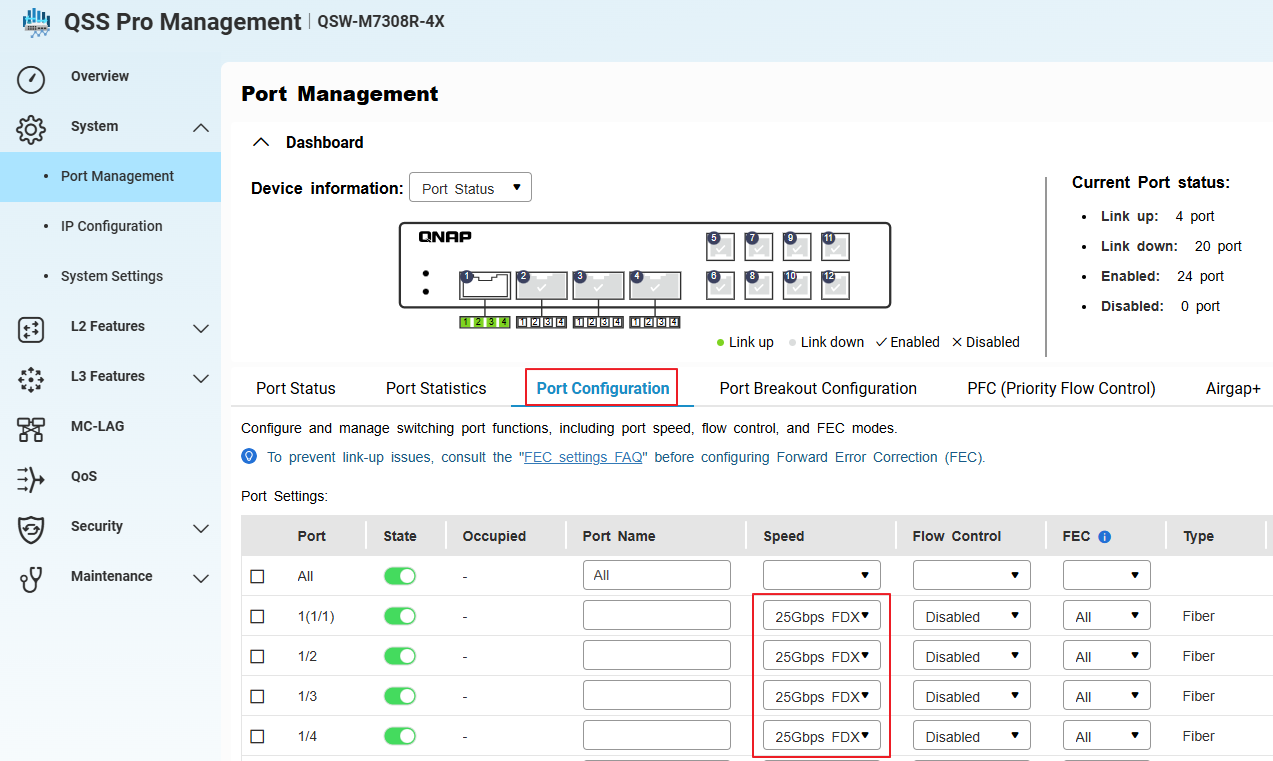
- Install compatible SFP28 modules and connect the 100GbE-to-4x25GbE breakout cable to the QSFP28 port.
- Apply and save the configuration.
Each breakout port will now function as an independent 25GbE interface. Make sure all connected devices, cables, and modules support 25GbE operation.
Procedure: Configuring 40GbE to 4x10GbE breakout or switching from 100GbE to 40GbE breakout
- Physically disconnect any existing 100GbE breakout cable and SFP28 modules from the QSFP28 port. (if any)
- Install a compatible QSFP+ 40GbE breakout cable and SFP+ modules for each intended 10GbE sub-interface.
- In the switch management interface, go to System > Port Management > Port Breakout Configuration.
- Select the same QSFP port (now using a 40GbE cable and modules).
- Enable breakout mode.
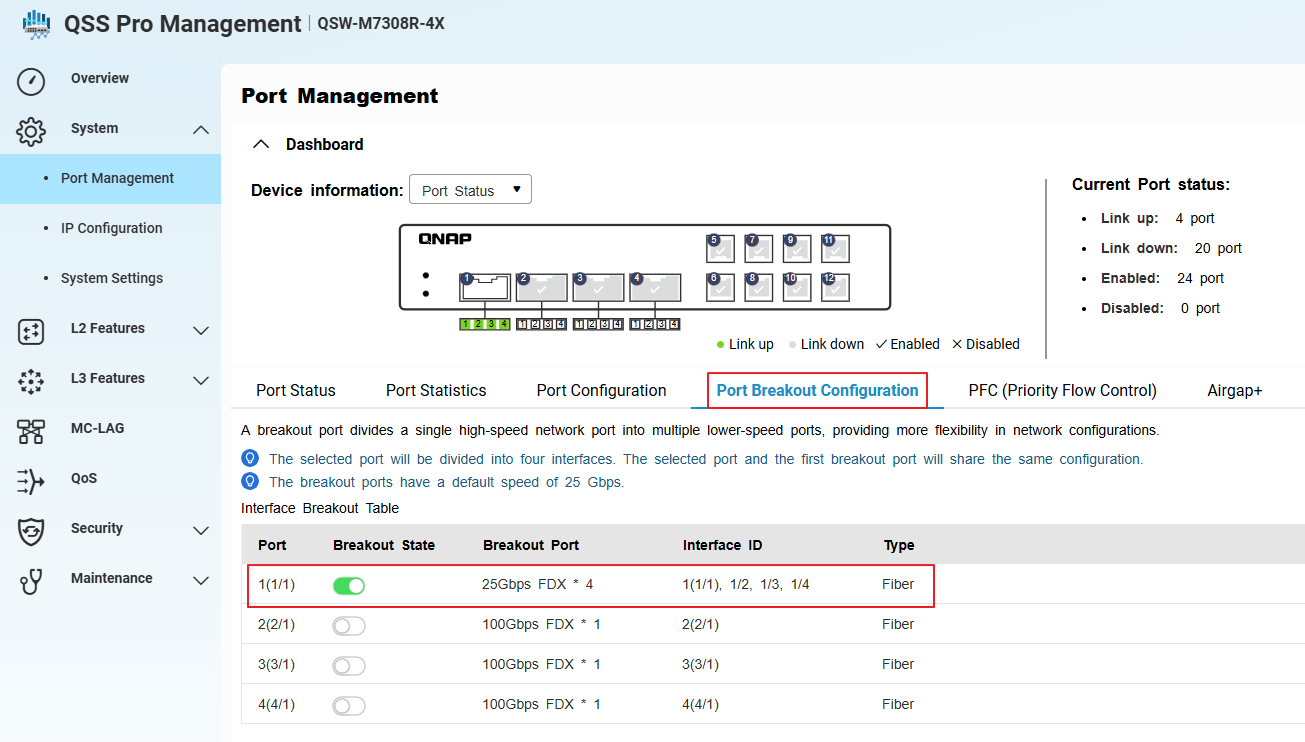
- Go to System > Port Management > Port Configuration.
- Confirm that the system has created four sub-interfaces (virtual ports) for the selected port, each operating at 10GbE.
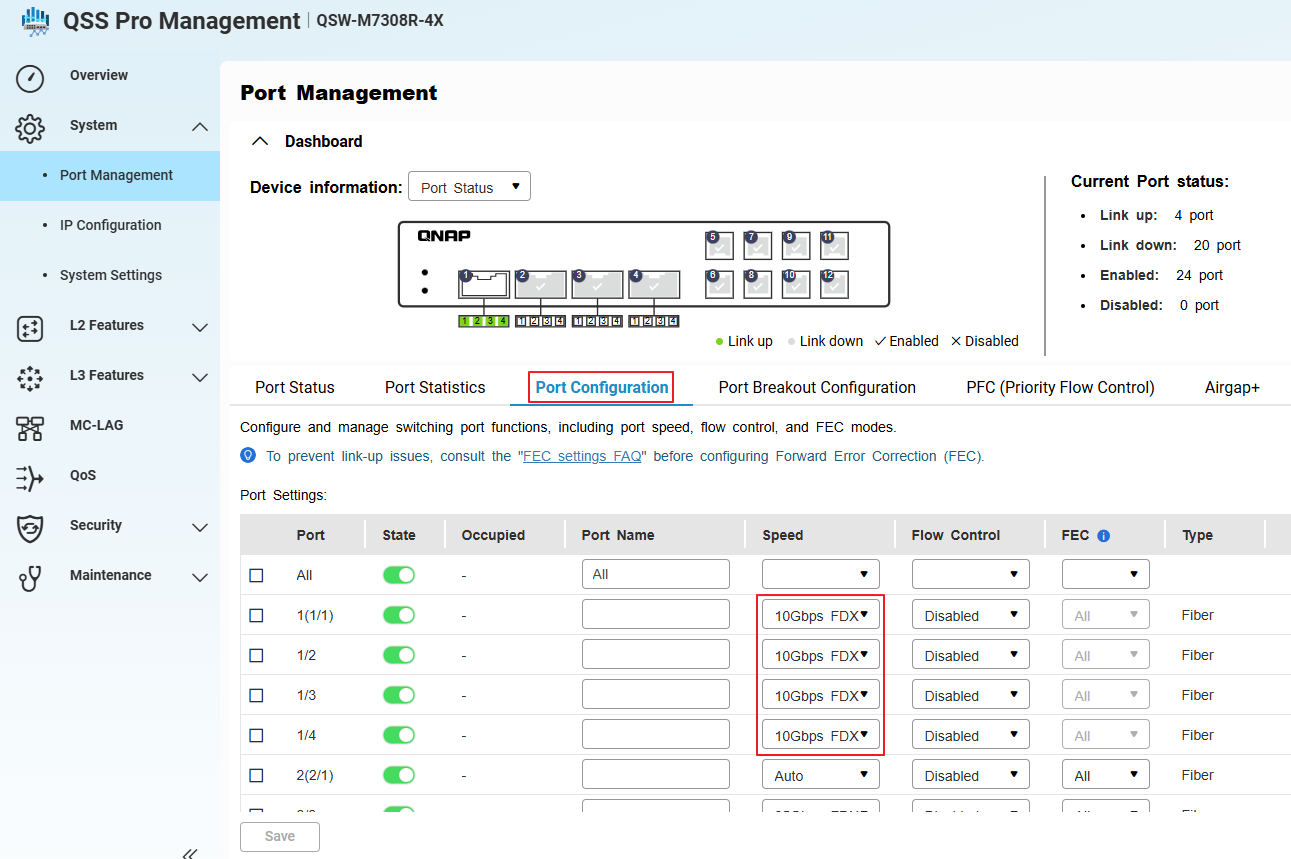
- Apply and save the configuration.
When switching from a 100GbE to 40GbE breakout, always physically replace the cables and modules before reconfiguring in the management interface.
Tip: Verify that all connected devices support 10GbE speeds.
적용되는 제품
개요
포트 브레이크아웃은 고속 QSFP 포트를 여러 저속 인터페이스로 분할하여 QNAP 스위치의 유연성과 포트 활용도를 높입니다. 가장 일반적인 사용 사례는 브레이크아웃 케이블과 호환되는 SFP28 모듈을 사용하여 QSFP28 100GbE 포트를 네 개의 독립적인 25GbE 인터페이스로 분할하는 것입니다.
QNAP M7308R-4X는 또한 QSFP+ 40GbE 포트를 네 개의 10GbE 인터페이스로 SFP+ 모듈과 적절한 브레이크아웃 케이블을 사용하여 분할하는 것을 지원합니다.
참고:브레이크아웃 케이블은 단일 고속 포트가 여러 독립적인 저속 포트로 기능할 수 있도록 하는 특수 케이블로, 종종 "서브 인터페이스"라고 불립니다.
중요: 브레이크아웃 모드를 구성하거나 변경하면 데이터 트래픽이 중단될 수 있습니다. 스위치가 생산 중인 경우, 이러한 작업을 예정된 다운타임 동안 수행하는 것을 고려하십시오.
절차: 100GbE를 4x25GbE 브레이크아웃으로 구성
- 스위치 관리 인터페이스에 로그인합니다.
- 이동: 시스템 > 포트 관리 > 포트 브레이크아웃 구성
- 선택: QSFP28 100GbE 분할하려는 포트
- 브레이크아웃 모드를 활성화하고4x25GbE를 브레이크아웃 옵션으로 선택합니다.
- 이동: 시스템 > 포트 관리 > 포트 구성
- 시스템이 선택한 포트에 대해 네 개의 서브 인터페이스(가상 포트)를 생성했으며 각각이 25GbE로 작동하는지 확인합니다.
- 호환 가능한 설치: SFP28모듈을 설치하고 100GbE-to-4x25GbE 브레이크아웃 케이블을 QSFP28 포트에 연결합니다.
- 구성을 적용하고 저장합니다.
각 브레이크아웃 포트는 이제 독립적인 25GbE 인터페이스로 작동합니다. 연결된 모든 장치, 케이블 및 모듈이 25GbE 작동을 지원하는지 확인하십시오.
절차: 40GbE를 4x10GbE 브레이크아웃으로 구성하거나 100GbE에서 40GbE 브레이크아웃으로 전환
- 기존의 100GbE 브레이크아웃 케이블과 SFP28 모듈을 QSFP28 포트에서 물리적으로 분리합니다. (있는 경우)
- 호환 가능한 설치QSFP+ 40GbE브레이크아웃 케이블 및SFP+모듈을 각 의도된 10GbE 하위 인터페이스에 설치합니다.
- 스위치 관리 인터페이스에서 이동합니다시스템 > 포트 관리 > 포트 브레이크아웃 구성.
- 동일한 QSFP 포트를 선택합니다 (이제 40GbE 케이블과 모듈을 사용 중).
- 브레이크아웃 모드를 활성화합니다.
- 이동합니다시스템 > 포트 관리 > 포트 구성.
- 시스템이 선택한 포트에 대해 10GbE로 작동하는 네 개의 하위 인터페이스(가상 포트)를 생성했음을 확인합니다.
- 구성을 적용하고 저장합니다.
100GbE에서 40GbE 브레이크아웃으로 전환할 때는 항상 관리 인터페이스에서 재구성하기 전에 케이블과 모듈을 물리적으로 교체하십시오.
팁:연결된 모든 장치가 10GbE 속도를 지원하는지 확인하십시오.


