


Get licenses for advanced features from our Software Store.
Upgrade RAM Memory for QNAP NAS
QNAP provides a 2GB DDR3* RAM module and a 4GB DDR3 ECC** RAM module (optional purchase) for you to upgrade the memory of the NAS. You may insert an extra RAM module on the motherboard of the NAS to upgrade the memory. The total memory will be shown in "System Information" of the administration page.
Please follow the steps below for the RAM module installation:
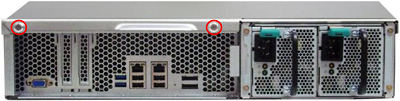
1. Loosen the 2 screws on the rear of the NAS as shown in the illustration.
2. Hold the notch at the edge of the top cover. Remove the top cover in both hands.

3. Release the ejector clips gently by pulling them out of the sides of the RAM slot.
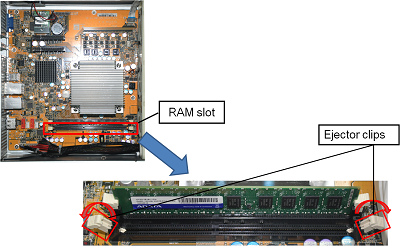
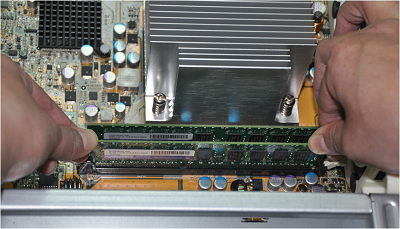
4. Grasp the edge of the RAM module. Align the notch on the gold edge of the RAM module with the notch in the RAM slot. Insert the RAM module to the RAM slot until it cannot go any further.
Applied models:
*Applied models: TS-879U-RP, TS-1279U-RP
**Applied models: TS-EC879U-RP, TS-EC1279U-RP
Download Installation Guide 

