


How do I configure port forwarding in QHora-301W?
Last modified date:
2023-01-03
Aplicable Products:
- QHora-301W
- Port Forwarding
In QHora-301W, you need to set up a Custom Service before configure port forwarding.
Follow the procedures below.
-
Login QHora-301W as admin
-
Find Service Port Management
-
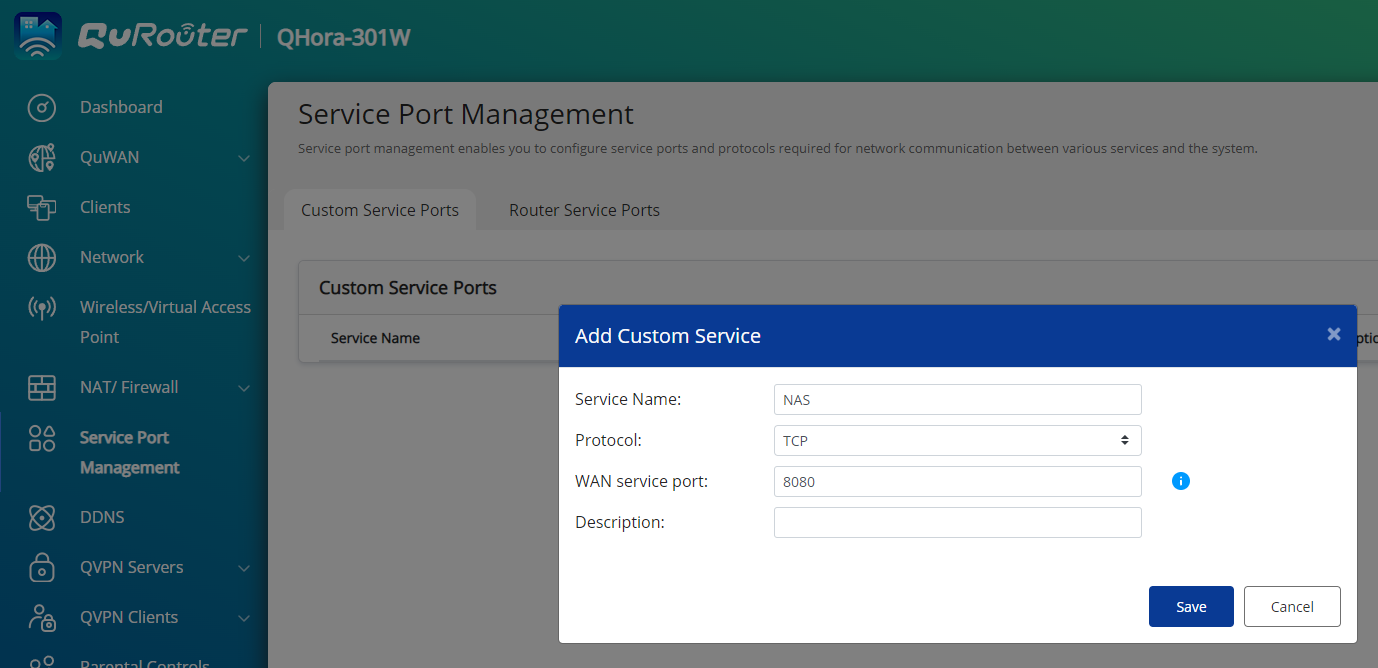
Click on Create Custom Services and complete the following information
- Service name : Give the service a name (for instance: NAS)
- Protocol : Choose the protocol (for instance: TCP )
- WAN service port : Fill in the port number (for instance: 8080 )
-
Save the setting
-
-
Find NAT/Firewall > NAT > Port Forwarding
-
Click on Add Rule and complete the following information
- WAN service port: Choose created Custom Service (for instance: NAS (TCP 8080) )
- WAN port: Choose the physical WAN interface (for instance: 1GbE WAN Port 1)
- Host IP address: The IP address which the server is located at (for instance: 192.168.100.2)
- LAN service port: The Port number which the server listens to (for instance: 8080)
- Allow Remote IPs: The IP address allows to connect to the server (for instance: leave blank)
-
Apply the setting
-


