How to expand storage pool in QES NAS
The procedure of expanding the pool on a NAS running QES system is different from those using QTS system. You can only expand the pool by adding a new RAID group. You cannot expand the pool by adding new disks into existing pool. Please note that the new RAID group will use stripe to expand the storage pool.
To avoid data loss in the event of RAID group failing, please ensure you have a proper backup plan.
-
To expand storage pool in QES NAS, please follow these steps below:
-
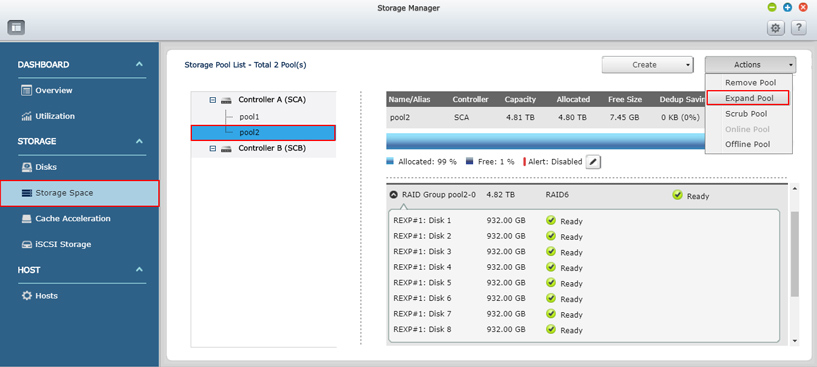
Go to Storage Manager > Storage space page and select the pool you want to expand.
-
Select Expand Pool in Actions menu to start the pool expansion.
-
Select these options to expand pool.
Enclosure Unit: You are allowed to select disks in the NAS or expansion enclosure.
Disks Lists: There is a minimum disks required for selecting disks to expand the pool.
It depends on the RAID type of original storage pool. For example:
To expand a RAID 1 pool, you need to select at least 2 disks.
To expand a RAID 5 pool, you need to select at least 3 disks.
To expand a RAID 6 pool, you need to select at least 5 disks.
To expand a RAID TP pool, you need to select at least 8 disks.
Click on the Expand button.

Click OK to confirm.

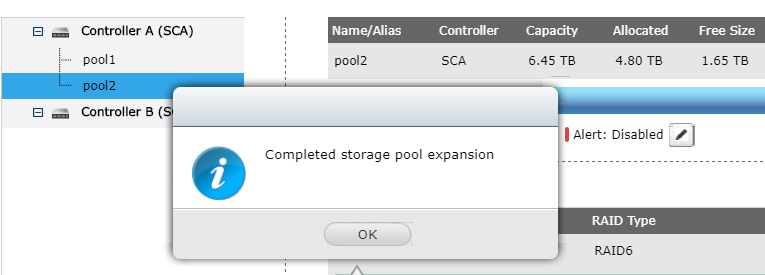
The storage pool expansion is now done.