


How to configure Hikvision camera on QVR Pro or QVR Elite
Date de la dernière modification :
2024-03-18
Applicable Products:
- QVR Pro / QVR Elite
Solution:
If your Hikvision camera is not on QNAP's camera compatibility list, you can try setting it up with the following brand and model on QVR Pro / QVR Elite:
https://www.qnap.com/en/compatibility-qvr-pro
https://www.qnap.com/en/compatibility-camera/
- ONVIF / ONVIF ProfileS Cameras model.
Please note that Hikvision cameras must first enable the ONVIF function from the settings and create an ONVIF account. For information on how to enable the ONVIF function on Hikvision cameras, please refer to the Hikvision technical documentation.
How-to-Enable-ONVIF-Protocol-on-IP-Camera.pdf (hikvision.com)
- Generic Model / Generic RTSP.

- Hikvision / Generic model.
Note: Some Hikvision cameras may not be compatible with this model. If setup is not successful, please use “ONVIF ProfileS Cameras” or “Generic RTSP” model instead.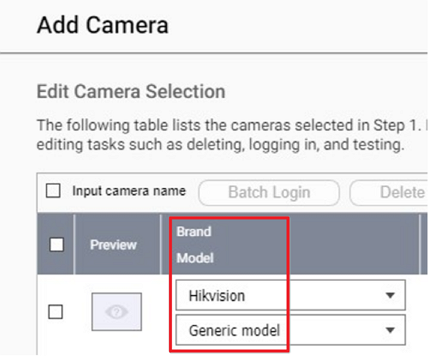
Est-ce que cet article a été utile ?
58% des utilisateurs pensent que ces informations sont utiles.
Pour obtenir de l'aide supplémentaire, posez votre question aux autres utilisateurs et aux experts QNAP dans la communauté. Accéder à la communauté QNAP


