


Why I can not set L2TP UPnP port forwarding in the Qhora-301W
Date de la dernière modification :
2022-06-24
Applicable Products:
- QHora-301W
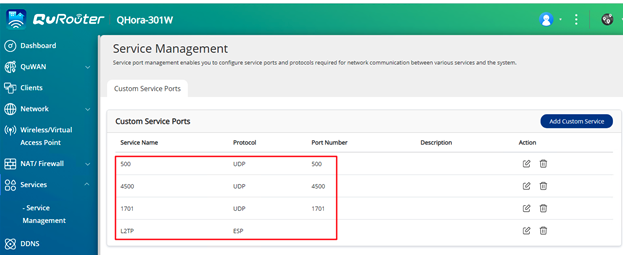
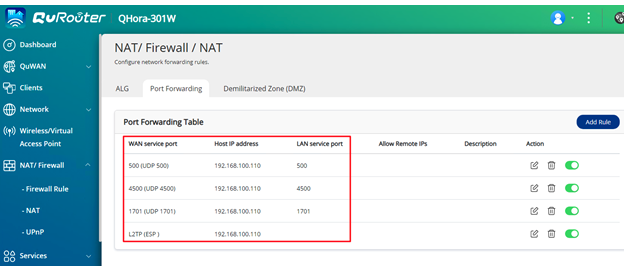
The Qhora-301W is not able to forward ESP packet in UPnP service, you will need to set service and port forwarding setting in Qhora-301W QuRouter UI with the following steps:
- Make sure the Qhora-301W router didn’t enable L2TP server in QVPN servers > QVPN settings page.
- Go to Services > Service Management to add 4 service UDP 500,UDP 4500,UDP 1701,ESP

- Go to NAT/Firewall > NAT > Port forwarding page add 4 rule for L2TP VPN server, the Host IP address set internal L2TP server IP address.

Est-ce que cet article a été utile ?
67% des utilisateurs pensent que ces informations sont utiles.
Pour obtenir de l'aide supplémentaire, posez votre question aux autres utilisateurs et aux experts QNAP dans la communauté. Accéder à la communauté QNAP


