 |
| |
The True Cost of Data Disasters– Why Backup Matters
|
|
|
| |
Data Breach Costs:
$4.45M
Average cost of a data breach (IBM 2023)
|
Ransomware Recovery:
$1.85M
Average cost to recover from a ransomware attack (Sophos 2023)
|
Downtime Expenses:
$100K – $1M
Cost of unplanned downtime per hour (Gartner)
|
|
|
|
| |
Data disasters can cripple businesses, leading to severe financial losses, operational disruptions, and potential legal or regulatory consequences. Whether caused by cyberattacks, hardware failures, human errors, or natural disasters, the impact of data loss can be devastating. Without a robust backup and disaster recovery plan in place, companies risk prolonged downtime, loss of critical information, and reputational damage.
QNAP's comprehensive Backup & Disaster Recovery strategies provide a multi-layered approach to safeguarding enterprise data, ensuring seamless recovery, minimal business disruption, and long-term data integrity. Don't wait for disaster to strike—take proactive steps to secure your data and maintain business continuity with QNAP.
|
|
| |
Learn More
|
|
|
| |
|
Strategy 1:
|
3-2-1-1-0 Backup Rule |
|
|
| |
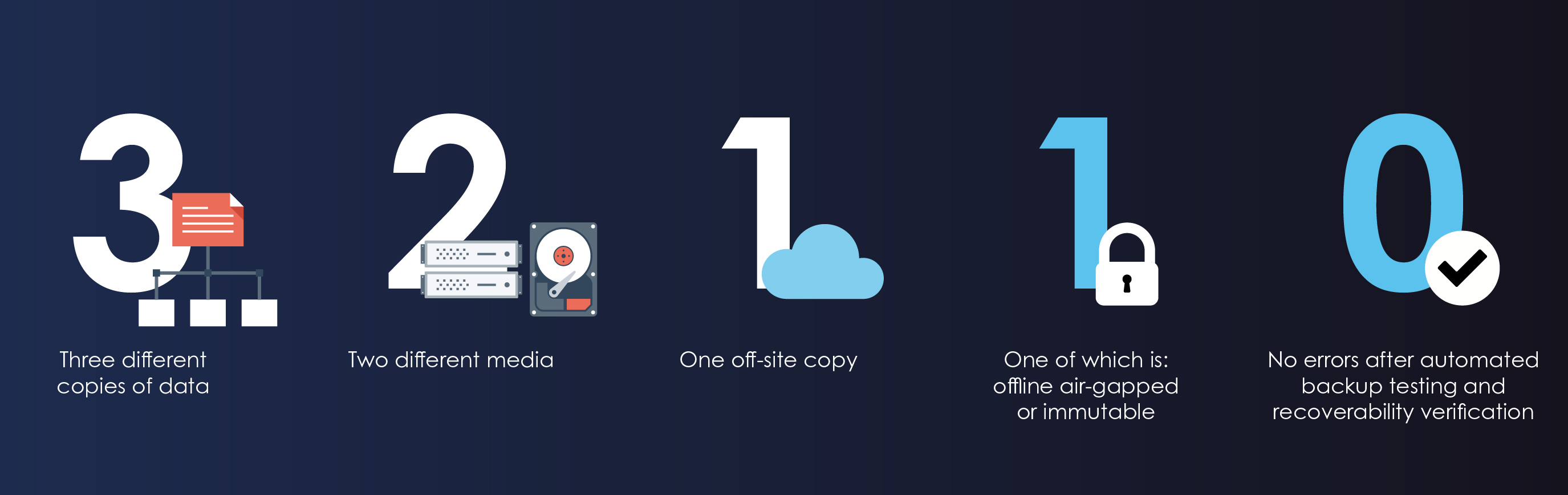
The 3-2-1-1-0 strategy ensures maximum data protection by reducing risks from hardware failures, cyber threats, and disasters. Here's why it matters:
-
➤
3 copies – Redundancy prevents data loss.
-
➤
2 storage types – Protects against hardware failure.
-
➤
1 offsite copy – Ensures disaster recovery.
-
➤
1 immutable/air-gapped backup – Shields against ransomware.
-
➤
0 errors – Verified backups ensure reliable recovery.
|
|
| |
 |
|
| |
Learn More
|
|
|
| |
|
Strategy 2:
|
Snapshot Protection |
|
|
| |
Snapshots provide an instant, tamper-proof backup to protect against ransomware, accidental deletion, and system failures. Here's why they're essential:
|
|
| |
 |
Volume and LUN snapshots
Protect your NAS folders, files, and iSCSI LUNs.
|
 |
Block-based snapshots
Supports incremental backups that save space by only copying modified data.
|
 |
Versioning
Regularly create snapshots to lower the risk of data loss.
|
 |
Restore in a click
Revert the entire volume/LUN or only restore specified files and folders.
|
|
|
| |
Learn More
|
|
|
| |
|
|
| |
Snapshots provide an instant, tamper-proof backup to protect against ransomware, accidental deletion, and system failures. Here's why they're essential:
|
|
| |
 |
|
| |
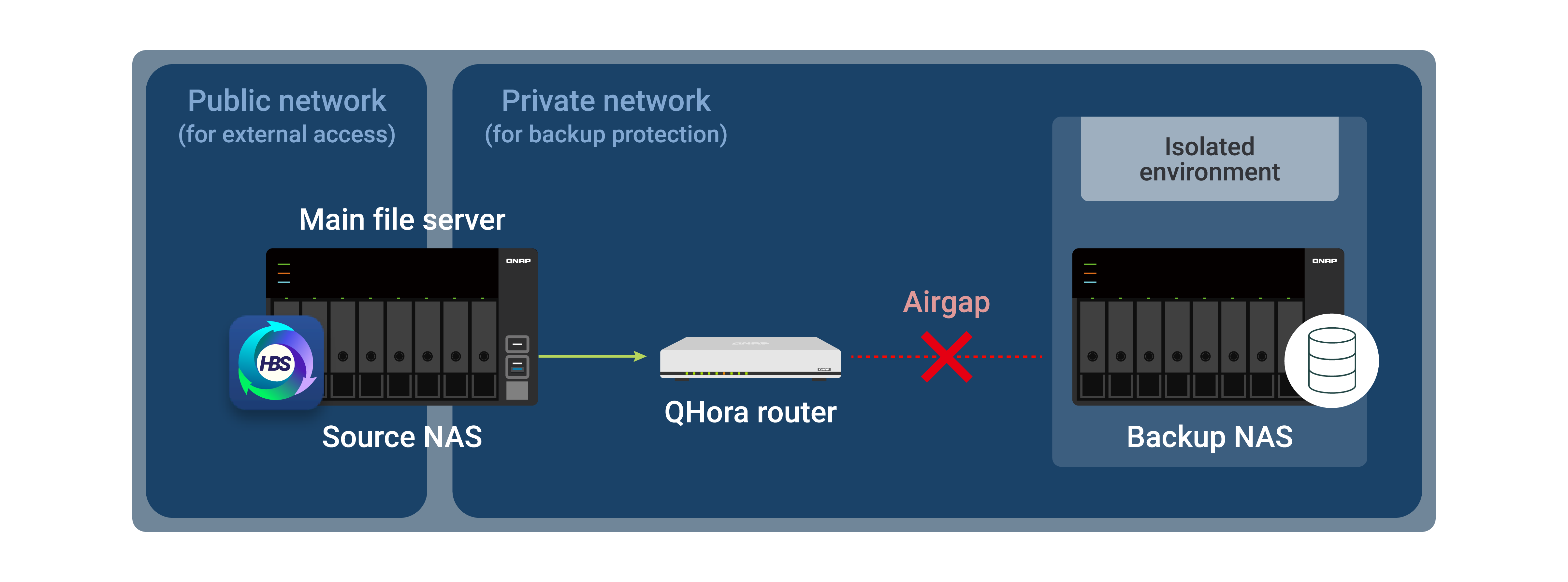
Key Benefits of Airgap+:
-
✔
Enhanced Data Security: By isolating backup storage from the network when not in use, Airgap+ significantly reduces the risk of cyberattacks, including ransomware.
-
✔
High-Speed Backup and Recovery: Leveraging QNAP NAS's support for 10/25/100GbE connections, Airgap+ facilitates rapid data backup and restoration, minimizing downtime.
-
✔
Data Immutability: With the ZFS-based QuTS hero operating system, Airgap+ ensures that once data is written, it cannot be altered or deleted, safeguarding the integrity of your backups against ransomware or human error.
-
✔
Simplified Maintenance: Unlike traditional LTO tape backups, Airgap+ requires no additional hardware or cabling, reducing maintenance complexity. QNAP Hybrid Backup Sync (HBS 3) + myQNAPcloud Storage make cloud integration seamless.
|
|
| |
Learn More
|
|
|
| |
|
|
Secure Your Data with QNAP’s Advanced Backup Strategies |
|
|
| |
Data loss is not an option in today's digital world. By implementing QNAP's 3-2-1-1-0 Backup, Snapshots, and Airgap+, you ensure multi-layered protection against cyber threats, accidental deletions, and system failures.
|
|
| |
|
Backup Strategy |
Description |
|
3-2-1-1-0 Backup |
A foolproof strategy for redundancy and disaster recovery. |
|
Snapshots |
Instant, immutable protection against ransomware and data loss. |
|
Airgap+ |
Isolates your backups to prevent unauthorized access and cyberattacks. |
|
|
| |
Don't wait for a disaster—protect your data now!
|
|
|
|
|
|
|
|
|
| Copyright © 2025 QNAP Inc. All rights reserved. |
|