


Why do I see the warning "The specified capacity has exceeded the maximum allowable capacity (XX TB)"
Applicable Products:
- Storage & Snapshots
If you found that you couldn't expand the static volume but receiving "The specified capacity has exceeded the maximum allowable capacity (xx TB)" after clicking Expand Capacity..

The reason is that your new RAID size may exceed the maximum capacity fixed by Bytes per inode.
You could confirm the maximum volume size and Bytes per inode of the existing volume by hovering the mouse over the “Capacity” column in Storage & Snapshots > Storage/Snapshots, as per the screenshot below.
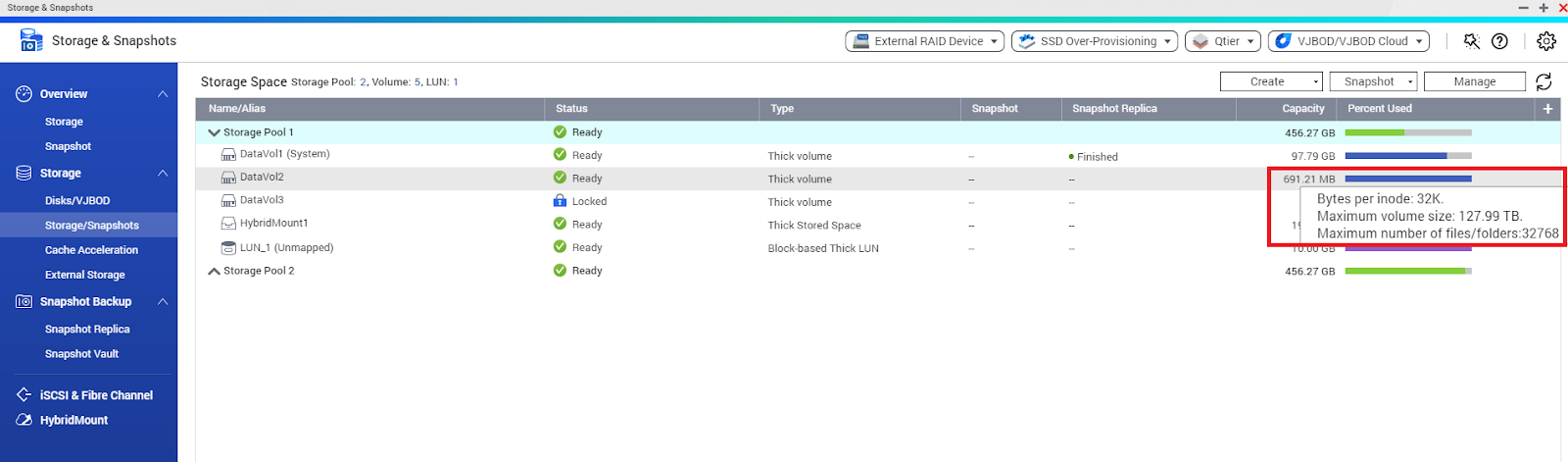
It is not possible to change the Bytes per inode after the single volume creation, in this case if you want to have a larger volume size, you need to backup your data externally and recreate the Static Volume selecting another “Bytes per inode”. Please note that the more volume size comes with the less numbers of files/folders.
| Bytes per Inode | Max. Size of Volume | Max. Number of files/folders |
|---|---|---|
| 4096 / 4K | 15.99 TB | 12M |
| 8192 / 8K | 31.99 TB | 6M |
| 16384 / 16K | 63.99 TB | 3M |
| 32768 / 32K | 127.99 TB | 1M |
| 65536 / 64K | 250 TB | 799K |


