How to disable IPv6 on my NAS
Last modified date:
2025-09-11
Applicable Products
QNAP NAS (QTS / QuTS hero)
Solution
Disabling IPv6 on a network interface
- Log in to the QTS or QuTS hero web interface using an administrator account.
- Go to Network & Virtual Switch → Network → Interfaces.
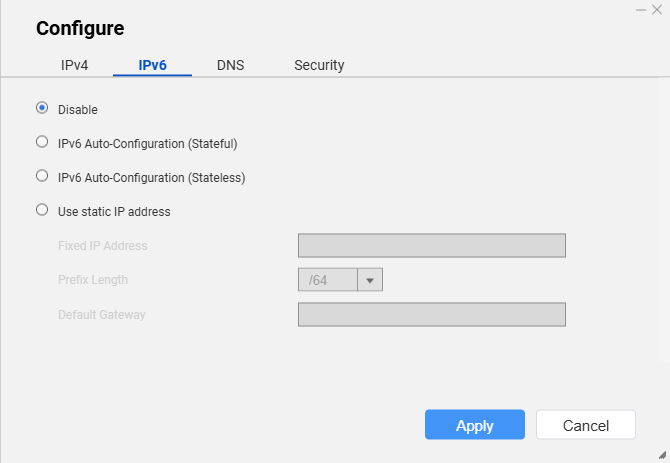
- Select the network adapter (e.g., Adapter 1), then click Configure.
- Go to the IPv6 tab, select Disable, and click Apply.
- Repeat these steps for any other interfaces where you want to disable IPv6.
Disabling IPv6 on a Virtual Switch
If a physical network interface card (NIC) is attached to a virtual switch, configure IPv6 on the Virtual Switch rather than on the individual NIC.
- Log in to the QTS or QuTS hero web interface using an administrator account.
- Go to Network & Virtual Switch → Network → Virtual Switch.
- Select the target Virtual Switch and click Configure.
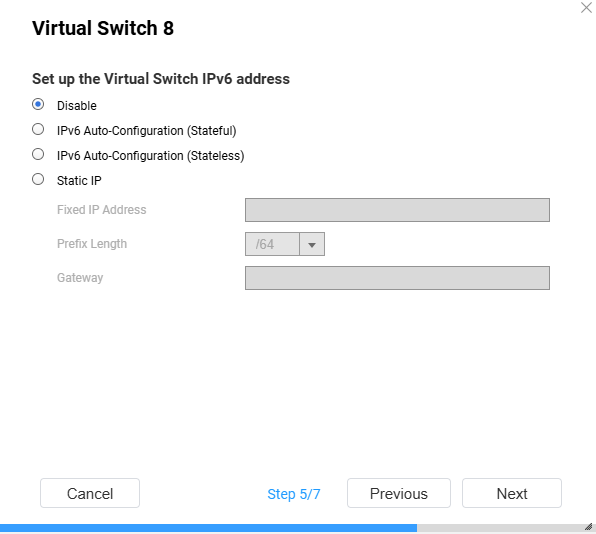
- In the setup wizard (step 5 of 7), set the IPv6 address to Disable, then click Apply.
- Repeat for any other virtual switches where you want to disable IPv6.