


How do I enable loop protection on a managed switch?
Applicable Products
- QSW-M408-2C
- QSW-M408-4C
- QSW-M408S
- QSW-M1208-8C
- QSW-M1204-4C
- QSW-M804-4C
- QSW-IM1200-8C
Overview
The loop protection feature detects and avoids network loop formations in layer 2, where the network has more than one active data path from the same source to the same target device. This results in repeated information transmission, causing network degradation.
When loop protection is enabled on a port, the system blocks the repeated data from being transmitted in the data path by blocking the port. When a loop is detected, the port shutdowns for a specific period that can be specified by the user.
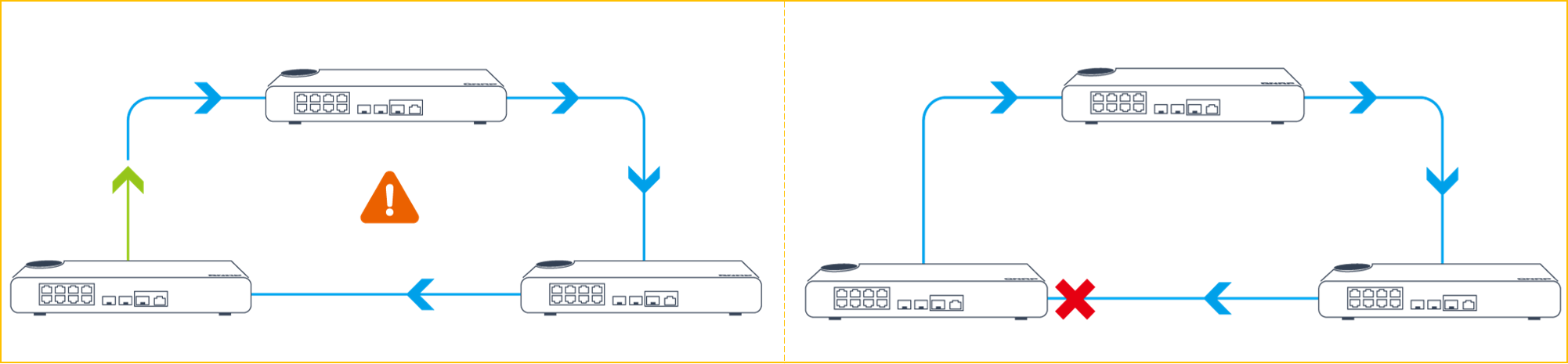
Fig a: Traffic from the origin switch does not automatically terminate at the destination, forming a network loop.
Fig b: After enabling loop protection on the origin switch, inbound trafficis shutdown for the specified interval.
| Icon | Description |
|---|---|
 | Origin source for the network loop |
 | Network loop detected |
 | Network loop blocked after enabling loop protection |
 | Regular data path |
The earlier versions of QSS (versions 1.2.0 and earlier) do not support the loop protection feature. To avoid network loops in the network, loop protection has been integrated in versions 1.3.0 and later of QSS.
Procedure
- Ensure that you update your managed switch to version 1.3.0 (or later).
- By default, loop protection settings are disabled on the switch.
- Make sure you disable RSTP on the switch first. RSTP and loop protection cannot operate on a switch simultaneously.
- Log in to QSS.
- Verify that the firmware is updated is version 1.3.0 or later.

- Go to Configuration>Loop Protection.

- Click
 to enable loop protection.
 - Specify the shutdown time between 0 and 604800 seconds (168 hours or 7 days).Note
- Use this setting to block a port for a specific period if a network loop is detected. Entering 0 enables loop protection on the interface indefinitely.
- You can enable loop protection on individual ports. You can also monitor the loop protection statistics of each port for debugging the network.
- The default shutdown interval is 180 seconds (3 minutes).
- The system status LED on the switch flashes red (amber for QSW-M408 switches) when loop detection occurs.
- Optional: Click to enable loop protection on individual ports.
- Click Save.
QSS saves and applies the loop protection settings.


