Applicable Products
- All QNAP NAS models running QTS or QuTS hero system
- QTS 4.3.6 (or later), including QTS 5.x and QTS 6.x
- QuTS hero 4.5.0 (or later), including QuTS hero 5.x and QuTS hero 6.x
Overview
iPerf3 is an open-source network performance testing tool that measures TCP/UDP bandwidth, latency, and packet loss between two devices.
Installing iPerf3 on a QNAP NAS allows the NAS to act directly as a test endpoint (server or client), which is useful in the following scenarios:
- Verify network throughput: Confirm whether the actual transfer
speed between the NAS and a computer, switch, or other device meets
expectations (e.g., 1GbE, 10GbE).
- Diagnose network performance issues: When NAS access speed is
unexpectedly slow, use iPerf3 to determine whether the bottleneck
is at the network layer or the storage layer.
- Evaluate the impact of network configuration changes: Compare
actual bandwidth before and after adjusting settings such as MTU,
Jumbo Frames, port bonding, or VLANs.
- Isolate hardware or cabling issues: Use point-to-point testing
to verify whether a network adapter, cable, or switch is functioning
correctly.
iPerf3 is not built into QTS or QuTS hero by default and must be installed separately.
Solution
iPerf3 can be installed on a QNAP NAS in either of two ways: as a container in Container Station, or using an Entware QPKG file.
Method 1: Run iPerf3 in Container Station
-
Open the App Center, then search for and install Container Station.
-
On first launch, complete the setup wizard and specify the storage location for container data.
-
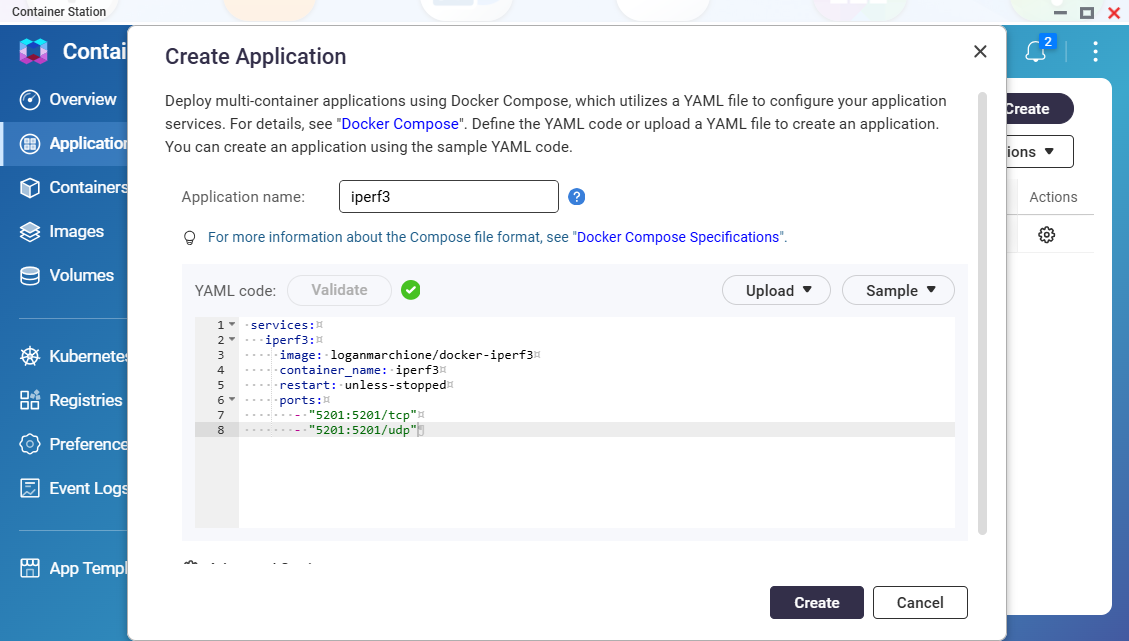
In Container Station, select Create > Create Application, then enter the following Docker Compose configuration:
services:
  iperf3:
    image: loganmarchione/docker-iperf3
    container_name: iperf3
    restart: unless-stopped
    ports:
      - "5201:5201/tcp"
      - "5201:5201/udp"
Refer to the documentation for the loganmarchione/docker-iperf3 image for its supported environment variables and parameters. To have the NAS act as the iPerf3 client rather than the server, or to use host network mode for more accurate results, adjust the configuration accordingly.
-
Click Validate to verify the correctness of the yaml code.
-
Click Create and wait for the image to be pulled and the container to start.
-
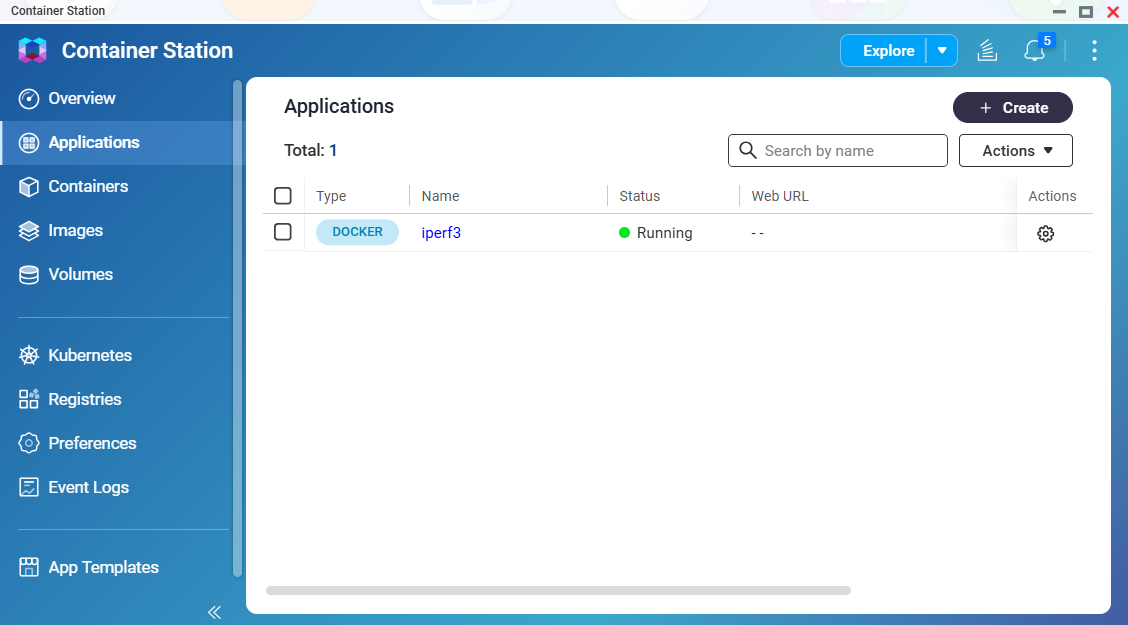
Confirm the container status is Running.
-
iPerf3 is now ready to use on your NAS.
If a firewall or security policy blocks port 5201, clients will report a refused connection. Confirm the port is not blocked under Control Panel > System > Security.
Method 2: Install iPerf3 using an Entware QPKG file
-
Download Entware_1.02std.qpkg from QNAP's download portal.
-
Install the QPKG file:
- Open the App Center
- Select Install Manually
- Click Browse and locate the downloaded QPKG file
- Click Install
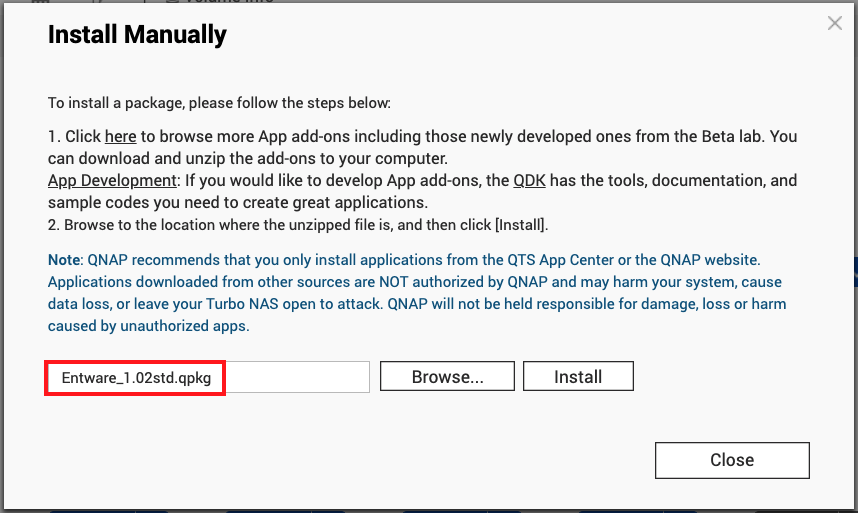
- Accept the risk acknowledgment checkbox and confirm installation
- Verify that Entware-std 1.02 appears in the App Center
-
Access the NAS command line via an SSH connection.
-
Navigate to the Entware installation directory:
# cd /share/CACHEDEV1_DATA/.qpkg/Entware/bin
The volume name in this path varies by model and storage configuration, and differs on QuTS hero systems. If the directory does not exist, locate it with:
# ls -d /share/*/.qpkg/Entware/bin
-
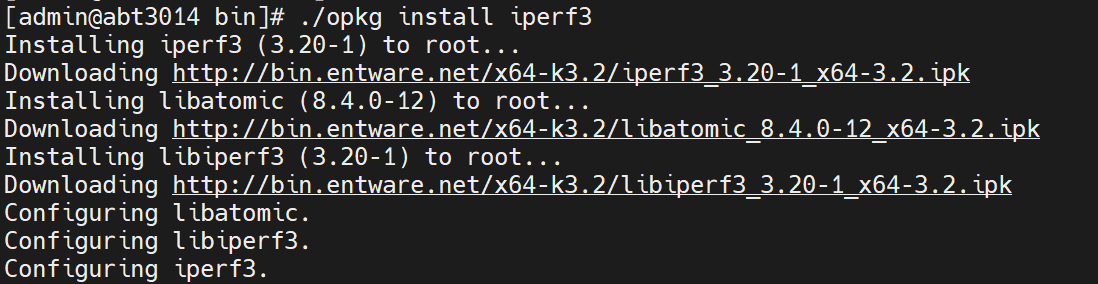
Execute the package installation command:
# ./opkg install iperf3
6. iPerf3 is now ready to use on your NAS.

適用產品
- All QNAP NAS models running QTS or QuTS hero system
- QTS 4.3.6 (or later), including QTS 5.x and QTS 6.x
- QuTS hero 4.5.0 (or later), including QuTS hero 5.x and QuTS hero 6.x
概覽
iPerf3 是一個開源的網路效能測試工具,用於測量兩個裝置之間的 TCP/UDP 頻寬、延遲和封包遺失。
在 QNAP NAS 上安裝 iPerf3 使 NAS 可以直接作為測試端點(伺服器或客戶端),在以下情境中非常有用:
- 驗證網路輸送量:確認 NAS 與電腦、交換器或其他設備之間的實際傳輸
速度是否符合預期(例如,1GbE、10GbE)。
- 診斷網路效能問題:當 NAS 存取速度
意外緩慢時,使用 iPerf3 確定瓶頸是否在網路層或儲存空間層。
- 評估網路配置變更的影響:比較
調整設定(如 MTU、巨型訊框、端口綁定或 VLANs)前後的實際頻寬。
- 隔離硬體或線纜問題:使用點對點測試
來驗證網路適配器、線纜或交換器是否正常運作。
iPerf3 並未預設內建於 QTS 或 QuTS hero 中,必須另外安裝。
解決方案
iPerf3 可以透過兩種方式安裝在 QNAP NAS 上:作為 Container Station 中的容器,或使用 Entware QPKG 檔案。
方法 1:在 Container Station 中執行 iPerf3
-
打開App Center,然後搜尋並安裝Container Station。
-
首次啟動時,完成設定精靈並指定容器資料的儲存空間位置。
-
在 Container Station 中,選擇Create > Create Application,然後輸入以下 Docker Compose 配置:
services:
  iperf3:
    image: loganmarchione/docker-iperf3
    container_name: iperf3
    restart: unless-stopped
    ports:
      - "5201:5201/tcp"
      - "5201:5201/udp"
參閱loganmarchione/docker-iperf3映像檔的文件以了解其支援的環境變數和參數。若要讓 NAS 作為 iPerf3 客戶端而非伺服器,或使用主機網路模式以獲得更準確的結果,請相應調整配置。
-
按一下 Validate 以驗證 yaml 代碼的正確性。
-
按一下Create,然後等待映像檔被拉取並容器啟動。
-
確認容器狀態為 Running。
-
iPerf3 現在已準備好在您的 NAS 上使用。
如果防火牆或安全政策阻擋了 5201 埠,客戶端將報告連線被拒。確認在控制台 > System > Security下埠未被阻擋。
方法 2:使用 Entware QPKG 檔案安裝 iPerf3
-
從 QNAP 的下載入口下載Entware_1.02std.qpkg。
-
安裝 QPKG 檔案:
- 開啟App Center
- 選擇手動安裝
- 按一下瀏覽並找到下載的 QPKG 檔案
- 按一下安裝
- 接受風險確認核取方塊並確認安裝
- 確認Entware-std 1.02出現在 App Center 中
-
透過 SSH 連線存取 NAS 命令列。
-
移至 Entware 安裝目錄:
# cd /share/CACHEDEV1_DATA/.qpkg/Entware/bin
此路徑中的磁碟名稱因型號和儲存空間設定而異,並在 QuTS hero 系統上有所不同。如果目錄不存在,請使用以下指令尋找:
# ls -d /share/*/.qpkg/Entware/bin
-
執行套件安裝指令:
# ./opkg install iperf3
6. iPerf3 現在已可在您的 NAS 上使用。


