


Can I enable QSAL on an existing storage pool?
Last modified date:
2023-10-31
Applicable Products
QuTS hero
Answer
The ability to enable QNAP SSD Antiwear Leveling (QSAL) on an existing storage pool depends on the QuTS hero version running on your NAS:
| Firmware Version | Can I Enable QSAL on an Existing Storage Pool? |
|---|---|
| QuTS hero h4.5.2–h5.0.1 | No. QSAL can only be enabled when creating a new storage pool and cannot be disabled later. |
| QuTS hero h5.1.0 or later | Yes. You can enable or disable QSAL on a storage pool at any time. |
To enable or disable QSAL on an existing storage pool in QuTS hero h5.1.0 or later, follow these steps:
- Open Storage & Snapshots.
- Go to Storage > Storage/Snapshots.
- Select a storage pool.Note
To enable QSAL on a storage pool, the pool must contain a RAID group that meets the following requirements:
- The RAID group must be one of the following RAID types: RAID 5, 6, 50, 60, TP.
- The RAID group must contain at least two SSDs that can provide estimated life remaining.
- At least one SSD in the RAID group must have over 3% estimated life remaining.
- Click Manage.
The storage pool management window opens. - Click QSAL.
This tab only appears if the storage pool contains a RAID group that meets the requirements for QSAL. - Optional: Select a different RAID group.
- Click the toggle button to enable or disable QSAL.
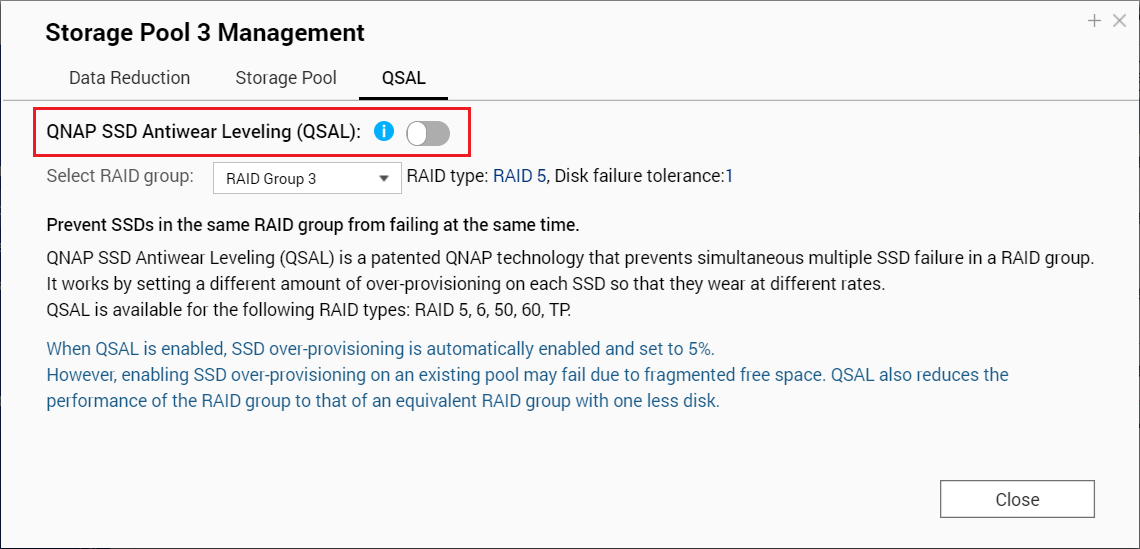
- Click Close.
Further Reading
Bạn vẫn cần hỗ trợ?
Hãy đăng câu hỏi của bạn trong Cộng đồng QNAP. Nhân viên QNAP và những người dùng giàu kinh nghiệm sẽ trả lời.


