Backup Enhancements
Symform Cloud Storage

Symform is available with all Turbo NAS units that qualify firmware V3.6 update. QNAP users simply click on the Symform tab in the QNAP Cloud Backup wizard to quickly register and start backing up their NAS data to the Symform cloud, enabling secondary backup and disaster recovery services.
In addition to fast and affordable backup services, users can use Symform to synchronize critical data directly from a QNAP device, between multiple QNAP devices, or between a QNAP device and other devices, such as laptops or tablet PCs. Because Symform has as no file size limits, users can use the cloud to back up large files or images.
Symform also provides users a way to earn more free storage through referrals and contribution. By referring users and contributing storage, users will have a maximum of 200 GB cloud storage from Symform.
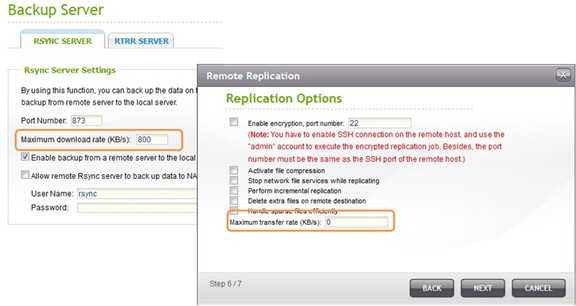
Bandwidth Control for Remote Backup
When performing NAS remote backup, massive data transfer could cause network congestion. Now the Turbo NAS provides flexible options to configure both upload and download bandwidth usage for RTRR and rsync backup.
NetBak Replicator 4
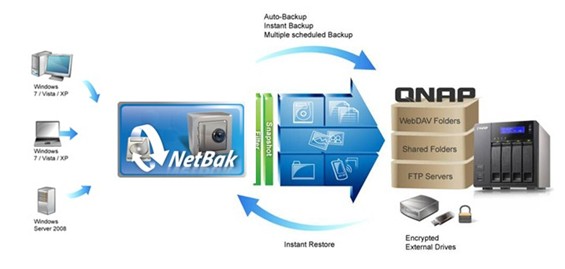
The QNAP NetBak Replicator provides Windows users with an intuitive way to back up entire disk drives, documents, pictures, music, videos, fonts, emails, and more to one or multiple Turbo NAS servers, AES-256bit encrypted external hard drives, and even personal cloud storage using MyCloudNAS service.
NetBak Replicator supports snapshot for consistent backup and allows users to back up open files without closing the applications. Real-time data synchronization and scheduled backup are supported.
The new NetBak Replicator 4 now provides email notifications upon backup completion.