Applicable Products
- All QNAP NAS models running QTS or QuTS hero system
- QTS 4.3.6 (or later), including QTS 5.x and QTS 6.x
- QuTS hero 4.5.0 (or later), including QuTS hero 5.x and QuTS hero 6.x
Overview
iPerf3 is an open-source network performance testing tool that measures TCP/UDP bandwidth, latency, and packet loss between two devices.
Installing iPerf3 on a QNAP NAS allows the NAS to act directly as a test endpoint (server or client), which is useful in the following scenarios:
- Verify network throughput: Confirm whether the actual transfer
speed between the NAS and a computer, switch, or other device meets
expectations (e.g., 1GbE, 10GbE).
- Diagnose network performance issues: When NAS access speed is
unexpectedly slow, use iPerf3 to determine whether the bottleneck
is at the network layer or the storage layer.
- Evaluate the impact of network configuration changes: Compare
actual bandwidth before and after adjusting settings such as MTU,
Jumbo Frames, port bonding, or VLANs.
- Isolate hardware or cabling issues: Use point-to-point testing
to verify whether a network adapter, cable, or switch is functioning
correctly.
iPerf3 is not built into QTS or QuTS hero by default and must be installed separately.
Solution
iPerf3 can be installed on a QNAP NAS in either of two ways: as a container in Container Station, or using an Entware QPKG file.
Method 1: Run iPerf3 in Container Station
-
Open the App Center, then search for and install Container Station.
-
On first launch, complete the setup wizard and specify the storage location for container data.
-
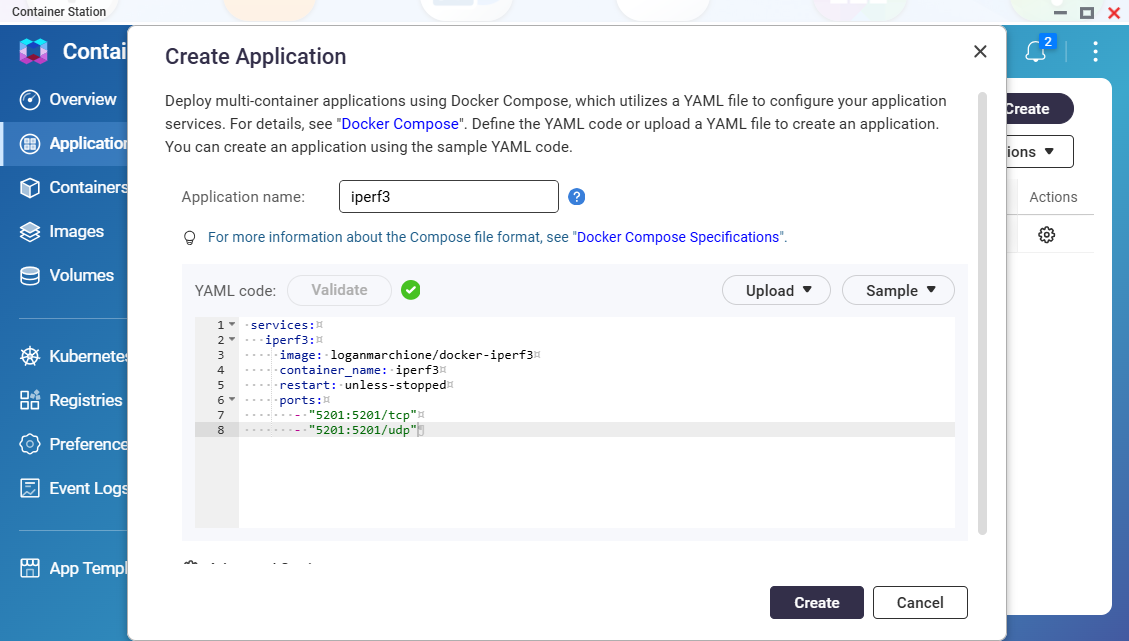
In Container Station, select Create > Create Application, then enter the following Docker Compose configuration:
services:
  iperf3:
    image: loganmarchione/docker-iperf3
    container_name: iperf3
    restart: unless-stopped
    ports:
      - "5201:5201/tcp"
      - "5201:5201/udp"
Refer to the documentation for the loganmarchione/docker-iperf3 image for its supported environment variables and parameters. To have the NAS act as the iPerf3 client rather than the server, or to use host network mode for more accurate results, adjust the configuration accordingly.
-
Click Validate to verify the correctness of the yaml code.
-
Click Create and wait for the image to be pulled and the container to start.
-
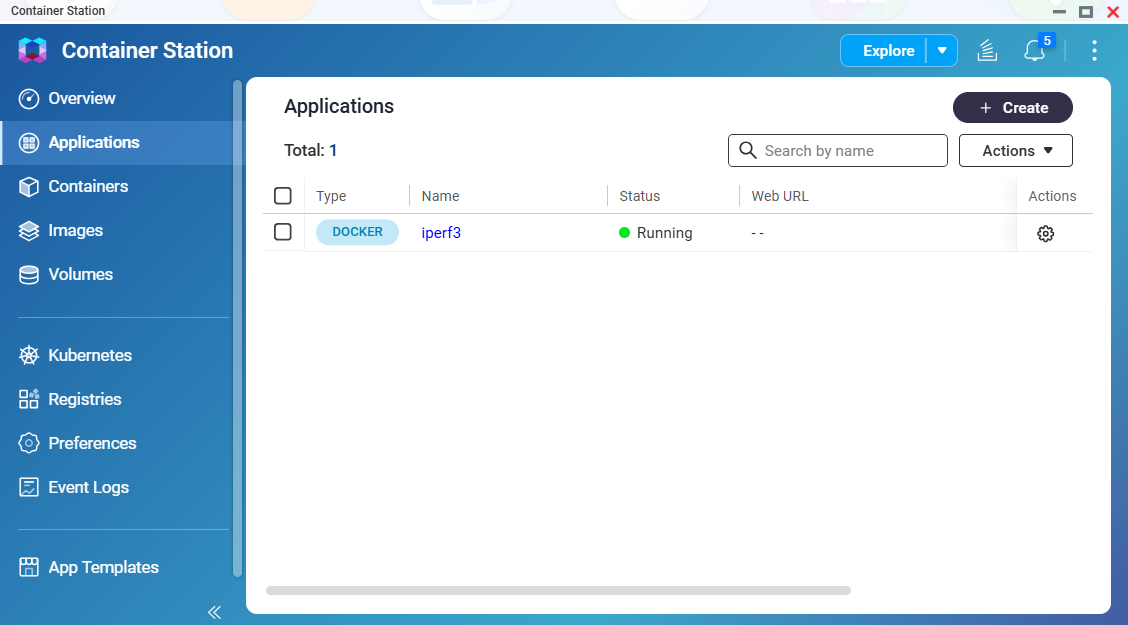
Confirm the container status is Running.
-
iPerf3 is now ready to use on your NAS.
If a firewall or security policy blocks port 5201, clients will report a refused connection. Confirm the port is not blocked under Control Panel > System > Security.
Method 2: Install iPerf3 using an Entware QPKG file
-
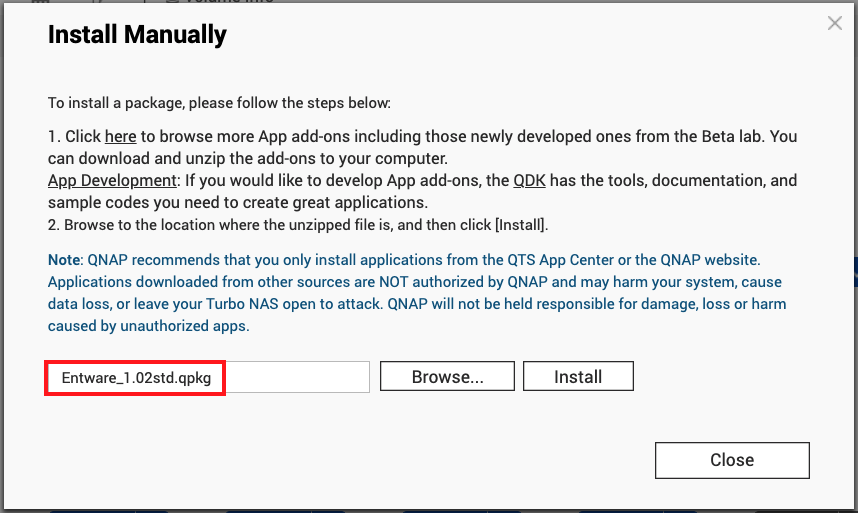
Download Entware_1.02std.qpkg from QNAP's download portal.
-
Install the QPKG file:
- Open the App Center
- Select Install Manually
- Click Browse and locate the downloaded QPKG file
- Click Install
- Accept the risk acknowledgment checkbox and confirm installation
- Verify that Entware-std 1.02 appears in the App Center
-
Access the NAS command line via an SSH connection.
-
Navigate to the Entware installation directory:
# cd /share/CACHEDEV1_DATA/.qpkg/Entware/bin
The volume name in this path varies by model and storage configuration, and differs on QuTS hero systems. If the directory does not exist, locate it with:
# ls -d /share/*/.qpkg/Entware/bin
-
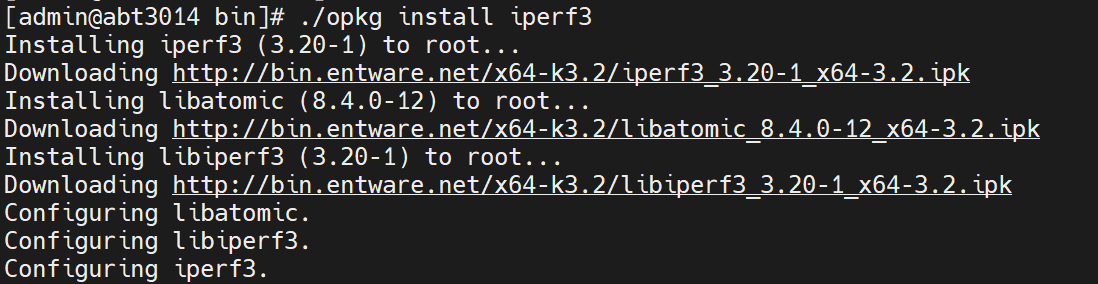
Execute the package installation command:
# ./opkg install iperf3
6. iPerf3 is now ready to use on your NAS.

적용되는 제품
- All QNAP NAS models running QTS or QuTS hero system
- QTS 4.3.6 (or later), including QTS 5.x and QTS 6.x
- QuTS hero 4.5.0 (or later), including QuTS hero 5.x and QuTS hero 6.x
개요
iPerf3는 두 장치 간의 TCP/UDP 대역폭, 지연 시간 및 패킷 손실을 측정하는 오픈 소스 네트워크 성능 테스트 도구입니다.
QNAP NAS에 iPerf3를 설치하면 NAS가 직접 테스트 엔드포인트(서버 또는 클라이언트)로 작동할 수 있어 다음과 같은 시나리오에서 유용합니다:
- 네트워크처리량확인: NAS와 컴퓨터, 스위치 또는 다른 장치 간의 실제 전송
속도가 기대치(예: 1GbE, 10GbE)를 충족하는지 확인합니다.
- 네트워크 성능 문제 진단: NAS 액세스 속도가
예상보다 느린 경우, iPerf3를 사용하여 병목 현상이 네트워크 계층에 있는지 또는스토리지계층에 있는지 확인합니다.
- 네트워크 구성 변경의 영향을 평가: MTU,
점보 프레임, 포트 결합 또는 VLAN과 같은 설정을 조정하기 전후의 실제 대역폭을 비교합니다.
- 하드웨어 또는 케이블 문제 격리: 포인트 투 포인트 테스트를 사용하여 네트워크 어댑터, 케이블 또는 스위치가 올바르게 작동하는지 확인합니다.
iPerf3는 기본적으로 QTS 또는QuTS hero에 내장되어 있지 않으며 별도로 설치해야 합니다.
솔루션
iPerf3는Container Station의 컨테이너로 설치하거나 Entware QPKG 파일을 사용하여 QNAP NAS에 설치할 수 있습니다.
방법 1: Container Station에서 iPerf3 실행
-
App Center을 열고Container Station을 검색하여 설치합니다.
-
처음 실행 시, 설정 마법사를 완료하고 컨테이너 데이터의스토리지위치를 지정합니다.
-
Container Station에서Create > Create Application을 선택한 후 다음Docker Compose 구성을 입력합니다:
services:
  iperf3:
    image: loganmarchione/docker-iperf3
    container_name: iperf3
    restart: unless-stopped
    ports:
      - "5201:5201/tcp"
      - "5201:5201/udp"
지원되는 환경 변수와 매개변수를 확인하려면loganmarchione/docker-iperf3이미지의 문서를 참조하십시오. NAS가 iPerf3 서버가 아닌 클라이언트로 작동하거나 보다 정확한 결과를 위해 호스트 네트워크 모드를 사용하려면 구성을 조정하십시오.
-
yaml 코드의 올바름을 확인하려면 Validate를 클릭합니다.
-
Create을 클릭하고 이미지가 풀링되고 컨테이너가 시작될 때까지 기다립니다.
-
컨테이너 상태가 Running인지 확인합니다.
-
이제 NAS에서 iPerf3를 사용할 준비가 되었습니다.
방화벽또는 보안 정책이 포트 5201을 차단하면 클라이언트가 연결 거부를 보고합니다. 제어판 > 시스템 > 보안에서 포트가 차단되지 않았는지 확인하십시오.
방법 2: Entware QPKG 파일을 사용하여 iPerf3 설치
-
QNAP의 다운로드 포털에서Entware_1.02std.qpkg을 다운로드합니다.
-
QPKG 파일을 설치합니다:
- App Center을 엽니다
- 수동 설치를 선택합니다
- 찾아보기를 클릭하고 다운로드한 QPKG 파일을 찾습니다
- 설치
를 클릭합니다
- 위험 승인 확인란을 수락하고 설치를 확인합니다
- Entware-std 1.02가App Center에 나타나는지 확인합니다
-
SSH 연결을 통해 NAS 명령줄에 액세스합니다.
-
Entware 설치 디렉토리로 이동합니다:
# cd /share/CACHEDEV1_DATA/.qpkg/Entware/bin
이 경로의 볼륨 이름은 모델 및스토리지구성에 따라 다르며, QuTS hero시스템에서는 다릅니다. 디렉토리가 존재하지 않으면 다음을 사용하여 찾습니다:
# ls -d /share/*/.qpkg/Entware/bin
-
패키지 설치 명령을 실행합니다:
# ./opkg install iperf3
6. iPerf3가 이제 NAS에서 사용할 준비가 되었습니다.


