


What should I do if I'm experiencing Slow File Transfer issue over Ethernet/thunderbolt/USB?
Applicable Products
- All NAS series
Diagnose
If you meet slow file transfer issue over the network, follow the steps below to diagnose the issue
Log in to QTS as an administrator
Open Control Panel
Go to Storage & Snapshots > Storage > Disk/VBOD> Performance Test
- Perform Sequential Read Test and replace the disk which has low disk speed (for example: less than 80 MB/s)
Open App center and Disable unused apps to release the resource.
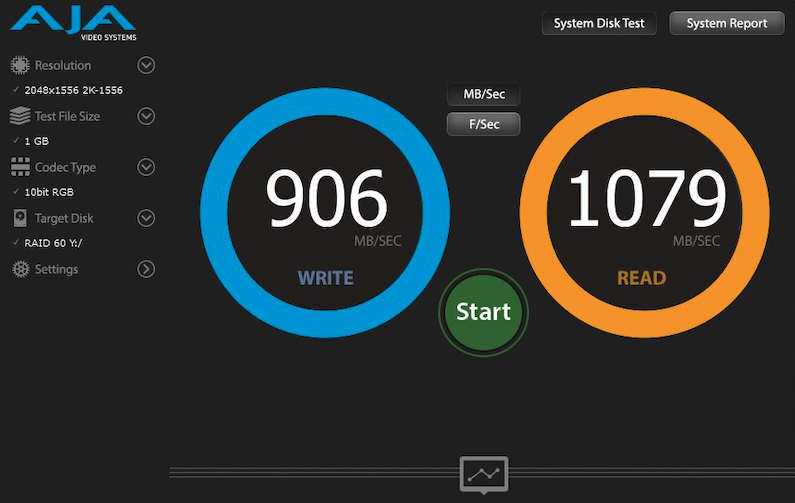
Perform an performance test using AJA System test
Connect your computer and NAS directly using an ethernet cable
Open Windows File explorer/macOS finder to access the shared folder on NAS.
Download and install AJA System test
Open AJA System test
Point the file path to the shared folder on NAS.
Perform the test
Solution
Slow READ speed, could be one of the following reason.
The thunderbolt or ethernet cable doesn't meet the requirement. (For example, you will need a CAT6 cable for a 1000Mbps network), try replace the cable.
Tweak the following settings to improve the performance.
Encryption will slow down the speed
- Use non-encrypt the shared folder and volume
- Disable SMB encryption if there is
- Disable SSD cache acceleration
Use SSD instead of the Hard disks
Use Static Volume instead of Storage pool/Volumes.
Use RAID 0 or RAID 6 to improve the RAID throughput.
Slow WRITE speed, could be one the following reason.
- The cable doesn't meet the requirement. (For example, you will need a CAT6 cable for a 1000Mbps network), try replace the cable.
Write speed on the computer is slow, you can confirm the writing read using AJA test by pointing the temp files to local drive.
Ethernet port doesn't provide enough speed,
- Windows: Check the Link Speed using the following command in power shell.
Get-NetAdapter | select interfaceDescription, name, status, linkSpeed - macOS: Check the Link Speed using System Preference > Network
- Windows: Check the Link Speed using the following command in power shell.
If modifying the settings doesn't improve the performance, please raise a ticket in QNAP support portal and provide the following information.
- Diagnostic log (Go to Helpdesk app > Diagnostic tool > Download logs, click Download )
- The screenshot of test result in AJA system test (as the screenshot above)
Further reading
For further assistance, ask other users and QNAP experts in the community. Go to QNAP Community


