


How do I check if the NAS is slow?
Last modified date:
2022-06-24
Applicable Products:
- All NAS Series
- All QTS Firmware Versions
If you are experiencing the slowness in web UI, use Resource Monitor to determine which process caused the issue.
-
Login NAS as an administrator
-
Go to Control Panel > System > Resource Monitor
-
Click on Processes then Enable Group by Application
-
Sort the processes by CPU usage or Memory and find out which process use the most of CPU and Memory resource.
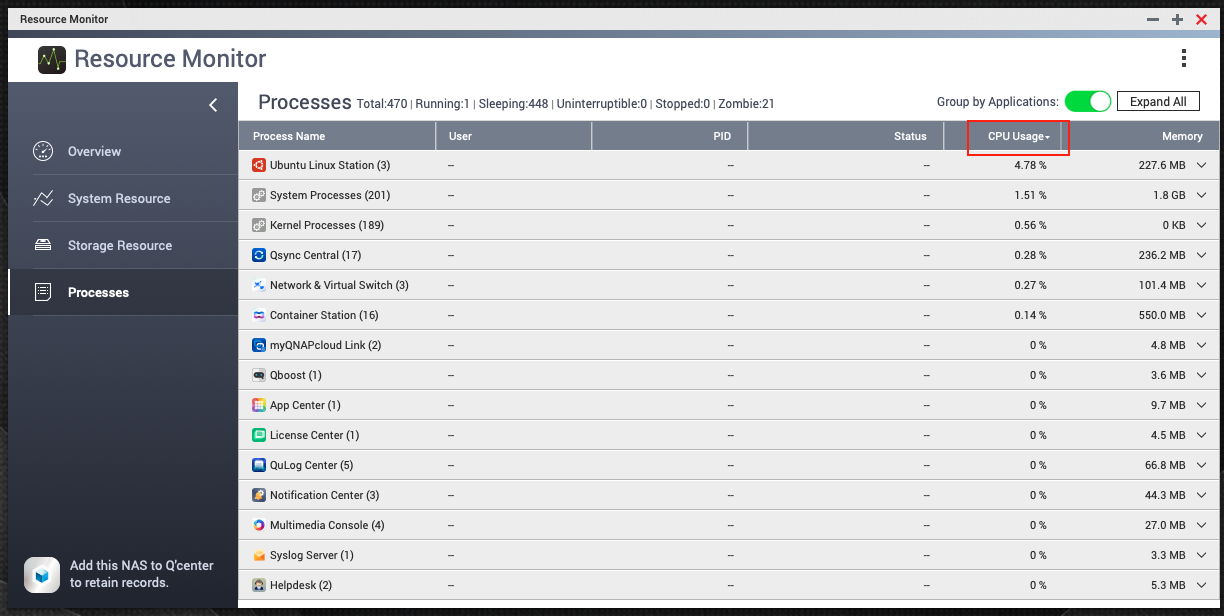
Ubuntu Linux Station uses most CPU usage. -
Go to Control Panel > App Center, and disable the related apps found at step 4 to confirm if the slowness is caused by them.
-
If the CPU and RAM usage is not high in Resource Monitor, but web UI is still slow. Please use your Web browser incognito Mode or clean the browser cache and check again.


