QuTS hero Operating System
Honored with 2026 MSP Today Product of the Year Award
2U Short depth design for up to 38% reduction in size
The 2U rackmount TS-873AeU has a short depth design of only 11.7 inches (297.4 mm), making it an excellent choice for smaller racks, wall-mount AV rack cabinets, and network rack cabinets. The space saved by the short depth design can be reserved for cabling or ventilation. The TS-873AeU is space-saving for flexible deployment and is especially suitable for multiple locations and applications including offices, audiovisual rooms, and security surveillance recording.
Note: Users can purchase the optional RAIL-S01 short rail kit to deploy the TS-873AeU in a 19-inch rack following the ANSI/EIA-RS-310-D standard.
Absolute performance with AMD Ryzen™ and up to 64GB RAM
Powered by a 4-core/8-thread AMD Ryzen™ V1500B 2.2GHz processor with AES-NI encryption acceleration and up to 64GB DDR4 RAM (supports ECC RAM), the rackmount TS-873AeU delivers aggressive yet power-smart performance to drive resource-demanding business applications such as VDI, R&D, private cloud, and server virtualization.

-
2 x 10GbE SMB, Sequential Throughput (1MB)
Read 2362 MB/sWrite 2344 MB/s -
2 x 2.5GbE SMB, Sequential Throughput (1MB)
Read 590 MB/sWrite 546 MB/s -
2 x 10GbE iSCSI, Random IOPS (4K)
Read 185406 IOPSWrite 176457 IOPS
| 2 x 10GbE SMB, Sequential Throughput (1MB) |
Read
2362
MB/s
|
Write
2344
MB/s
|
|---|---|---|
| 2 x 2.5GbE SMB, Sequential Throughput (1MB) |
Read
590
MB/s
|
Write
546
MB/s
|
| 2 x 10GbE iSCSI, Random IOPS (4K) |
Read
185406
IOPS
|
Write
176457
IOPS
|
Tested in QNAP Labs. Figures may vary by environment.
Test environment:
NAS: TS-873AeU (-RP)
OS: QTS 5.0.0
Volume type: RAID5
SSD: Samsung 860 PRO 512GB
Expansion card: QXG-10G2T-X710 for 10GbE testing only
Client PC:
- Windows Server 2019 Standard, Intel Xeon W1250 3.3GHz, DDR4 32GB, NIC Intel I225 for 2.5GbE testing
- Windows Server 2016 Standard, Intel i7-6700 3.4GHz, DDR4 64GB, NIC Intel X550 for 10GbE testing


Two M.2 PCIe Gen3 slots for SSD caching and accelerated AI-powered image recognition
The 8-bay TS-873AeU is equipped with two M.2 PCIe Gen3 x 1 slots, enabling cache acceleration or SSD storage pools for improved performance, or Edge TPU for AI image recognition.

Abundant I/O capabilities with PCIe Gen3 expansion
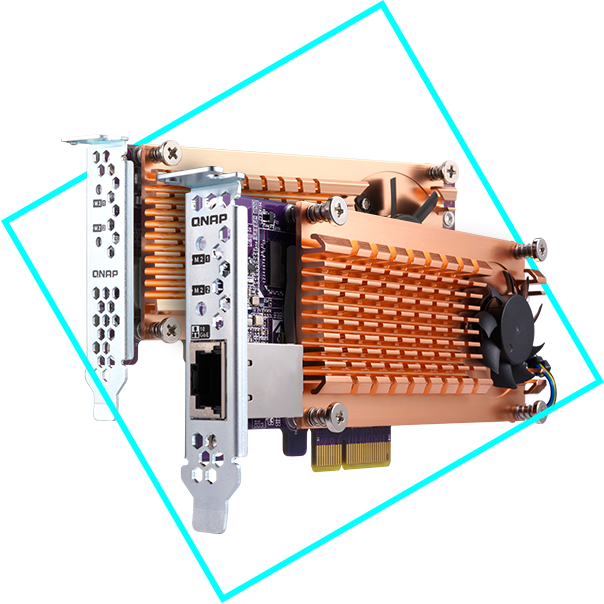
The TS-873AeU has a PCIe Gen 3 x 8 slot that allows for installing various expansion cards for expanding application potential.

Build an affordable Fibre Channel SAN environment
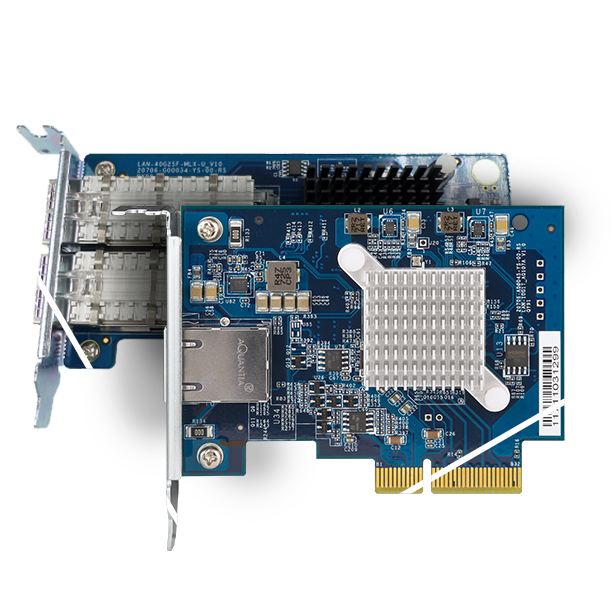
Common Fibre Channel Storage Area Networks (SAN) devices are often costly. By installing QNAP dual-port 16Gb Fibre Channel expansion cards in the TS-873AeU, you have more budget-friendly options to add a NAS to a SAN environment. You can set a Fibre Channel Target using the iSCSI & Fibre Channel app. Moreover, the LUN Masking and Port Binding features provide an additional layer of data security.
Learn More: QNAP NAS supports Fibre Channel SAN, QNAP Fibre Channel cards

Comprehensive backup and disaster recovery solution
The TS-873AeU supports various apps that cover all your backup needs. Practice safe IT habits by regularly backing up files and device content, allowing them to be easily restored when needed.
-

PC/Laptop backup
For Windows®, install NetBak Replicator to back up your PC to QNAP NAS. In macOS®, just set up the built-in Time Machine® to secure your data.
Learn More: NetBak Replicator
-

Remote backup for NAS
Hybrid Backup Sync makes it easy to back up data from a TS-873AeU to another QNAP NAS or remote server to fulfill your 3-2-1 backup strategy.
Learn More: Hybrid Backup Sync
-

VM backup
Enjoy license-free VMware® and Hyper-V VM backup with source-side incremental backup, global deduplication, and recovery compression.
Learn More: Hyper Data Protector
-

SaaS backup
Safeguard enterprise cloud data by backing up/syncing files, emails, calendars, and contacts from Google™ Workspace and Microsoft® Office 365® to the NAS.
Learn More: Boxafe
Note: Minimum memory requirements are 2 GB available and 4 GB installed.
-

Cloud backup for NAS
Use Hybrid Backup Sync to back up NAS data to myQNAPcloud Storage or other mainstream cloud space. For backup to object cloud storage, VJBOD Cloud is especially useful to reduce bandwidth usage and backup time.
Learn More: Hybrid Backup Sync, QNAP-hosted myQNAPcloud Storage, VJBOD Cloud
Multi-version snapshots mitigate ransomware threats
The TS-873AeU supports block-based snapshots that record the state of the system at any time. It helps protect data, which can be restored back to a specific point of time, greatly helping in mitigating the threat of ransomware.

Reliable, high-performance storage for virtualization
The TS-873AeU supports block-based iSCSI LUN as a reliable, high-performance, and affordable storage solution for mainstream virtualization environments. It supports VMware® VAAI and Microsoft® ODX to increase performance by offloading server loading for ESXi server and Hyper-V respectively.

Optimized performance for VMware Virtualization with iSER
The iSCSI Extensions for RDMA (iSER) protocol boosts the data transfer performance of VMware® ESXi storage and reduces the CPU load of the ESXi server. iSER support can be added to the TS-873AeU by installing a QNAP QXG-25G2SF-CX6 25GbE PCIe card, which uses the Mellanox® ConnectX-6 Lx controller. iSER can provide a significant increase in performance, providing an essential tool to optimize demanding virtualization applications.
Learn More: iSER
Note: To create an iSER connection with VMware ESXi, both the server and NAS require compatible Mellanox® NICs and switches compatible with Mellanox® or supporting PFC (Priority Flow Control) configuration.

All-in-one solution for hosting virtual machines and containers
By running multiple virtual machines and containers on the TS-873AeU, you can deploy multi-tenant environments and applications to increase management efficiency and save hardware costs. Coupled with the Network & Virtual Switch app that boosts interoperability between virtual machines, containers, QNAP NAS, and other physical devices on the network, you can flexibly allocate physical and virtual network resources to simplify network deployment.
-

Virtualization Station
Run multiple Windows®, Linux®, UNIX®, Android™, and QuTScloud virtual machines and access them via a web browser or Virtual Network Computing (VNC). Businesses can run virtualized server applications on a single NAS without needing additional physical servers.
Learn More: Virtualization Station, QuTScloud on hypervisors
-

Container Station
Experience Docker®, LXD, and Kata Containers lightweight virtualization technologies, download apps from the built-in Docker Hub Registry®, import/export containers, and create abundant microservices.
Learn More: Container Station
-

Linux Station
Run Linux® applications (including apps from the Software Center) directly on the NAS and remotely access the Linux® desktop from a web browser. The open-source Linux® platform is also ideal for Internet of Things development.
Learn More: Linux Station
-

QuTScloud virtual NAS
QuTScloud is a virtual appliance based on the QTS operating system. Enterprises can quickly launch QuTScloud on hypervisors including Linux® KVM, Microsoft® Hyper-V, and VMware ESXi™ to acquire advanced NAS features without requiring additional NAS hardware.
Learn More: QuTScloud for private cloud
Comprehensive security and privilege settings
The TS-873AeU is loaded with flexible privilege settings and security measures. Besides IP blocking, QNAP Authenticator, HTTPS connection, there are more apps that help ensure optimal NAS protection against threats like malware and hackers.
-

myQNAPcloud secures remote access
myQNAPcloud allows convenient connection to the TS-873AeU through the Internet without any complex DDNS settings. To ensure your remote access service is secure, myQNAPcloud strengthens keys on SSL Certificates to 2048-bits.
Learn More: myQNAPcloud service
-

Simplified privilege settings
The TS-873AeU supports comprehensive access right settings for shared folders, Azure Active Directory Domain Services (Azure AD DS), LDAP, and Windows ACL to help IT staff efficiently manage user accounts and access rights for multiple NAS systems.
-

QuFirewall protection
Supports IPv6, firewall access lists, and GeoIP filtering to restrict access based on geographical locations for higher NAS network security.
Learn More: QuFirewall
-

Superior security with QVPN
A virtual private network (VPN) allows secure access to network resources and services across public networks. QVPN supports creating a VPN client, using the TS-873AeU as a VPN server, and WireGuard® VPN service with an easy-to-use interface for setting up a secure connection.
Learn More: QVPN
-

QuWAN SD-WAN
To facilitate digital transformation, multi-site expansion and remote working, QuWAN SD-WAN helps automatically mesh multi-site VPN. It features IPsec encryption and cloud-centric management, allowing secure multi-site network including QNAP NAS and VMware ESXi platforms.
Learn More: QuWAN
-

Security Center
A security portal for the TS-873AeU to proactively detect NAS status, unusual file activity and potential security threats – offering instant protective measures against vulnerabilities to safeguard your system and data.
Learn More: Security Center
-

Malware Remover
Regularly scan your TS-873AeU using the latest malware definitions. If infected files are detected, they will be immediately removed to ensure NAS data security.
Learn More: Malware Remover
-

TeamViewer remote access
TeamViewer app enables remote management and connectivity to multiple NAS devices from Windows® PCs with an unparalleled level of safety, while increasing IT efficiency and end user productivity.
Learn More: TeamViewer
The best file storage and collaboration center
The TS-873AeU integrates rich apps for storing, managing, synchronizing, searching, and archiving files. It supports SMB/CIFS, AFP, and NFS protocols for streamlined file sharing across Windows®, Mac®, and Linux®/UNIX®, and provides the smartest NAS solution for professionally managing your files.
File Station
Qsync
Qsirch
Qfiling


Smart surveillance solution for 24/7 security
QVR Elite is QNAP’s subscription-based smart surveillance solution, allowing you to easily build a surveillance system with lower TCO and higher scalability. Recordings are saved as MP4 files, allowing playback on nearly every device. QVR Elite also integrates QNAP AI-based solutions to build smart facial recognition for retail and door access systems with QNAP NAS. You can arrange a dedicated, independent storage space for surveillance data on the TS-873AeU and enjoy simplified camera management, storage space allocation, camera live viewing and playback.


QNAP NAS is also the best storage for professional VMS platforms for Milestone XProtect® and Nx Witness™
Flexible and economical storage expansion
QNAP provides easy ways to expand your storage capacity. Here are several ways to expand your TS-873AeU storage as needed to accommodate data and business growth.
-

Attach QNAP expansion enclosures
Connect expansion enclosures to the TS-873AeU, and manage NAS storage expansion with the user-friendly Storage & Snapshots Manager app.
-

Mount cloud storage or remote file servers
Mount cloud storage or remote file servers to expand the capacity of the TS-873AeU while also centrally managing files on the NAS, cloud storage, and remote devices.
-

Migrate to a new NAS
Install your NAS hard drives into a larger QNAP NAS and retain all your existing data and configurations.
-

Upgrade RAID capacity
Hot-swap lower-capacity drives with larger-capacity drives to expand your NAS capacity so it can grow with your business.
More productivity-boosting applications
The TS-873AeU provides an App Center that includes feature-rich apps to expand your NAS potential!
-

QuObjects
Run a high-performance S3 compatible development environment on your TS-873AeU to simplify service development workflows from testing to production. You can also move cold data from the cloud to an on-premises QuObjects to save cloud storage costs.
-

Proxy Server
By using a high-capacity TS-873AeU as a proxy server, online resources can be efficiently accessed with greater cost-savings and productivity, while network security is also enhanced at the same time.
A health check for your hard drives
Hard drives are at the heart of your NAS, and ensuring their long-term health and reliability is absolutely crucial. QNAP provides various methods and tools to help you monitor hard drive health, ensuring that you can take proactive decisions to safeguard your data and files.
S.M.A.R.T. and back block scanning
DA Drive Analyzer
Seagate® IronWolf™ Health Management


Switch to QuTS hero operating system for optimal data integrity and reliability
The TS-873AeU also supports QuTS hero - QNAP’s ZFS-based NAS operating system. Providing end-to-end data integrity, data reduction (inline data deduplication, compression, and compaction), and much more, QuTS hero uses additional system resources to ensure an optimal environment for protecting business data.
-
QTS
Suited for cross-teams file sync, and HDD-SSD hybrid storage applications
-
QuTS hero
Featuring highly reliable data protection and data reduction, and optimized for SSD-based applications
Learn More: QuTS hero operating system, How to migrate data & folder permissions between QTS and QuTS hero with HBS3?
1. QTS and QuTS hero use different file systems. You must remove all the drives from the TS-873AeU before switching from QTS to QuTS hero.
2. QuTS hero requires a NAS with at least 8 GB memory.
3. Inline Data Deduplication requires a NAS with at least 16 GB memory (at least 32 GB memory is recommended for optimal performance).
4. It is recommended to create an SSD RAID with at least two SSDs for the QuTS hero system drive to attain optimal system performance. Please note that M.2 SSD hot-swapping is only supported by M.2 SSD slots on PCIe cards (such as the QM2). M.2 SSD slots that are built into the NAS do not support hot-swapping.
5. It is recommended to upgrade the memory to 16GB or more when using the NAS with the QuTS hero operating system, especially if installing multiple QPKG applications, to ensure better system stability and performance.
