ENTERPRISE COMPLIANCE

Bring NAS into Your Enterprise's
ISO 27001 management system

When customer audits, supply-chain security questionnaires, or insurance underwriting come knocking—can your storage system provide the required evidence?

What enterprises need is not a NAS labeled “ISO 27001”, but a device that does not disrupt existing management systems (ISMS, Information Security Management System), and can continuously deliver audit evidence. QNAP designs the storage platform according to ISO/IEC 27002 control measures: configurable, monitorable, auditable, and restorable.

Reference standards: ISO/IEC 27001:2022 (Information Security Management System, Annex A with 93 controls) ・ ISO/IEC 27002:2022 (Implementation guidance for controls)
Enterprise IT / Implementation Consulting Understand control mapping and audit evidence  SMEs・Have not yet implemented ISO 27001 Three-step process starting from supply chain questionnaires and customer audits  Home and individual users NAS security settings highlights and backup principles
US$4.4M
The global average cost of a single data leak incident
IBM Cost of a Data Breach Report 2025
93 items
ISO/IEC 27001 Annex A control measures—each item may be randomly questioned by auditors
1 copy
Refer to the control mapping table and directly incorporate the relevant controls of NAS into your company's Statement of Applicability (SoA)
“ISO/IEC 27001 certifies an organization's management system, not a single product. Therefore, QNAP does not claim product certification—we focus our efforts on making NAS fit into your system and deliver your evidence.”
Internal audits, customer supply chain audits, and insurance underwriting questionnaires all ask the same thing: whether the control measures are implemented and whether there are records. In the following eight domains, each capability clearly indicates the corresponding Annex A control number, along with the evidence you can provide on the day of the audit.
ISO/IEC 27001

The “certificate” obtained by the enterprise

The certification target is the company's management system—like an exam, it tests how the “organization” manages information security, not a specific unit. Annex A lists 93 control measures that must be implemented.

ISO/IEC 27002

The “explanation” for practical use

It expands those 93 control clauses into guidance on “how to actually do it.” This is the layer where products can help—QNAP's features are designed accordingly, so the controls involved in the product can be implemented and logged.

How evidence flows into the hands of auditors

From the configuration of control measures, to the generation, collection, and export of logs—once this path is clear, audits can be passed.

QNAP NAS

QNAP NAS

Access control · Encryption · WORM
Backup & Snapshot · Firewall
= Implementation points of control measures

Record generation

Record generation

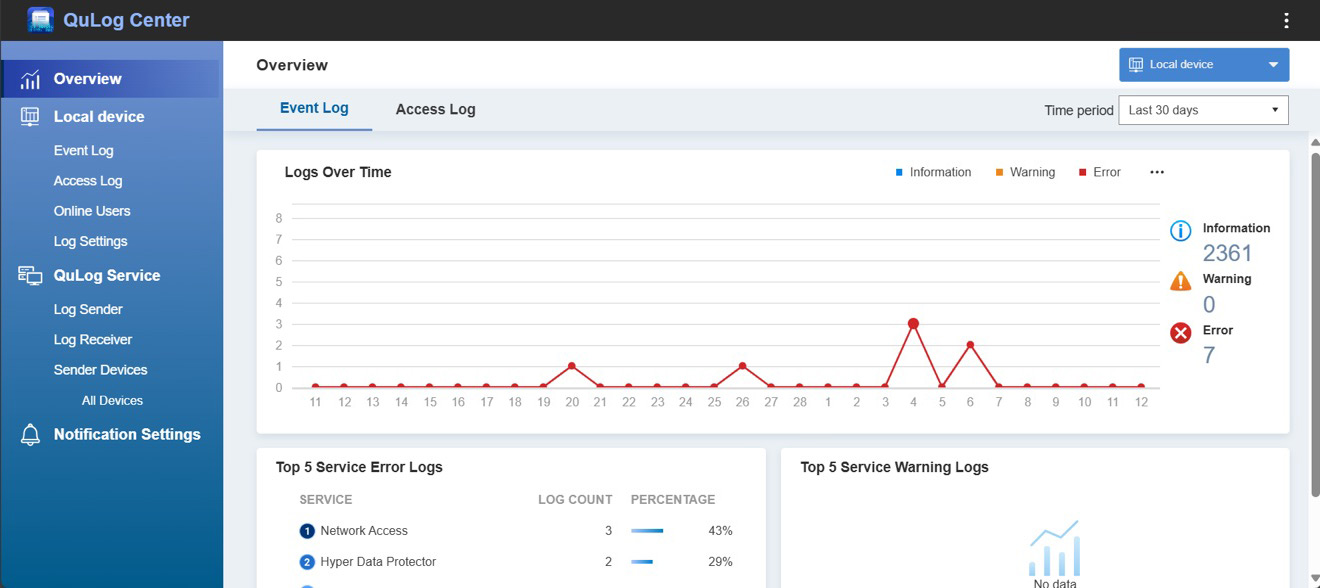
QuLog Center Event and Access Log
HBS Backup Result · Integrity Report
Notification Center Alarm Log

Centralization & Retention

Centralization & Retention

Syslog Forwarding to Enterprise SIEM
(No SIEM: QuLog centralized retention
Retention can also be satisfied with period filtering)

Audit Evidence

Audit Evidence

CSV/PDF Export
Settings page as proof
SIEM Query Results

Eight Major Control Domains × Annex A Mapping × Audit Evidence

The eight categories correspond to QNAP's alignment with ISO/IEC 27002:2022 technical and organizational controls. Each card indicates the corresponding Annex A control number.

A.5.15–A.5.18・A.8.2・A.8.5

Identity and Access Control

  • AD/LDAP domain integration, centralized account management
  • Two-factor authentication (2FA/2SV) can be enforced for specified accounts
  • Delegated administration—minimum privilege granted according to duties QTShero
  • Shared data folder and file-level ACL permission management
  • Password policy enforcement, auto logout after idle period
Audit evidence: User and group list, permission settings page audit, login records—QuLog Center filter and export CSV by period
A.5.3・A.5.18・A.8.2

Privileged Account Management

  • Disable default admin, use named management accounts (strengthen basic steps)
  • Separate administrator and general user accounts
  • Delegated roles: system, application, backup, etc. each with their own permissions
  • Administrative operations are logged in system event records
Audit evidence: Admin account list, account anomalies, and management operation event logs (QuLog Center export)
A.8.24・A.8.3・A.5.33

Data Protection

  • volume AES-256 encryption, SED self-encrypting hard disk drives support
  • Transmission encryption: HTTPS/TLS, SMB encryption, SFTP/FTPS
  • WORM data folder and Immutable Snapshot QuTS hero only
  • QuObjects Object Lock——S3-compatible immutable object storage
  • HBS client-side encrypted backup
Audit evidence: Encryption status, WORM/snapshot retention settings page evidence
A.8.15–A.8.17

Logs and Monitoring

  • QuLog Center centralized log management and retention
  • Syslog forwarding——integration with enterprise SIEM (centralized security monitoring platform)
  • NTP time synchronization, ensuring consistent time across devices (A.8.17)
  • Abnormal login notifications, event alert rules
Audit evidence: Log retention and forwarding settings, alert history, SIEM query results
A.8.13–A.8.14

Backup and Recovery

  • 3-2-1-1-0 backup principle—HBS 3 multi-destination backup and synchronization
  • Snapshot and Snapshot Replica remote copy
  • Immutable backup destination: WORM QuTS hero only, Object Lock
  • Airgap+ isolated backup (requires QNAP networking equipment)
  • data integrity check (hash comparison), includes report download
Audit evidence: Backup task results, integrity check report (downloadable), snapshot retention strategy
A.8.8·A.8.19·A.5.37

Vulnerabilities and Remediation

  • PSIRT product security incident response, security advisories, and CVE public lookup
  • QNAP Security Bounty Program vulnerability reward plan
  • Firmware digital signature, automatic security patch update (scope configurable)
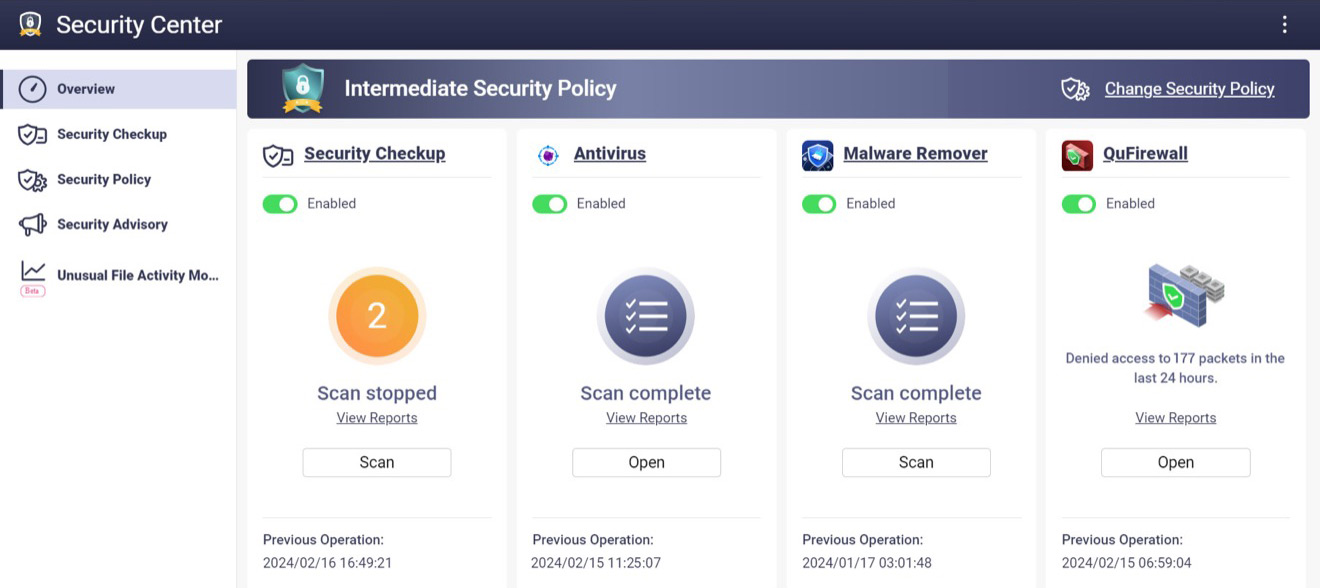
  • Malware Remover and security risk scan
  • Product support period (EOL/EOS) public inquiry
Audit evidence: Firmware version, security advisory mapping, update records, support period documents
A.8.20–A.8.22

Network Security

  • SSH/Telnet and other unnecessary services are disabled by default
  • QuFirewall Firewall: IP allow list, geo-blocking
  • TLS certificate management, enforce HTTPS management connection
  • Custom service port and source access restrictions
Audit evidence: Service and port settings, firewall rules, TLS settings page as proof
A.5.24–A.5.28・A.8.10 (handling)

Event Response and Handling

  • QuLog log filtering and export, supports event investigation
  • Snapshot rollback to the data state before being affected by restore
  • Event notifications and forwarding log
  • device retirement: Secure disk erase (Secure Erase)
Audit evidence: Event period log export, notification log, erase operation log
Note: The Annex A numbering corresponds to QNAP’s mapping to ISO/IEC 27002:2022 and is provided for reference during adoption; for formal applicability determination, please refer to your company’s risk assessment and the opinions of certification bodies.

Not just functionality, but also evidence is required

Stating “supported” in the specification table is just the starting point—each item tells you where to get the evidence and in what format it should be presented.

General product terminologyWhat enterprises adopting ISO 27001 truly need
Supports MFAEnforce two-step verification for important accounts, and enable status for inspection Get location | Control Panel → User account (status inspection format varies by version)
Supports encryptionShow which volume and transmission channels have encrypted settings status Get location | Storage & Snapshots → volume encryption status; Control Panel → network services
Supports logsLog collection, time consistency, SIEM forwarding supported, periodic export Get location | QuLog Center → Event/Access log → Filter → Export CSV
Backup supportedSuccess/failure logs, failure alerts, and integrity check reports are available for review Get location | HBS 3 → Task log; Integrity check → Download report
Update supportedRefer to the current firmware version and security advisories to understand patch status and support period Get location | Control Panel → Firmware Update; qnap.com Security Announcements and Product Support Status Page
QuLog Center Dashboard
Security Center Security Overview
QuLog Center — Centralized log dashboard and event statistics, records can be filtered and exported by period

Scope of Application

QTS and QuTS hero Capability comparison of the two major operating systems for model planning reference

CapabilityQTSQuTS heroNote
WORM data folder/Immutable Snapshot—✓Immutable storage is exclusive to QuTS hero (ZFS) models
QuObjects Object Lock✓✓S3-compatible immutable object storage
volume encryption/2FA/QuFirewall/QuLog✓✓—
Airgap+ Isolated Backup✓✓Requires designated QNAP networking equipment

Secure by Default—security starts at the factory

Factory default settings meet the security baseline—compliance from day one

No universal default password

Initialization forces the creation of a custom administrator account and password, so there is no factory-shared account and password that could be vulnerable to dictionary attacks.

Non-essential services are disabled by default

Services such as SSH and Telnet are not enabled by default, reducing the attack surface from day one.

Encrypted management connection

Supports enforced HTTPS and TLS certificate management, ensuring management traffic is not transmitted in plain text.

Firmware Signature Verification

Update file digital signature verification. Files that have not passed verification cannot be installed.

Automatic Security Update

Security patches can be applied automatically (scope and time window configurable), reducing the exposure time of known vulnerabilities.

Proactive Risk Detection

Security risk scanning and proactive alerts for weak passwords and externally exposed settings.

Haven't implemented ISO 27001 yet? Start from here

Most small and medium-sized enterprises aren't preparing for ISO 27001 certification, but are instead approached by major clients with supply chain security questionnaires or insurance audit questionnaires—three steps get your NAS ready to answer confidently

STEP 1

Apply the security baseline

Follow QNAP's security hardening guide to complete the basic settings for accounts, services, and network—topics like “default password” and “service management” can be answered based on actual settings and attached as supporting evidence.

STEP 2

Centralize log collection

No SIEM required: QuLog Center provides built-in centralized storage, time-based filtering, and export, meeting basic log retention and review requirements.

STEP 3

Enable backup verification

Backups comply with the 3-2-1-1-0 rule (3 copies of data, 2 types of media, 1 offsite copy, 1 immutable copy, 0 restore errors). Enable integrity check—questions like “restore test” and “backup protection” can be answered with records.

QNAP's own security governance

When evaluating suppliers, look beyond the product and check the original manufacturer—products operated in an open and verifiable manner ensure security

Having experienced attacks, we understand defense even better

QNAP, as a CVE Numbering Authority (CNA) and with a public PSIRT response system, ensures product security for hundreds of thousands of devices worldwide—this system was forged from the lessons learned during large-scale ransomware attacks. Each incident has led to structural reforms:

01

Establishing a dedicated PSIRT response team

A product security incident response team, public security advisories, and full disclosure of CVE responses.

02

Became a CVE Numbering Authority

As a CNA, we collaborate with global security researchers to disclose vulnerabilities according to international standards and procedures.

03

Vulnerability Bounty Program

Security Bounty Program—Let white hat researchers find problems before attackers do.

04

Secure by Default

Non-essential services are disabled by default, enforced custom account passwords, and firmware signature verification, making security the starting point right out of the box.

05

Full lifecycle commitment

Automatic security patch updates, public product support periods, and information security not ending with warranty expiration.

Every QNAP NAS shipped today comes with these revolutionary improvements built-in.
ISO
27001
27017

Information Security Management Certification

myQNAPcloud One cloud service operations have obtained ISO/IEC 27001 and 27017 certification (service scope)

Learn More →
PSIRT

Product Security Incident Response

Product Security Incident Response Team; Security advisories are publicly released, QNAP is a CVE Numbering Authority (CNA)

Security Advisory →
BOUNTY

Vulnerability Bounty Program

Security Bounty Program and global security researchers jointly disclose

Program Description →
EOL
/EOS

Support period disclosure

Product support and security update period can be checked publicly, unit replacement can be planned in advance

Support status inquiry →

Take the tools with you, no need to contact sales first

ISO 27 Customer Assurance Pack—reference for IT, explanation for auditors, a one-page document for the boss

27002 Control Mapping Table
Annex A Number × QNAP Function × Evidence Output × Obtain Path, can be directly incorporated into SoA (Statement of Applicability)
Security Hardening Guide
Account, Service, and Network Basic Configuration Steps (Hardening Guide)
SIEM Integration Guide
Syslog Format, Example Logs, and Mainstream SIEM Configuration Methods
SME Audit Checklist
Common questions from supply-chain & insurance-underwriting questionnaires × how the NAS answers
Executive Summary One-Pager
One Page Overview: Positioning, Eight Major Mappings and Evidence Flow—Supplier Presentation and Internal Communication

FAQ

Correct Understanding of NAS and ISO 27001

ISO 27001 certifies the enterprise's system, so what role does NAS play in it?
The certification target of ISO/IEC 27001 is the organization's information security management system (ISMS), not a single product. The role of NAS is “the implementation points and sources of evidence for control measures”: access control, encryption, logs, backup and other controls are configured and executed on the NAS, and during audits, NAS provides the corresponding records. QNAP designs these capabilities according to ISO/IEC 27002 control measures, and uses the comparison table on this page to indicate where each piece of evidence can be obtained.
Our company hasn't implemented ISO 27001 yet. Is this page useful for me?
Yes. In practice, most companies face not certification, but rather supply chain security questionnaires or insurance underwriting questionnaires from major clients—the topics (such as backup protection, access control, log retention) are highly aligned with 27002 controls. By following the three-step setup in “Haven't implemented ISO 27001 yet? Start here,” you can answer NAS-related questions and provide the necessary records.
When auditors require access logs and backup certificates, how can they be obtained?
Access and management operation logs: QuLog Center can be filtered by period and exported as CSV. Backup certificates: HBS 3 task logs and data integrity check reports can be directly viewed and downloaded. The retention settings for snapshots and WORM can be verified on the settings page. The locations for obtaining evidence in each control domain are noted in the comparison table above.
What is the difference between WORM, Immutable Snapshot, and regular backup?
Regular backups can be deleted by those with sufficient privileges; Immutable Snapshot and WORM cannot be modified or deleted through the management interface during the retention period—even if the admin account is compromised, attackers will find it difficult to destroy backups through the system interface. This is a key difference for complete protection of ransomware defense and audit evidence. Note: This feature is limited to QuTS hero models. Please refer to the applicable scope table above when selecting models.
Do home NAS users also need to do these?
No need to follow the entire set—enterprise-level controls (WORM, SIEM integration, audit evidence) are designed for organizations subject to audits. For home environments, doing these three things will provide significant protection: initialize with a custom account and enable two-step verification, enable snapshots, and follow the 3-2-1 rule to keep an offsite or cloud backup copy.

Let your next audit provide evidence directly from your NAS

First, take the checklist for self-assessment, or discuss your company’s implementation scenario with QNAP

Extended reading