


Why are my music files displayed in Qfile, but not in Qmusic?
Last modified date:
2023-12-22
Applicable Products
Qmusic
Procedure
In order to display music files in the Qmusic app, you must first add the files to Music Station on the NAS. If the content is displayed in Qfile, but not in Qmusic, you may need to configure the music folders as Content Sources in the Multimedia Console.
Sign in to the NAS.
Go to Multimedia Console > Content Management.
Select Music Station and click Edit.
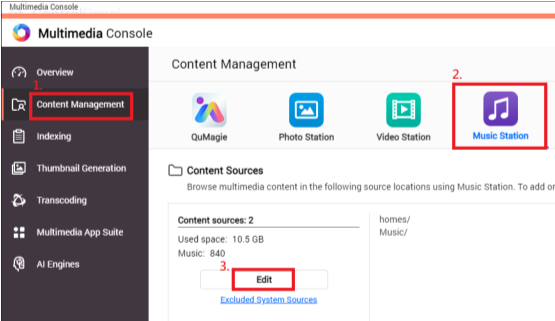
Select one or more music folders.
Click Apply.
After adding folders as a content source for Music Station, it should be visible in the Qmusic app.
Still need help?
Post your question in QNAP Community. QNAP staff and experienced users will reply.


