[Important Security Notice] Fake Qfinder Pro Websites Detected. Learn more >

How to download repair invoice from Qnap service portal after repair?


Last modified date: 2022-06-24
Applicable Products:
  • QNAP service Portal
  1. Use QNAP account login to http://service.qnap.com/
    img
  2. Click the “Support” button on the nav menu.
    img
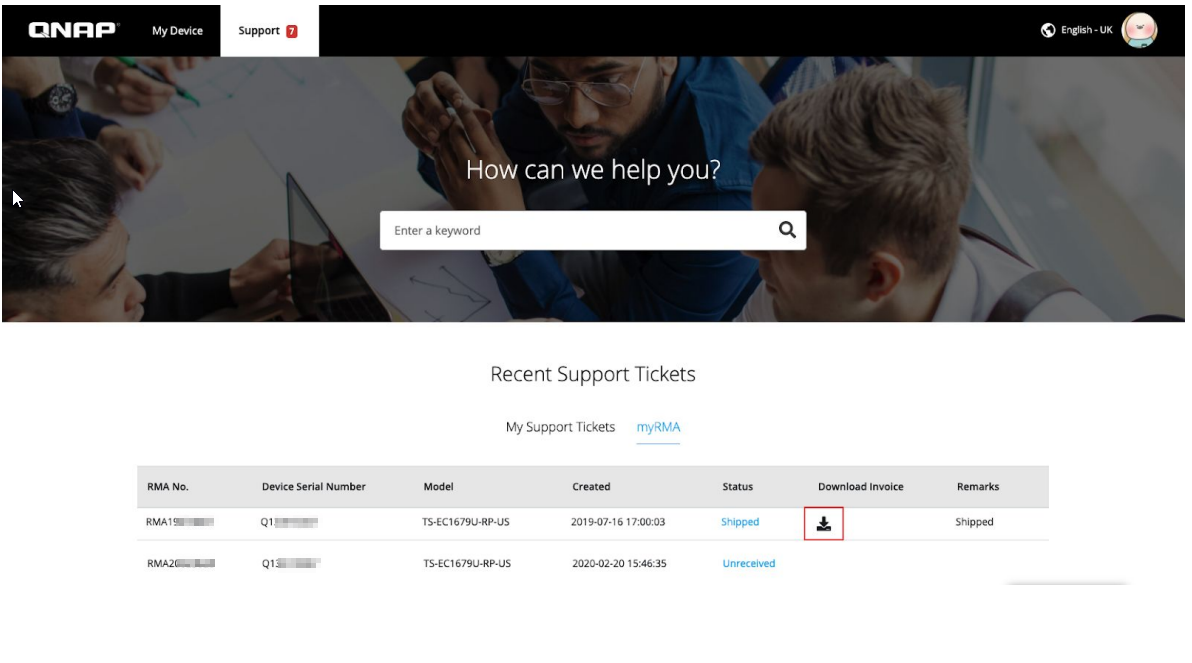
  1. Click the “myRMA” tab button.
    img
  2. Click the icon on “Download invoice” column.
    img

Was this article helpful?

75% of people think it helps.
Thank you for your feedback.

Still need help?

Post your question in QNAP Community. QNAP staff and experienced users will reply.

Ask the Community

Please tell us how this article can be improved:

If you want to provide additional feedback, please include it below.

Choose specification

      Show more Less
      Choose Your Country or Region
      back to top