


Why can't KoiBox make or receive KoiMeeter mobile calls?
Applicable products:
- KoiBox-100w
When a client that is behind a NAT in a private network needs to find its public IP address (the firewall's mask), it can make a request to a STUN (Session Traversal Utilities for NAT) server. The STUN server then replies with the public IP address for the requesting party which can then be used to set up a peer-to-peer connection.
If your KoiBox can't make or receive KoiMeeter mobile calls, check your firewall and NAT type.
The STUN server must be open in your firewall:Check the STUN server in Meeting & Contact Setting > Setting > STUN server.
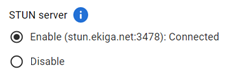
Open ports based on the table below.
| stun_server | stun_port | protocol |
|---|---|---|
| stun.ekiga.net | 3478 | UDP |
If KoiBox still cannot connect, configure your router settings:
- Set NAT type Full Cone or Type A.
- Configure port forwarding
For example, when using the QHora-301W:
- Follow the tutorial: How to set up NAT Type A for game consoles on QHora-301W.
- Use the port forwarding range of 10000~20000.
Still need help?
Post your question in QNAP Community. QNAP staff and experienced users will reply.


