


Why does Photoshop 7 not save files to a NAS network drive?
Last modified date:
2023-03-06
Applicable Products
All NAS series
Workaround
Adobe Photoshop 7.0 is a legacy product initially released in 2002. Due to its age it does not recognize volumes larger than 1 TB.
A recommended workaround is to set a user quota below 1 TB (for example: 990 GB) for those using Photoshop 7.0.
You can set a user quota by following these steps:
- Open Control Panel.
- Go to Privilege > Quota.
- Check "Enable quota for all users".
- Enter a value of 990 GB for Quota size on the disk.
- Click Apply.
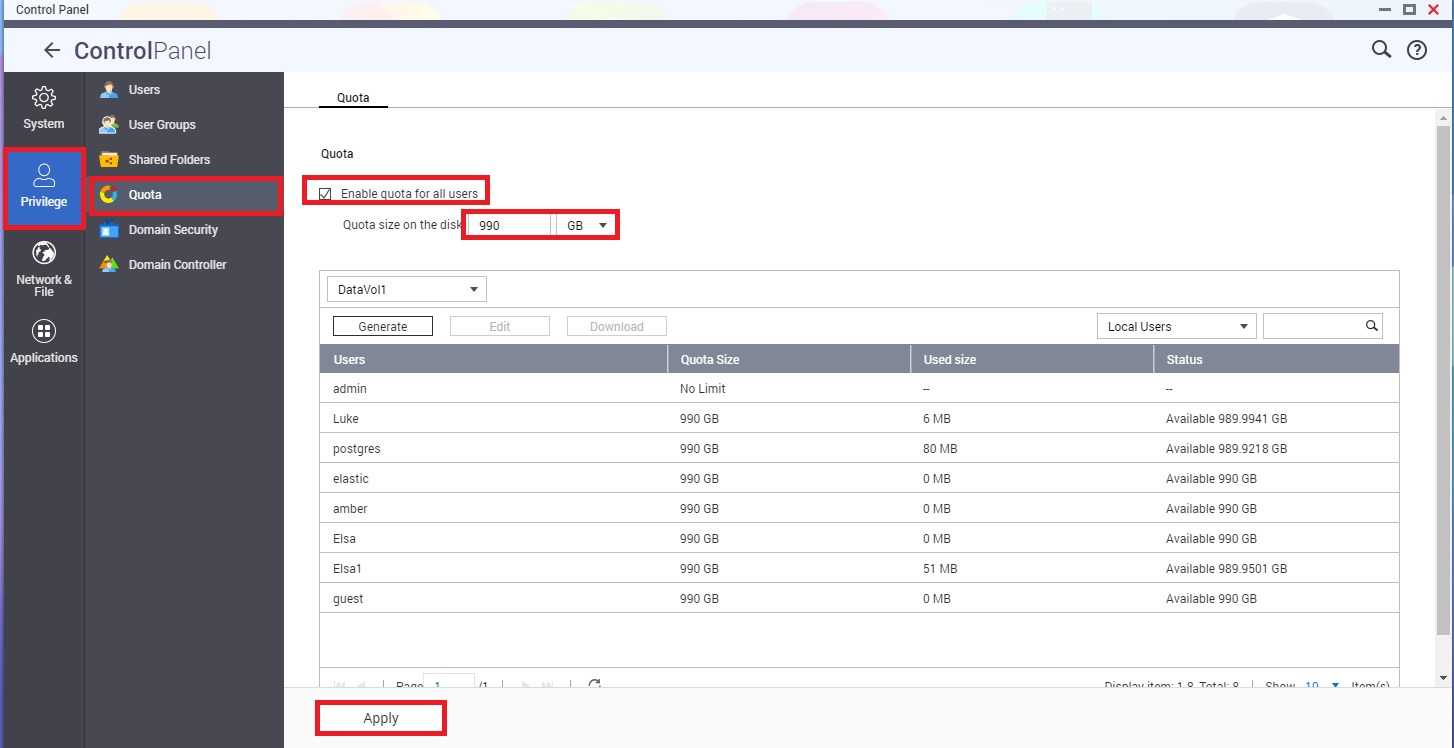
For users that do not use Photoshop 7.0, their quota can edited individually if additional storage is required.
Further Reading
Why can I not save Photoshop files in macOS when connecting to the NAS via network drive?
Troubleshoot issues with networks, removable media in Photoshop
Still need help?
Post your question in QNAP Community. QNAP staff and experienced users will reply.


