


Where do I collect the Qsirch debug logs to send for analysis?
Applied models:
Applied Firmware:
Please, make sure to have the NAS fully updated with the latest firmware and also the latest version installed of the Qsirch app.
When having errors on the tasks created in Hybrid Backup Sync, it is not a good experience and to order to facilitate the analysis from the QNAP Support Team, please, it is required to collecting the following.
1) Provide the NAS firmware version and the Qsirch app version;
2) The picture of the error message;
3) Debug Logs from Qsirch, it is showed on the picture below where it can be collected;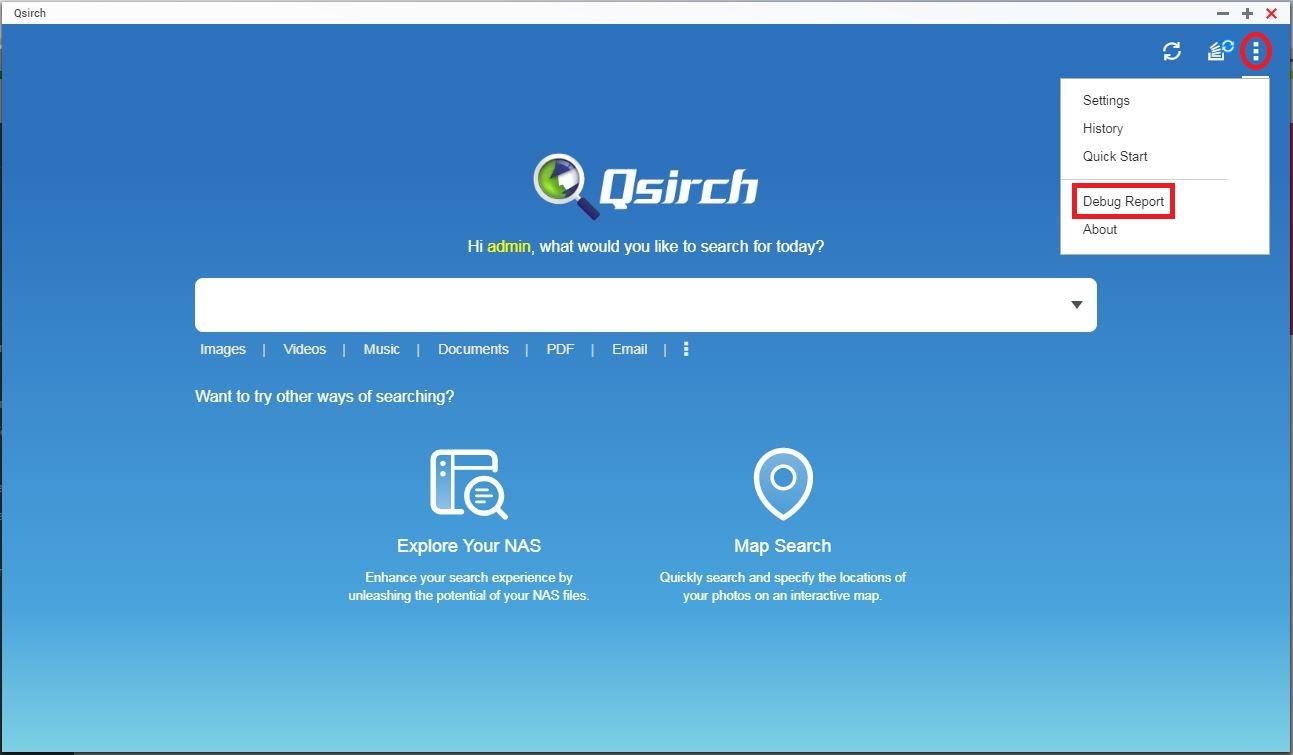
4) Dump logs from the NAS, see more information below.
How to download the Dump logs:
I. Login to QTS;
II. Open the Main Menu and select the application "Helpdesk";
III. Navigate to "Diagnostic Tool" on the left side of the menu;
IV. Press the "Download Logs" button below;
V. The log file will download as a ZIP file as soon as you press the "Download" button.
With all the provided information above, the troubleshooting of the problem, as well the solution will be given much faster.
Thank you for your help.
Benötigen Sie weitere Hilfe?
Stellen Sie Ihre Frage in der QNAP Community. QNAP-Mitarbeiter und erfahrene Anwender antworten Ihnen.


