


How to install multiples Wordpress in QNAP
Applied models:
Applied Firmware:
-
All
Through the APP center you can install normally Wordpress but this allows you only to run one site. So for the first site we will follow the instructions in this link https://www.qnap.com/en/how-to/knowledge-base/article/how-to-install-wordpress-on-qts-4-4/
To install more than one, we will need to create a folder inside the shared folder web (or another location), For example I will create the folder Wordpress2
Then will follow these steps:
1. Go to Wordpress official website and download the latest available version ((https://wordpress.org/download/)
2. Unzip the downloaded file
3. Upload the content of the file to the created folder “Wordpress2”

4. Go to “Control panel > Applications > Web server > Virtual host” and create a virtual host to the created folder and select the desired port and protocol
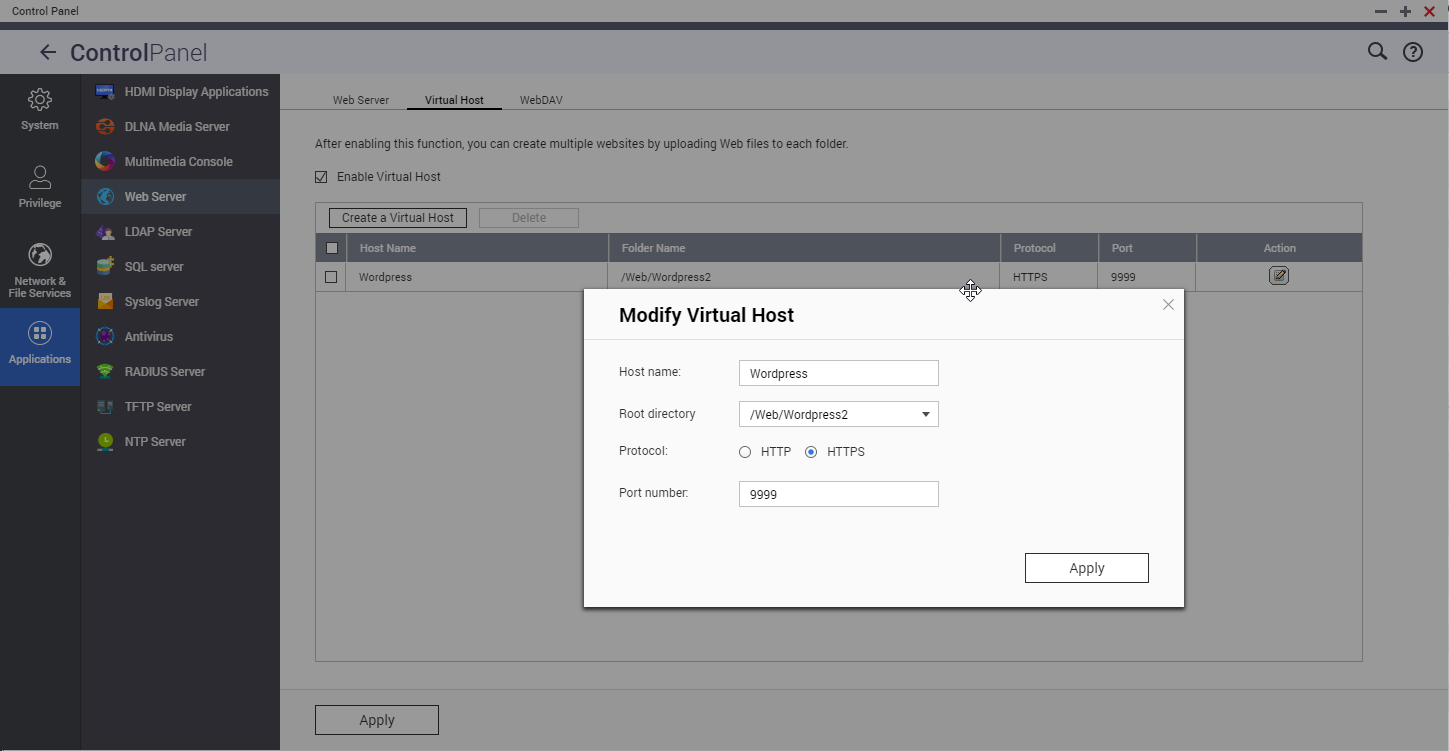
5. Open in a browser the created virtual host. In our case just wrote in the address bar https://NASIP:9999
6. Follow the wizard to complete the installation.
Benötigen Sie weitere Hilfe?
Stellen Sie Ihre Frage in der QNAP Community. QNAP-Mitarbeiter und erfahrene Anwender antworten Ihnen.


