


How to restart the myQNAPcloud DDNS service?
Datum poslední úpravy:
2017-03-20
After the myQNAPcloud DDNS service was suspended due to security concerns, you can still restore it through the myQNAPcloud website:
Connecting to your Turbo NAS
(1)LAN environment: Find your Turbo NAS using Qfinder Pro and login to QTS.


(2)Internet: Go to the myQNAPcloud website (www.myqnapcloud.com) and sign in with your QID.


Click “Device detail” > “Restore DDNS”.

Or, you can follow the below steps to restart your myQNAPcloud DDNS service:
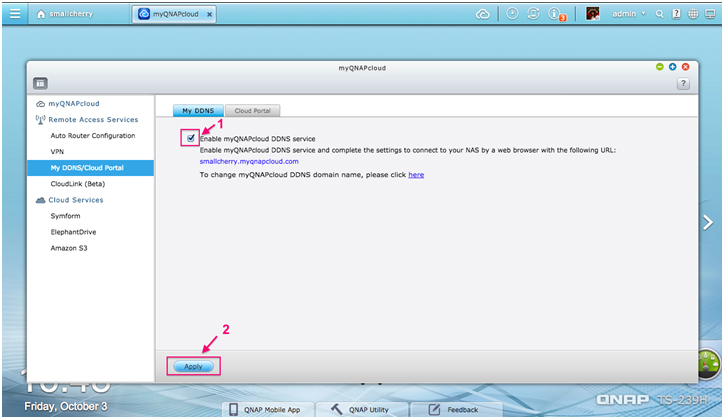
Restarting the myQNAPcloud DDNS service
1. Click “My DDNS/Cloud Portal” in myQNAPcloud after login to QTS.

2. Uncheck “Enable myQNAPcloud DDNS service” and click “Apply”. Check “Enable myQNAPcloud DDNS service” and click “Apply” again.

Note:
- Before connecting to your Turbo NAS, please clear your browser’s cache.
- If you still cannot connect to your Turbo NAS using myQNAPcloud DDNS after the steps in this tutorial, it might be caused by your Internet Service Provider (ISP). Please try again after two hours.
Stále potřebujete pomoc?
Položte svůj dotaz v komunitě QNAP. Odpoví vám pracovníci QNAP a zkušení uživatelé.


