


If my NAS does not support on-the-fly transcoding, how can I play HEVC video files?
Datum poslední úpravy:
2022-11-25
Applicable Products
ARM-based NAS
Overvew
The Cayin MediaSign Player app is required to transcode HEVC files on ARM-based NAS as they lack the ability to perform on-the-fly transcoding. This app can be downloaded from the QNAP App Center, but requires a license to operate (a free license is available).
If you have an x86-based NAS, refer to the steps in the following link to transcode HEVC files: How to Transcode Videos and View HEIC Photos With CAYIN MediaSign Player Installed
Procedure
- Open CAYIN MediaSign Player
- Select the HEVC video files to transcode, and click the transcode button.
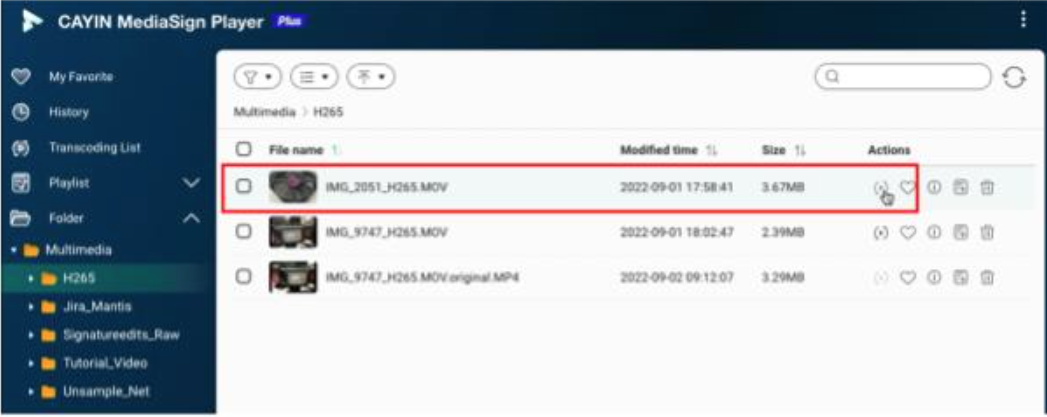
- Once finished, an MP4 file is generated.
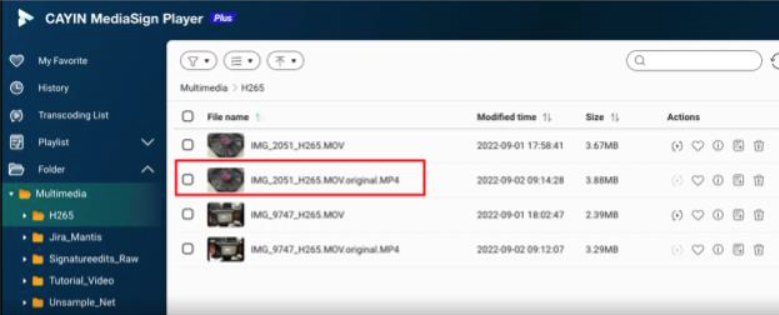
- MP4 files are saved under the @Transcode folder. This folder is hidden from other applications by default, and the MP4 files should be copied to other folders to be accessed by other applications.
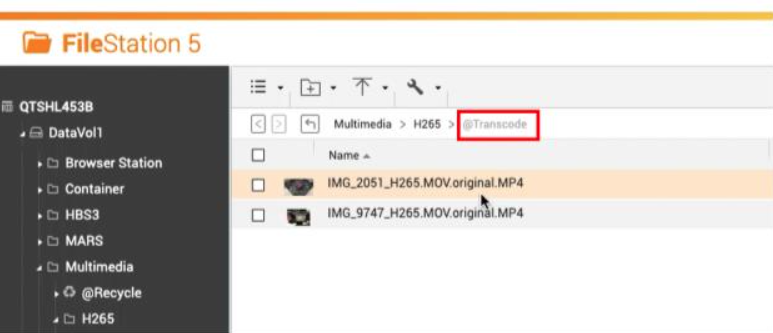
- Once the MP4 files are moved to other folders, they become visible to other applications.
Further Reading
How to Transcode Videos and View HEIC Photos With CAYIN MediaSign Player Installed
Stále potřebujete pomoc?
Položte svůj dotaz v komunitě QNAP. Odpoví vám pracovníci QNAP a zkušení uživatelé.


